


TYPO3 Website Maintenance Checklist (for 2026)
Building a TYPO3 website is only the first milestone. While you are ready to start your site, you can’t just relax once it goes live. It is a living system, and to live well requires regular maintenance. Though TYPO3 is a powerful, reliable CMS, it still requires continuous maintenance to be able to do its best.
If you stop paying attention after development, problems start to build up, such as slow loading times, security risks, outdated features, or even data issues. That’s why ongoing maintenance is just as important as the initial development phase.
To help you keep your TYPO3 website smooth, secure, and future-ready, here is an updated 2025 maintenance checklist you can rely on.
Read more…below!
Regular Maintenance Checklist for TYPO3 Website
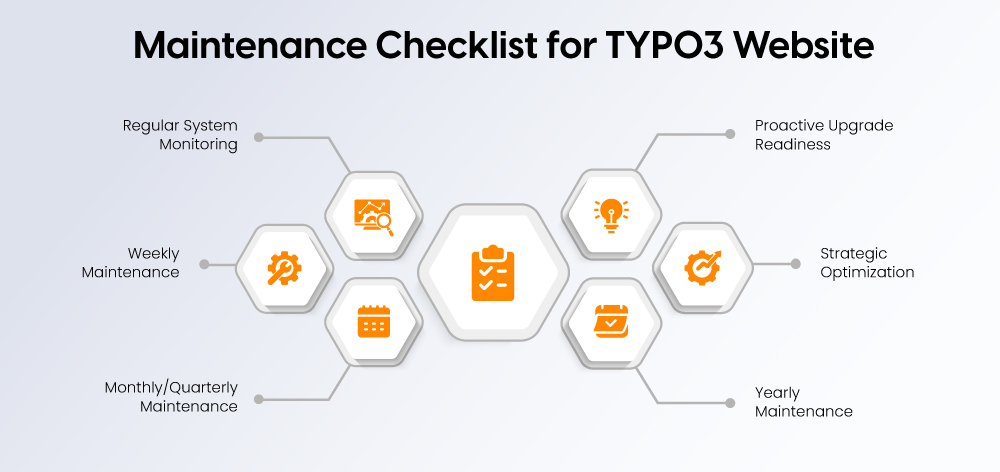
Keeping a TYPO3 website healthy requires a structured approach. Breaking maintenance into weekly, monthly/quarterly, and yearly tasks makes it easier to manage and make sure nothing is overlooked.
Weekly:
- Run automated backups and check site uptime.
- Apply minor TYPO3 security updates.
- Scan for broken links and 404 errors.
Monthly / Quarterly:
- Test performance and Core Web Vitals.
- Review logs and run security scans.
- Check forms, integrations, and extensions.
- Apply minor core and extension updates.
- Audit SEO and accessibility.
Yearly:
- Plan and perform major TYPO3 upgrades.
- Test full backup restoration.
- Optimize server and database performance.
- Review GDPR/DSGVO compliance and legal updates.
- Test UX/UI across devices and browsers.
TYPO3 Backups & Disaster Recovery
Backups are the backbone of website maintenance. Having a reliable backup strategy is essential to prevent data loss and downtime.
What to back up:
- Database (all tables and content)
- /fileadmin and /uploads folders (all assets)
- /typo3conf folder (extensions and configurations)
- /config folder (site settings)
Backup strategy:
- Require both cloud and local backups for redundancy.
- Backup backups that cannot be manually run on a schedule.
- Set snapshot restore and instant recovery to save time.
Tools & tips:
- Use TYPO3-compatible backup software or server-level backup software.
- Test the backup restoration in a regular way to make sure that data is safe.
TYPO3 Upgrades & Extension Management
TYPO3 and its extensions must be constantly updated to remain secure, usable, and compatible.
Minor vs Major Updates:
- Minor Changes: Some bug fixes and security updates. Not recommended for emergency or regular use.
- Major upgrades: This may include new features and potentially breaking changes. Take the time to plan carefully, preferably first in a staging environment.
Extensions:
- Check compatibility with your TYPO3 extensions.
- Remove outdated or expired extensions to avoid security vulnerabilities.
- Watch for new extensions for the extensions you use.
Workflow Tips:
- The Composer mode can be used to manage the TYPO3 Core and extensions.
- Test updates on a staging site before deploying them to production.
Security Best Practices for TYPO3
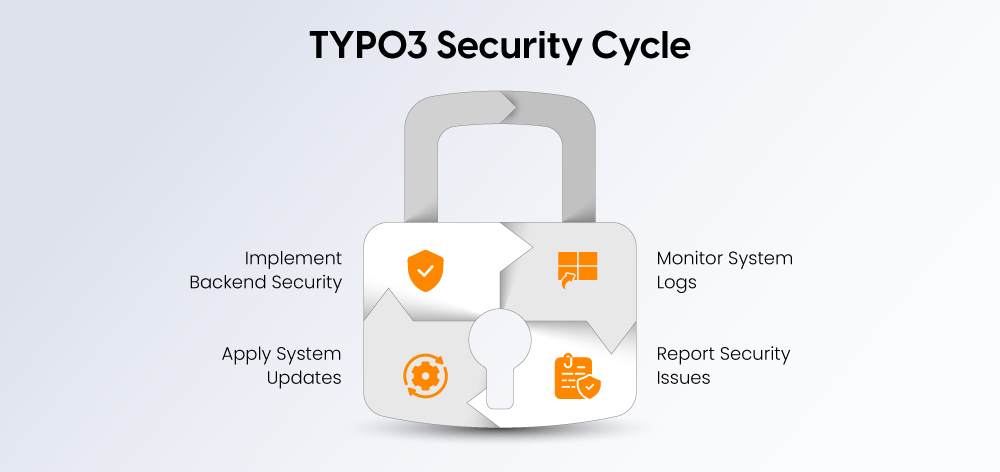
Security practices and timely updates help prevent and maintain trust.
Backend Security:
- Use strong, unique passwords and usernames.
- Enable multi-factor authentication (MFA).
- Grant appropriate user roles and permissions.
System Security & Updates:
- TYPO3 security updates are regularly installed for the core and extensions.
- Apply minor releases immediately to fix security vulnerabilities without affecting the site.
- HTTPS and security headers like HSTS and Content Security Policy are correctly configured.
Monitoring & Reporting:
- Check for suspicious activities in the system and server logs.
- Conduct vault scans to identify vulnerabilities.
- Report security issues to the TYPO3 security team.
Performance Optimization for TYPO3 Website
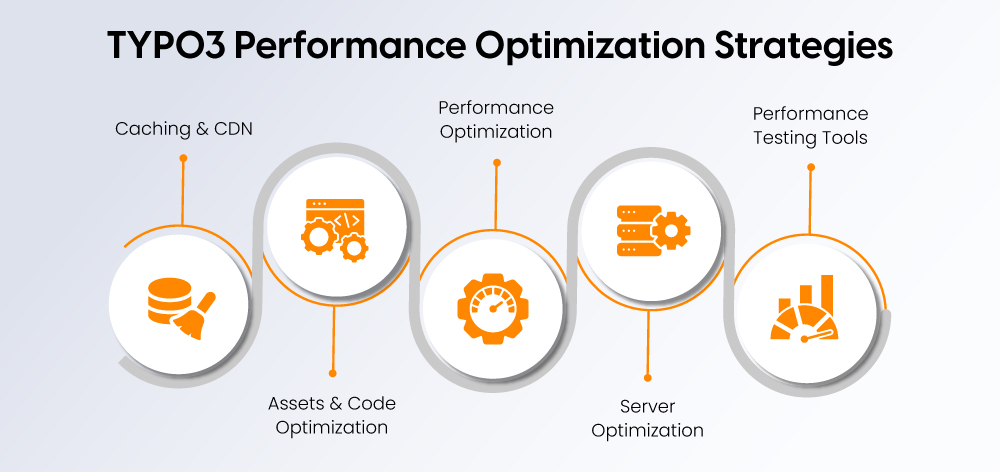
Fast websites keep visitors engaged and lead to better search rankings. Regular performance tests help identify bottlenecks and ensure your site runs smoothly.
Caching & CDN:
- Enable caching for TYPO3 and adjust the configuration accordingly.
- Deploy a CDN for global content delivery to increase delivery speed.
Assets & Code Optimization:
- Improve the efficiency of images by using WebP or AVIF.
- To save page load time, remove unnecessary CSS and JavaScript.
- Minify or compress scripts and styles whenever possible.
Server Optimization:
- Use PHP-FPM, Redis, and Opcache to improve server performance.
- Support server resources and upgrade hardware or software when necessary.
Performance Testing Tools:
- Test speed and performance with tools like:
- Regularly review the reports and fix reported issues.
SEO, Accessibility & Content Health
One TYPO3 site is not just a performance and security website. It should also have a search-friendly, accessible, content-ready design for your audience.
Technical SEO Checks:
- Sitemaps, metadata, canonical tags, and URLs are in place.
- Observe index issues and fix crawl errors.
Structured Data:
- Use schema markup to improve search visibility.
- In the event that content becomes less synchronous, JSON-LD structured data will be updated.
Accessibility (WCAG 2.2):
- Review contrast, keyboard navigation, labels, and alt text.
- Fix any barriers that prevent users with disabilities from accessing content.
Content Health:
- Refresh outdated content and keep high-value pages accurate.
- Check for thin or duplicate content and improve where necessary.
- Follow EEAT principles to maintain trust and authority.
QA, Monitoring & System Health
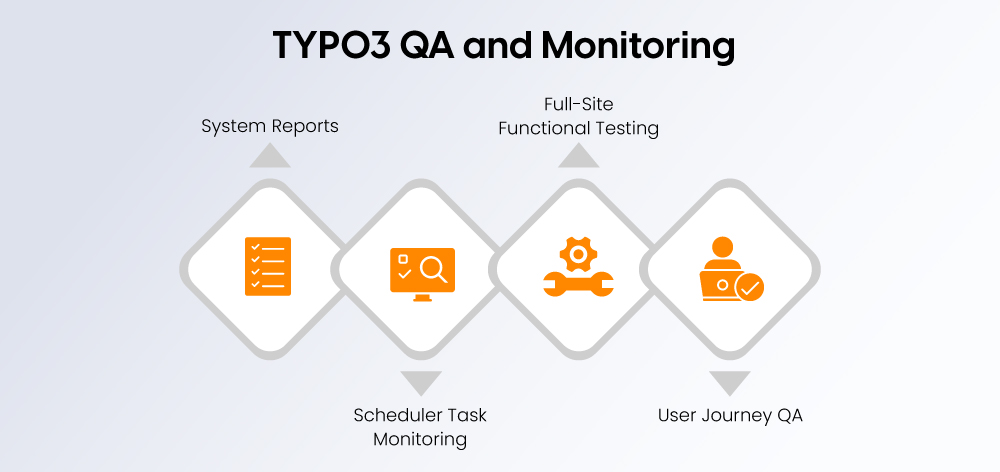
Quality assurance and continuous monitoring help to identify problems early and keep your TYPO3 website stable.
System Reports & Environment Checks:
- Check the TYPO3 system reports for warnings or configuration issues.
- Ensure that PHP, database, and server settings comply with TYPO3 requirements.
Scheduler Task Monitoring:
- Confirm that all TYPO3 scheduler tasks (indexing, cleanup, email queues, etc.) are running without errors.
- Fix or reschedule tasks that fail or take unusually long.
Full-Site Functional Testing:
- Test key workflows such as forms, search, navigation, and login.
- Validate third-party integrations and custom extensions.
User Journey & Cross-Platform QA:
- Check how users experience the website on different devices and browsers.
- Ensure that the design remains consistent, navigation works smoothly, and no errors occur.
Conclusion
A TYPO3 site can only deliver maximum performance with regular maintenance. The updates, backups, security checks, and performance tuning are the activities that will keep your website stable and reliable in the eyes of users.
For this reason, a lot of companies decide to partner with a TYPO3 Agency proficient in the field. They operate with a structured maintenance workflow, handling all the things your website needs from updates to monitoring, thus you can concentrate on your business without worrying about technical matters.
Maintenance is not just a technical task; it actually is an investment in the long-run health and reliability of your TYPO3 site.
FAQs
The reason for this is that TYPO3, being a CMS, requires constant monitoring and updates to make sure its security, stability, and speed. The lack of maintenance may lead to your website being exposed to security risks, having performance issues, or experiencing unexpected downtime.
Minor updates should be done every month or once every three months. Major upgrades are usually necessary after 1–2 years, depending on the TYPO3 release cycle.
The basic content tasks can be done without technical skills, but the technical maintenance, such as upgrades, backups, and server checks, usually requires technical expertise.
You should look at your current TYPO3 version. If it is old or coming to the end of support, then it is time to arrange an upgrade
Maintenance entails the small, standard updates and checks on a regular basis. A major upgrade consists of moving to a new version of TYPO3, and this will involve compatibility checks and more detailed planning.
Contact for Internet agency and TYPO3 projects
Sven Thelemann
Service Partner - Germany


Sven Thelemann
Client Service LeadSven Thelemann serves as the Client Service Lead at NITSAN, focusing on delivering TYPO3 solutions that meet client goals. With a strong understanding of technology and client expectations, he ensures smooth communication and project execution. Outside of work, Sven enjoys cycling and experimenting with homemade recipes.
Be the First to Comment