


TYPO3 v14 Performance Optimization for Large-Scale Projects
Large TYPO3 projects usually slow down over time. Heavy templates, old records, weak caching, large page trees, unoptimized assets, too many extensions, and outdated infrastructure all add pressure.
For enterprise websites, speed affects much more than page load time. It influences search visibility, trust, leads, hosting costs, and how efficiently editors can work.
TYPO3 v14 gives large projects a stronger base, but speed still depends on how the system is built, hosted, cached, and maintained. Caching, database health, frontend assets, hosting, extensions, and deployment workflows need to be handled properly.
Before you start optimizing, use the free TYPO3 Version Checker to see whether your site needs an upgrade, performance tuning, or a deeper technical audit.
Why TYPO3 Performance Matters More at Large Scale
For large TYPO3 projects, performance should be treated as an ongoing business risk, not a one-time technical task.
Small TYPO3 websites can often handle minor speed issues. Large projects cannot. When a site has thousands of pages, several languages, custom extensions, many editors, and important landing pages, every delay creates a bigger problem.
Slow pages can hurt organic traffic, Core Web Vitals, and lead generation. Users may leave before they read, fill out a form, or contact your team. Campaign pages can also lose value if they load slowly during peak traffic.
Performance also affects the people managing the site. If the TYPO3 backend is slow, editors need more time to create pages, update content, review translations, and publish changes.
At large scale, TYPO3 performance is not only about frontend speed. It is also about backend speed, stable hosting, clean content structures, lower server costs, and easier long-term maintenance.
What Makes Large TYPO3 v14 Projects Slow?
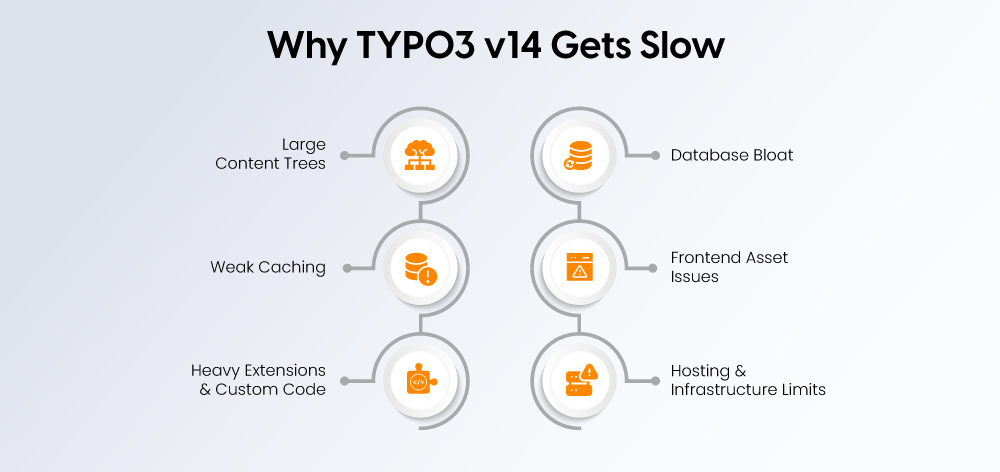
Large TYPO3 sites usually slow down when several issues build up together. The first step is to find where the pressure starts.
Large Content Trees and Complex Site Structures
Big TYPO3 sites often include 10,000+ pages, multiple country sites, several languages, old campaign pages, and large news or resource sections.
This can make the site harder to manage. Editors need more time to find pages, update content, and publish changes.
Deep or messy structures can also affect users. Navigation becomes harder, and important pages may take longer to load or reach.
Weak or Misconfigured Caching
Caching is one of the biggest parts of TYPO3 performance. TYPO3 supports flexible cache setups, but large projects need a clear cache strategy.
Common caching problems include:
- Page cache not used properly
- Dynamic plugins disabling cache
- Editors clearing all caches too often
- Missing cache tags
- No cache warmup after deployment
When caching is weak, the server repeats the same work again and again. This slows down pages and adds extra load.
Heavy Extensions and Custom Code
Extensions and custom features can slow down TYPO3 when they are outdated, unsupported, or poorly built.
This often happens with:
- Slow listing pages
- Complex filters
- Custom search features
- CRM, DAM, ERP, or PIM integrations
- Old Extbase queries
These issues are not always obvious on the frontend. But they can create delays in page loading, editing, and data processing.
Database Bloat
Large TYPO3 projects collect a lot of old data over time.
Common examples include:
- Old logs
- Deleted records
- Unused tables
- Old versions
- Large cache tables
- Extension leftovers
- Missing indexes
A bloated database makes queries slower. It also makes the whole system harder to maintain.
Frontend Asset Problems
Frontend speed often drops when pages load too many files or oversized assets.
Common issues include:
- Oversized images
- Unused CSS
- Render-blocking JavaScript
- Too many tracking scripts
- Heavy fonts
- Sliders and animations
- Third-party embeds
These problems affect page speed, Core Web Vitals, and user experience.
Hosting and Infrastructure Limits
TYPO3 v14 also depends on the hosting setup. Large projects need a modern stack with PHP 8.2+, Composer, and supported database systems such as MariaDB, MySQL, PostgreSQL, or SQLite.
Weak hosting can slow down even a clean TYPO3 installation. Server resources, database performance, caching, and deployment setup must match the size of the project.
How to Optimize TYPO3 v14 Performance for Large-Scale Projects
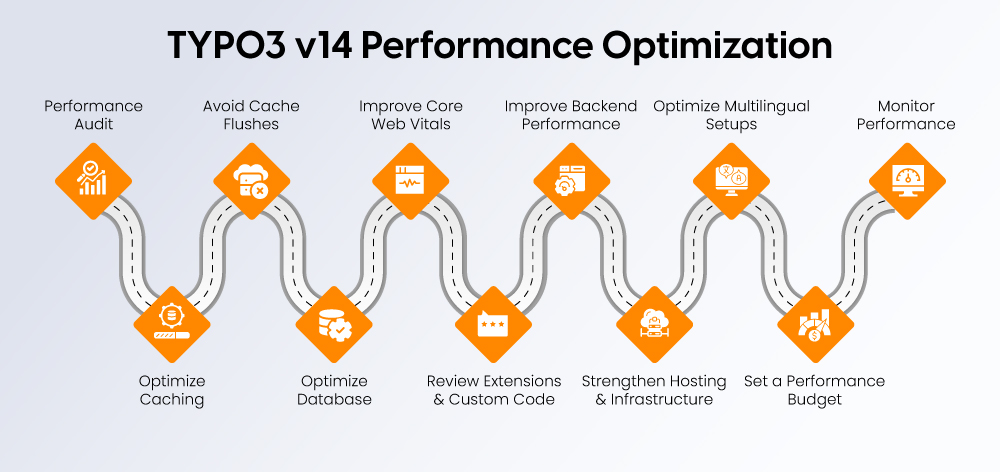
A large TYPO3 site needs more than quick speed fixes. Image compression and script cleanup help, but deeper gains usually come from caching, database cleanup, extension review, hosting, and backend workflow improvements.
Start with a TYPO3 v14 Performance Audit
Start by finding where the site is slow. Do not guess. Measure the frontend, backend, server, database, and key business pages.
Check frontend performance first:
- Largest Contentful Paint
- Interaction to Next Paint
- Cumulative Layout Shift
- Time to First Byte
- Mobile and desktop speed
- Field data and lab data
Then review the TYPO3 backend. Slow page trees, slow modules, media library delays, publishing issues, complex permissions, and workspaces can all reduce editor productivity.
A proper TYPO3 performance audit helps you find whether the main issue is frontend assets, backend setup, hosting, database load, caching, extensions, or editorial workflow.
Optimize TYPO3 Caching
Caching is one of the strongest ways to improve TYPO3 performance. TYPO3 supports different cache storage options, and each cache can be configured based on the project need.
For large projects, review:
- Page cache
- Cache tags
- Cache lifetime
- Cache backend
- Cache clearing rules
- Dynamic plugins
- Cache warmup after deployment
Important pages should be cacheable wherever possible. Dynamic content should be handled carefully, because one uncached plugin can slow down an entire page.
For larger cache workloads, Redis can help reduce database pressure. TYPO3 documentation notes that Redis can be used for large cache tables and can handle many cache entries when enough memory is available.
Example Redis cache setup for config/system/additional.php:
<?php
$redisHost = '127.0.0.1';
$redisPort = 6379;
$redisCaches = [
'pages' => [
'database' => 2,
'defaultLifetime' => 86400 * 7,
'compression' => true,
],
'pagesection' => [
'database' => 3,
'defaultLifetime' => 86400 * 7,
],
'hash' => [
'database' => 4,
],
'rootline' => [
'database' => 5,
],
];
foreach ($redisCaches as $cacheName => $settings) {
$GLOBALS['TYPO3_CONF_VARS']['SYS']['caching']['cacheConfigurations'][$cacheName]['backend']
= \TYPO3\CMS\Core\Cache\Backend\RedisBackend::class;
$GLOBALS['TYPO3_CONF_VARS']['SYS']['caching']['cacheConfigurations'][$cacheName]['options'] = [
'hostname' => $redisHost,
'port' => $redisPort,
'database' => $settings['database'],
'defaultLifetime' => $settings['defaultLifetime'] ?? 86400,
];
if (!empty($settings['compression'])) {
$GLOBALS['TYPO3_CONF_VARS']['SYS']['caching']['cacheConfigurations'][$cacheName]['options']['compression'] = true;
}
}
Do not place all important caches in one Redis database. TYPO3 recommends separating caches when the same keys are used, especially for pages and pagesection.
Avoid Full Cache Flushes
Full cache clearing can hurt large TYPO3 sites. After a full flush, the server may need to rebuild many pages, menus, and cache entries at once.
Use selective cache clearing where possible. TYPO3 v14 includes a cache:flushtags command, which can clear cache entries by specific tags instead of flushing everything.
Example:
vendor/bin/typo3 cache:flushtags pageId_123
For deployments, warm up caches before users arrive. TYPO3 supports cache warmup from the command line.
Example:
vendor/bin/typo3 cache:warmup
vendor/bin/typo3 cache:warmup --group pages
Warm these pages first:
- Homepage
- Service pages
- Product pages
- Campaign landing pages
- German and English entry pages
- High-traffic blog pages
TYPO3 also provides a scheduler task for cache garbage collection. This is useful for cache backends that do not remove old entries on their own.
Clean and Improve the Database
Large TYPO3 websites often carry years of old data. This can slow down queries and make the system harder to maintain.
Review and clean:
- Deleted records
- Old versions
- Expired sessions
- Logs
- Temporary records
- Unused extension tables
- Large cache tables
Also check slow query logs. Slow queries often come from custom extensions, news listings, filters, search pages, related content blocks, large menus, and permission-heavy queries.
Indexes should also be reviewed. Important queries should not scan large tables again and again. This matters most on pages with filters, search, large content lists, and dynamic blocks.
Test database cleanup in staging before production. Some old records may still be linked to pages, files, or extensions.
Improve Core Web Vitals and Frontend Speed
Frontend speed is what users and search engines notice first. In TYPO3 v14, caching and hosting matter, but images, JavaScript, CSS, fonts, and layout stability also decide how fast a page feels.
Start with images:
- Use responsive images
- Upload correct image sizes
- Compress large files
- Use modern formats where possible
- Lazy load lower-page images
- Do not lazy load the main hero image if it affects LCP
- Give editors clear crop rules
Then review JavaScript. Remove unused scripts, defer non-critical scripts, and avoid loading every tracking tool on every page.
Also clean CSS. Large frameworks, unused styles, and heavy design components can slow down pages. Keep templates lean and load only what the page needs.
Fonts should be simple. Use fewer font families, fewer weights, and avoid layout shifts while fonts load.
For Core Web Vitals, focus on three things:
- LCP: the main content should load fast
- INP: clicks and interactions should respond quickly
- CLS: the layout should not jump while loading
For global or multilingual projects, use a CDN for images, CSS, JavaScript, downloads, and media assets. TYPO3 documentation includes CDN setup as part of performance optimization.
Review Extensions and Custom Code
Extensions and custom code are common performance bottlenecks in large TYPO3 projects. This is especially true when the site uses filters, custom search, large listings, CRM, DAM, ERP, or PIM integrations.
Review:
- Unused extensions
- Unsupported extensions
- Slow custom plugins
- Expensive database queries
- API calls during page rendering
- Poorly cached plugins
- Repeated content processing
Remove extensions that are no longer needed. Replace unsupported ones before upgrading or optimizing deeper parts of the system.
Custom code should be profiled on real pages. If extensions, filters, search features, or integrations are slowing the site down, a TYPO3 development review can help identify and fix the root cause.
Avoid uncached plugins unless they are truly needed. If only one part of the page is dynamic, do not make the full page uncached.
Improve Backend Performance for Editors
Large TYPO3 projects also need a fast backend. If editors wait too long for page trees, modules, file lists, or publishing actions, content work becomes slower.
Start with the page tree. Archive old pages, reduce unnecessary nesting, and separate active content from legacy content.
Then review roles and permissions. Keep user groups clear. Avoid overly complex page mounts, file mounts, and function access rules unless they are needed.
Clean up content elements too. Too many unused layouts and duplicated elements make the backend harder to use and maintain.
Train editors on performance-safe habits:
- Upload optimized images
- Avoid unnecessary embeds
- Use approved content elements
- Understand cache behavior
- Keep metadata clean
- Remove old campaign content when it is no longer useful
Strengthen Hosting and Infrastructure
TYPO3 v14 performance depends on the hosting stack. TYPO3 v14 requires at least PHP 8.2, and TYPO3’s Composer installation guide also points to Composer-based setup for v14 projects.
Large projects should review:
- PHP version and settings
- Database version and tuning
- Composer setup
- Redis setup
- CDN setup
- Server-level caching
- File storage
- Backup process
- Staging environment
Separate development, staging, and production. Major performance changes should not be tested on the live site.
Also prepare for traffic peaks. This matters during trade fairs, product launches, seasonal campaigns, newsletters, and press coverage.
Deployment should protect performance. Use clear deployment steps, cache warmup, rollback options, database migration checks, and performance testing before release. TYPO3 documentation also covers deployment tools such as Deployer for automated deployment steps.
Example deployment checklist:
# 1. Put release in place
composer install --no-dev --optimize-autoloader
# 2. Run database updates if needed
vendor/bin/typo3 database:updateschema
# 3. Flush only what is needed
vendor/bin/typo3 cache:flush --group system
# 4. Warm caches before traffic arrives
vendor/bin/typo3 cache:warmup
# 5. Run smoke tests for key pages
curl -I https:// example.com/
curl -I https:// example.com/de/
curl -I https:// example.com/en/contact/
Use this only as a deployment example. Command names, database update steps, and cache behavior should be checked against your TYPO3 v14 setup before running them on production.
Optimize Multilingual and Multisite Setups
Large TYPO3 projects often serve several countries, brands, or languages. These setups need separate performance planning.
Focus first on key entry pages:
- German homepage
- English homepage
- Country-specific landing pages
- Market-specific service pages
- Product or solution pages
Avoid duplicated heavy templates across every language or site. Each market should not load scripts, assets, or tracking tools that are not needed.
Review hreflang and canonical setup. Clean multilingual SEO helps search engines understand the site better and can reduce wasted crawling.
For German and EU B2B websites, also review third-party scripts. Consent tools, maps, videos, chat widgets, and tracking tools can affect both speed and compliance.
Set a TYPO3 Performance Budget
A performance budget helps prevent the site from becoming slow again after cleanup.
Set clear limits for:
- Page weight
- Image size
- JavaScript size
- Font count
- Third-party scripts
- LCP target
- INP target
- CLS target
- Backend response time
- Template complexity
This gives developers, editors, and marketers the same rules. Before adding a new slider, tracking script, video embed, or template block, the team can check whether it fits the budget.
Monitor Performance After Launch
Performance work does not end after one round of fixes. New content, extensions, campaigns, and releases can slow the site again.
Track frontend KPIs:
- Core Web Vitals
- TTFB
- Page load time
- Mobile speed
- Conversion rate
- Bounce rate
- Landing page speed
Track backend KPIs:
- Editor login time
- Page tree loading
- Module loading
- Publishing time
- Search speed
- File list speed
Track server and database KPIs:
- CPU
- Memory
- Database query time
- Cache hit ratio
- Redis memory
- Error rate
Review performance after every major release, campaign, migration, or extension update. For large TYPO3 projects, regular TYPO3 support & maintenance helps keep speed, security, and stability under control.
TYPO3 v14 Performance Optimization Checklist
Use this checklist to keep the optimization process clear before, during, and after technical changes.
Before Optimization
- Audit Core Web Vitals: Review LCP, INP, CLS, TTFB, and mobile performance on key pages.
- Review backend editor performance: Test page trees, modules, file lists, and publishing actions.
- Check hosting and PHP/database setup: Check PHP version, database version, server resources, Composer setup, and staging environment.
- Identify slow extensions and custom code: Check which extensions, plugins, queries, or integrations add extra load.
- Review high-value pages: Check service pages, landing pages, contact pages, product pages, and top organic pages first.
During Optimization
- Configure TYPO3 caching properly: Check page cache, cache tags, cache lifetime, and cache clearing rules.
- Use Redis where needed: Check if large cache tables or high traffic are putting too much pressure on the database.
- Clean database records and logs: Check old logs, deleted records, old versions, unused tables, and extension leftovers.
- Optimize images, CSS, JavaScript, and fonts: Check oversized images, unused CSS, blocking scripts, heavy fonts, and layout shifts.
- Add CDN for global delivery: Check if users in different regions get slow asset loading from the main server.
- Review third-party scripts: Check tracking tools, chat widgets, maps, video embeds, and consent tools that slow pages down.
- Improve database queries: Check slow query logs, missing indexes, large menus, filters, and listing pages.
- Test everything in staging: Check performance, forms, redirects, cache behavior, and key pages before production.
After Optimization
- Warm up important caches: Check that homepage, service pages, landing pages, and language entry pages are preloaded after deployment.
- Monitor Core Web Vitals: Check whether LCP, INP, CLS, and TTFB improve after changes.
- Track backend performance: Check editor login, page tree loading, module speed, publishing time, and file search.
- Review server and database metrics: Check CPU, memory, cache hit ratio, Redis usage, query time, and error logs.
- Train editors: Check that editors know how to upload optimized images, avoid heavy embeds, and use approved content elements.
- Set a performance budget: Check limits for page weight, image size, scripts, fonts, and third-party tools.
- Schedule regular audits: Check performance after major releases, campaigns, migrations, and extension updates.
When Should You Get Expert Help?
Some TYPO3 performance fixes can be handled in-house, especially when the issue is simple and visible. Image compression, basic script cleanup, content cleanup, and removing unused assets can often be done by your own team.
Expert help becomes useful when the issue is harder to trace. This includes slow custom extensions, database queries, Redis setup, CDN configuration, multisite structures, high traffic, or Core Web Vitals problems that keep coming back.
You may need TYPO3 development support if custom code, extensions, filters, or integrations are slowing the site down. You may need TYPO3 support and maintenance if speed drops after updates, campaigns, content changes, or new feature releases.
You may need a TYPO3 upgrade if your current setup is outdated, difficult to maintain, or not ready for TYPO3 v14.
Common signs that it is time to get help:
- The TYPO3 backend is slow for editors
- Core Web Vitals stay poor after basic fixes
- Important landing pages load slowly
- Cache clears cause performance drops
- Database queries are slow
- Extensions are outdated or unsupported
- The website slows down during campaigns
- Multilingual pages perform inconsistently
- Your team cannot find one clear cause
If these issues affect business-critical pages, avoid random fixes. Start with a TYPO3 performance audit so your team knows whether the problem is caching, hosting, database load, extensions, frontend assets, or outdated infrastructure.
Conclusion
TYPO3 v14 gives large websites a strong technical base, but performance depends on the whole setup. Caching, database health, frontend assets, extensions, hosting, editor workflows, and ongoing monitoring all need to work together.
The best results come from a clear process. Start with an audit, fix the biggest bottlenecks first, test changes in staging, and keep monitoring after launch.
Not sure what is slowing down your TYPO3 website? Start with a TYPO3 performance audit to find the real cause, whether it is caching, database structure, extensions, frontend assets, hosting, or an outdated setup. Then talk to a TYPO3 expert for a clear next step.
FAQs
Start with a performance audit, then fix caching, database issues, frontend assets, hosting, extensions, and backend workflows.
Common causes include weak caching, old database records, heavy extensions, oversized images, too many scripts, poor hosting, or complex page structures.
TYPO3 v14 gives you a stronger technical foundation, but real speed depends on caching, hosting, database health, frontend setup, and code quality.
Yes. Redis can reduce database load and improve cache handling, especially for large TYPO3 sites with high traffic or many pages.
Optimize images, reduce JavaScript, clean CSS, improve server response time, use caching, avoid layout shifts, and monitor key pages regularly.
Get expert help when slow speed comes from custom code, database queries, Redis setup, CDN setup, outdated extensions, or recurring Core Web Vitals issues.

Contact for project management and team coordination
Mihaela Angelova
Project Manager - Germany

Mihaela Angelova
Project ManagerMihaela keeps technology projects on track and ensures to meet business goals. She specializes in coordinating teams, optimizing workflows, and delivering projects. At NITSAN, she works closely with clients to transform ideas into actionable solutions. Outside of work, she enjoys exploring new hiking trails.

Be the First to Comment