


TYPO3 Headless CMS: Architecture, Setup, Benefits & Real Use Cases
The headless CMS market hit $91.55 billion in 2026 and is projected to reach $155.20 billion by 2032. TYPO3 sits at the center of this shift for organizations that need enterprise-grade content management plus modern frontend freedom.
TYPO3 Headless decouples the TYPO3 backend from any presentation layer, delivering content via JSON APIs to websites, mobile apps, kiosks, or IoT devices, a flexibility TYPO3 Agency teams now build around by default.
This guide covers the architecture, EXT:headless 4.8 setup, real 2025–2026 case studies, platform comparisons, and exactly when TYPO3 Headless is, and isn't, the right call.
What Is TYPO3 Headless CMS?
TYPO3 Headless is an architectural approach where TYPO3 acts as the backend content repository and the frontend is built separately, communicating with TYPO3 through a JSON API.
The "head", the presentation layer, is removed. The same content can now be delivered to a website, mobile app, kiosk, or IoT device from one source.
Headless vs Traditional TYPO3
Traditional TYPO3 (server-side):
- TYPO3 receives a request, renders HTML using Fluid templates, sends a finished page to the browser
- Backend and frontend live in the same stack
- Presentation logic is tied to the CMS
Headless TYPO3 (decoupled):
- TYPO3 stops rendering HTML
- Content is requested through RESTful API calls and returned as structured JSON
- No TYPO3 Templates, no Fluid, no presentation logic on the server
- The frontend can be Nuxt, React, Next.js, a mobile app, or any channel that speaks HTTP
What stays the same: the TYPO3 Backend still handles content input, editing, workflows, permissions, and translations. Editors keep their familiar interface. Only the output format changes.
Where TYPO3 Headless Stands in 2026
The official EXT:headless extension is mature, actively maintained, and enterprise-ready:
- Current version: 4.8.0, released 8 May 2026 (Macopedia / TYPO3 Extension Repository)
- Total downloads: 2,64,000+
- TYPO3 compatibility: v12 LTS and v13 LTS
- PHP requirement: 8.2+
- Built-in JSON API coverage: pages, navigation, multilingual content, forms, frontend login
- Maintained by: TYPO3 Headless Initiative (launched 2019, sponsored by Macopedia)
The ecosystem now includes the official nuxt-typo3 Vue/Nuxt frontend and the TYPO3 AI extension for ChatGPT-assisted translation.
How TYPO3 Headless Architecture Works
TYPO3 Headless runs on three independently deployable layers: the TYPO3 backend that stores and manages content, the EXT:headless extension that serves it as JSON, and any frontend that consumes that JSON over HTTP.
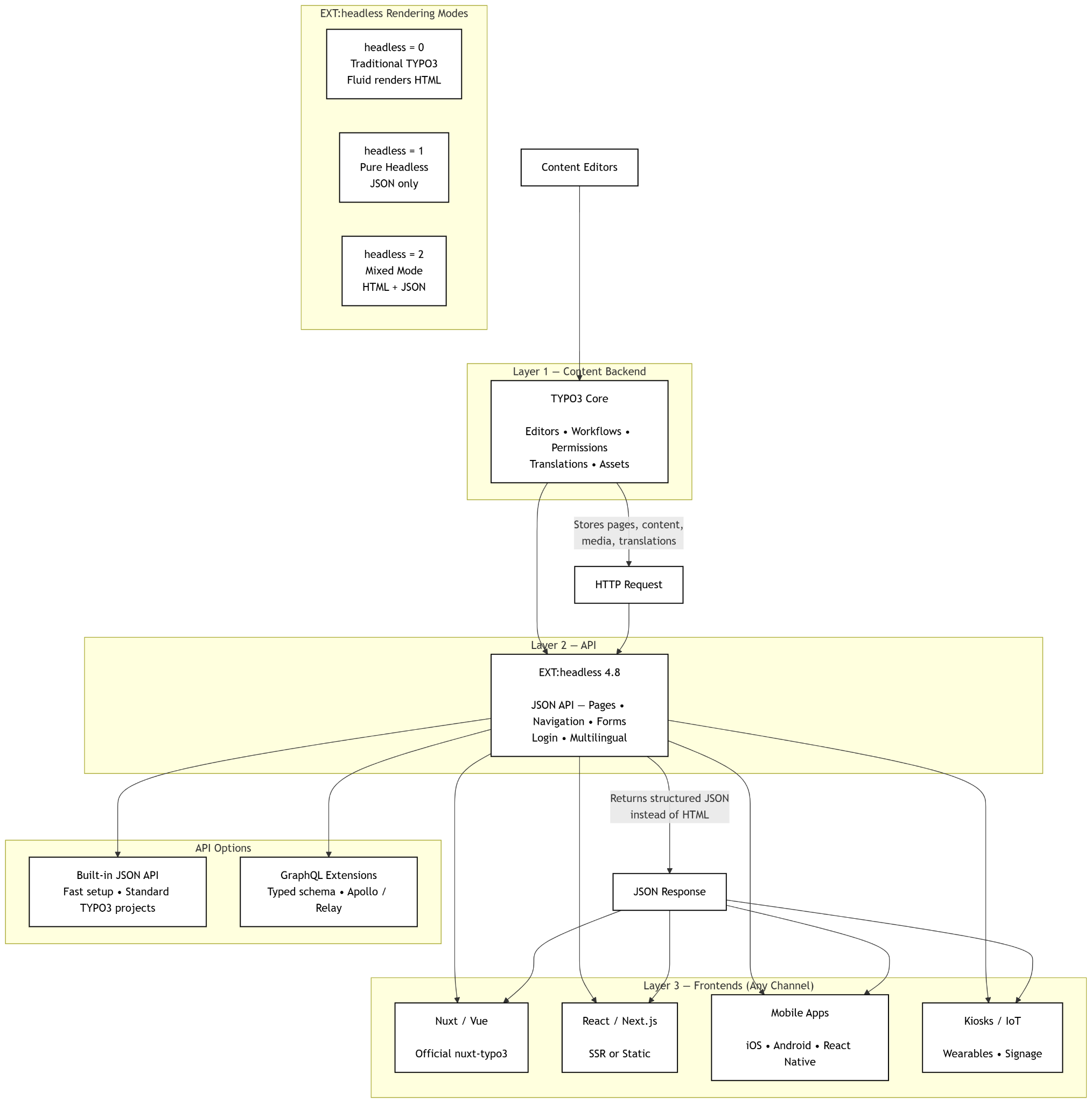
The Decoupled Stack - TYPO3 + JSON API + Any Frontend
Content flows in one direction:
- TYPO3 backend stores pages, content elements, media, and translations exactly as in a traditional site
- EXT:headless intercepts the request and returns structured JSON instead of HTML
- Frontend (Nuxt, React, mobile, IoT) fetches that JSON over HTTP and renders it however it wants
The browser never talks to TYPO3 directly. There is no Fluid rendering, no PHP-generated markup, no plugin output in the response.
Pure Headless vs Mixed Mode
EXT:headless supports three modes via a single site-config flag, a detail that often decides whether a migration is viable:
headless = 0- Traditional TYPO3. Fluid renders HTML. JSON API is off.headless = 1- Pure headless. Every request returns JSON. Fluid is bypassed entirely.headless = 2- Mixed mode. The same TYPO3 instance serves both. Requests withAccept: application/jsonget JSON; everything else gets the normal HTML page.
Mixed mode is the migration path for existing TYPO3 sites. Teams can ship a new Nuxt or React frontend for one section while the rest of the site keeps rendering through Fluid — no big-bang rebuild.
JSON API vs GraphQL on TYPO3
EXT:headless is JSON-first and ships out of the box. GraphQL is supported through community extensions when teams need typed schemas, single-request field selection, or strict client/server contracts.
For most TYPO3 projects, the built-in JSON API covers the use case; GraphQL is the right call when frontend teams demand schema introspection or are already standardized on Apollo / Relay.
Benefits of TYPO3 Headless (and Honest Limitations)
TYPO3 Headless is the right choice when content needs to live in more than one place. It's the wrong choice when a single website is the whole product and the team has no JavaScript depth. Both sides matter, buyers searching this keyword need both.
Where TYPO3 Headless Wins
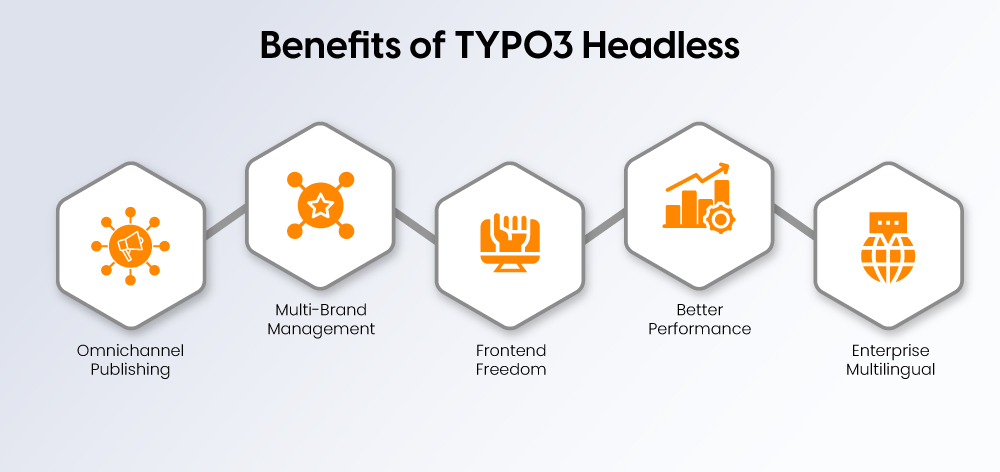
All 11 commonly listed benefits collapse into five concrete wins:
- Omnichannel content delivery - One TYPO3 backend feeds websites, mobile apps, kiosks, smart signage, wearables, and IoT devices through the same JSON API. Editors write once; every channel pulls the latest version. Covers: omnichannel publishing, better media delivery, live blogging, write-once-publish-anywhere.
- Multi-brand and microsite management - Build one content engine that powers separate brand sites, country variants, campaign microsites, and event pages. No duplicate CMS installations to maintain. Covers: microsite manager use case.
- Frontend framework freedom - TYPO3's PHP-based Fluid layer is replaced by Nuxt, React, Next.js, Angular, or Vue. Frontend teams ship faster, interactions feel modern, and the CMS is no longer the bottleneck. Covers: elegant UI, adaptability, scaling without redesign.
- Performance and Core Web Vitals gains - Static and server-side-rendered JS frontends can improve Core Web Vitals when caching, image delivery, routing, and hydration are handled correctly. Edge caching of JSON responses is straightforward. Covers: speed, live preview, quick & easy.
- Enterprise multilingual support, fully free and open-source - TYPO3 supports 50+ languages with native fallback rules, workspaces, and granular permissions. GPL v2 licensing, no per-seat fees. Covers: 51+ language support, user-friendly interface, free & open-source.
AI and LLM-Readiness - The 2026 Differentiator
Structured headless content is one reason enterprises are moving away from monolithic CMS delivery in 2026, not just multi-channel delivery.
AI Overviews, ChatGPT search, and Perplexity cite content they can parse cleanly. Headless TYPO3 outputs semantic JSON with clear field-level structure, title, body, metadata, relationships, exactly what LLMs need to extract, summarize, and cite.
Fluid-rendered HTML buried in templates is harder for AI crawlers to interpret. The same structure also feeds AI-powered tagging, auto-translation (via the TYPO3-AI extension), and personalization pipelines without re-modeling content.
When TYPO3 Headless Is the Wrong Choice
Four honest blockers:
- Higher upfront cost - Two stacks to build (TYPO3 backend + JS frontend), two CI/CD pipelines, two hosting environments. Total cost of ownership is higher in year one, especially for sub-10-page sites.
- WYSIWYG live preview is harder - Editors lose true in-page preview by default. Solutions exist (preview deployments, draft mode), but they need engineering setup.
- Multi-stack team required - A TYPO3/PHP developer is no longer enough. Projects need frontend JS expertise (Nuxt or React) plus DevOps for the decoupled deployment.
- Personalization and A/B testing get more complex - Content and delivery are separated, so personalization tools that hook into the rendering layer need rewiring through the API.
If a project is a single-language, single-channel marketing site under 20 pages with no team capacity to maintain a JS frontend, traditional TYPO3 with Fluid is still the better answer.
TYPO3 Headless vs Other Headless CMS Platforms
TYPO3 Headless is not the lightest headless CMS. It is the strongest fit when the project already needs enterprise publishing rules, multilingual governance, permissions, workspaces, and multisite control.
TYPO3 CMS is GPL-licensed, supports multisite and multilingual management, and includes editorial workflow capabilities through workspaces.
Strapi is easier for JavaScript teams that want a developer-first backend. Contentful is faster to launch as a managed SaaS, but costs rise with scale.
Headless WordPress works when the editorial team already knows WordPress, but serious multilingual and workflow needs usually depend on plugins. Drupal is the closest enterprise open-source alternative, especially for complex content models and API-heavy builds.
Factor | TYPO3 Headless | Strapi | Contentful | Headless WordPress | Drupal Headless |
Licensing | Open-source, GPL v2+ | Open-source core, paid cloud/enterprise | Proprietary SaaS | Open-source, GPL | Open-source, GPL v2+ |
Enterprise features | Strong permissions, workspaces, multisite, localization | Good, but enterprise depth needs paid tier/custom setup | Strong SaaS governance and roles | Plugin-dependent | Strong permissions, workflows, structured content |
Multilingual depth | Native, mature, built for complex regions | Available, less deep than TYPO3/Drupal | Strong localization model | Plugin-led | Very strong native multilingual |
Hosting model | Self-hosted or agency-managed | Self-hosted or Strapi Cloud | Fully managed SaaS | Self-hosted, managed WP, or custom | Self-hosted or enterprise managed |
Learning curve | Higher | Moderate for JS teams | Lower for editors, moderate for developers | Low for editors, higher headless setup | Higher |
TCO | Higher build cost, lower license lock-in | Moderate, rises with cloud/enterprise | Lower setup, higher recurring platform cost | Low entry cost, plugin maintenance risk | Higher build and maintenance cost |
Ideal use case | Enterprise multisite, multilingual, regulated content | Product teams building custom apps | Fast omnichannel SaaS rollout | Content-heavy sites with WP-trained editors | Complex public-sector, education, enterprise platforms |
The practical split is simple: choose TYPO3 Headless when governance matters as much as frontend freedom.
Choose Strapi for developer speed, Contentful for managed SaaS convenience, WordPress for familiar publishing, and Drupal when content architecture is extremely complex.
What EXT:headless Delivers: JSON API, Navigation, Forms, Login
EXT:headless is the core TYPO3 extension that turns normal TYPO3 content into structured JSON. Editors still work inside TYPO3. Developers get clean API output for websites, apps, portals, kiosks, or any frontend framework.
Key capabilities:
- Serves TYPO3 pages and content elements as JSON
- Outputs the page tree and navigation structure
- Respects language, translation, and fallback settings
- Supports custom fields and custom content elements
- Lets developers rename, nest, and reshape JSON fields with TypoScript
- Works with EXT:form for TYPO3 forms
- Supports frontend login flows through EXT:felogin
- Keeps TYPO3’s backend strengths: permissions, workspaces, media handling, and multisite management
The important detail: EXT:headless does not replace TYPO3. It removes TYPO3 from the rendering layer while keeping it as the editorial and content governance system.
Supporting Extensions
Most real TYPO3 projects need more than basic page content. The headless ecosystem covers common enterprise requirements:
- EXT:headless_news - JSON output for EXT:news records
- headless_solr - connects TYPO3 Solr search with a headless frontend
- headless_powermail - exposes Powermail forms through JSON
- headless_gridelements - supports projects that still rely on Gridelements
- EXT:form support - allows native TYPO3 forms to work in a decoupled setup
- EXT:felogin support - enables login-related frontend flows
This makes TYPO3 Headless usable for full websites, not just simple content APIs.
nuxt-typo3 - The Official Vue/Nuxt Frontend Companion
nuxt-typo3 is the frontend companion for teams building with Vue and Nuxt. It consumes EXT:headless JSON and gives developers a ready structure for rendering TYPO3 content in a modern frontend.
It helps with:
- Dynamic page routing
- TYPO3 content element rendering
- Multilingual pages
- SEO metadata
- Layout handling
- Server-side rendering through Nuxt
Use it when the project needs TYPO3’s backend power but a Vue/Nuxt frontend experience.
TYPO3-AI Extension - ChatGPT-Powered Translation
TYPO3-AI is not part of EXT:headless, but it fits the modern TYPO3 stack. It helps editors generate or translate content with ChatGPT/OpenAI inside TYPO3.
Best use:
- Faster translation drafts
- AI-assisted editorial workflows
- Multilingual content preparation before JSON delivery
It should support human review, not replace it.
Setting Up TYPO3 Headless: Step-by-Step
Start by installing the TYPO3 Headless extension on an existing TYPO3 project. The cleanest method is Composer:
composer require friendsoftypo3/headless
You can also install it manually through the TYPO3 Extension Manager using the extension key:
headless
After installation, include the EXT:headless TypoScript template in the relevant site package or template setup. This enables TYPO3 to start rendering page content as JSON instead of standard HTML output.
One important rule: do not use fluid_styled_content on the same page tree together with EXT:headless. The headless extension is meant to take over content rendering for that tree.
Configure the Site Flag & TypoScript Template
EXT:headless uses a site configuration flag to decide how TYPO3 should respond.
Use the headless flag like this:
headless = 0- traditional TYPO3 mode; Fluid renders normal HTMLheadless = 1- pure headless mode; TYPO3 returns JSON for every requestheadless = 2- mixed mode; TYPO3 returns JSON only when the request asks for it
For new headless builds, use headless = 1. For migrations, headless = 2 is usually safer because the same TYPO3 instance can serve both the old Fluid frontend and the new headless frontend during rollout.
Customize JSON Output With TypoScript
EXT:headless adds a JSON Content Object. This lets developers control which fields are returned and how the JSON structure looks.
Simple header field example:
lib.page = JSON
lib.page {
fields {
header = TEXT
header {
field = header
}
}
}
Output:
{
"header" : "headerFieldValue"
}
You can also nest fields inside JSON structures.
lib.page = JSON
lib.page {
fields {
data {
fields {
foo = TEXT
foo {
field = bar
}
foo1 = TEXT
foo1 {
field = bar1
}
}
}
}
}
Output:
{
"data": [
{
"foo": "bar",
"foo1": "bar1"
}
]
}
This is where TYPO3 Headless becomes flexible. Teams can keep TYPO3’s backend structure while reshaping API output for Nuxt, React, mobile apps, or other frontend consumers.
Test the JSON Endpoint
Once the extension, TypoScript template, and site flag are configured, open a TYPO3 page URL and check the response.
In pure headless mode, the page should return JSON directly. In mixed mode, request the page with:
Accept: application/jsonThen confirm that the response includes the page data, content elements, navigation, language information, and any custom fields added through TypoScript.
Real-World TYPO3 Headless Case Studies: 2025–2026
EKHN - Headless Church Portal
- Built for 1.3 million members across 1,075+ parishes
- Source explicitly describes a headless CMS relaunch with TYPO3
- Added improved UX, mobile experience, accessibility work, and contrast mode
- Best proof point: large public-service TYPO3 Headless portal with accessibility focus
Source: TYPO3 case study.
Robomow / MTD Products - Multi-Country Brand Management
- Source explicitly says TYPO3 Headless & PWA implementation
- Replaced scattered local sites with one central TYPO3 system
- Supports multilingual content, shared layouts, and multi-country brand control
- Best proof point: headless TYPO3 used for international content governance
Source: Macopedia case study.
Raben Group - Corporate PWA at Scale
- Source explicitly says TYPO3 Headless & PWA solution
- Used TYPO3 as the enterprise CMS while improving mobile-first frontend delivery
- Supports multilingual content, integrations, offline access, and corporate-scale UX
- Best proof point: headless architecture kept TYPO3 stable while modernizing frontend delivery
Source: Macopedia case study.
Arvato - Customer Portal With Headless TYPO3
- Source explicitly says Arvato uses a headless setup with TYPO3
- Existing TYPO3 backend serves as the central content platform
- Content is delivered headlessly to the my arvato customer portal
- Best proof point: TYPO3 used as a shared backend for corporate site content and portal delivery
Source: TYPO3 case study.
Ready to Choose TYPO3 Headless?
Choose TYPO3 Headless when your content needs to power multiple channels, brands, or markets, not just one website. If you need enterprise governance with frontend freedom, it is worth the investment. If you are unsure, inquire before committing to the architecture.
Topic: TYPO3 Headless CMS: Architecture, Setup, Benefits & Real Use Cases.

Choosing the right CMS is a strategic decision
A clear comparison that helps you decide based on complexity, security, scalability, and long-term requirements.
FAQs
Yes. TYPO3 CMS and EXT:headless are open-source, with no per-seat license fee. Costs come from implementation, frontend development, hosting, integrations, and maintenance.
Yes, if the frontend is built correctly. Use server-side rendering, clean metadata, crawlable URLs, structured content, and fast page delivery.
Yes. Use mixed mode with headless = 2 to serve normal Fluid HTML and JSON responses from the same TYPO3 instance during migration.
Not by default. EXT:headless is JSON-first, but GraphQL can be added through separate TYPO3 community extensions when a project needs typed schemas.
EXT:headless 4.8 supports TYPO3 v12 and v13. The listed compatibility range is TYPO3 v12.4.21 to v13.4.99.
TYPO3 Headless is the JSON API layer. TYPO3 PWA is the frontend approach that consumes that API, usually with Vue/Nuxt.
It usually costs more than traditional TYPO3 upfront. Budget for TYPO3 setup, JavaScript frontend development, API mapping, preview workflows, hosting, and maintenance.
Contact for Internet agency and TYPO3 projects
Sven Thelemann
Service Partner - Germany


Sven Thelemann
Client Service LeadSven Thelemann serves as the Client Service Lead at NITSAN, focusing on delivering TYPO3 solutions that meet client goals. With a strong understanding of technology and client expectations, he ensures smooth communication and project execution. Outside of work, Sven enjoys cycling and experimenting with homemade recipes.
Be the First to Comment