


Building Custom TYPO3 v14 Extensions: A Complete Guide
TYPO3 is a powerful CMS for complex, content-rich digital platforms. With PHP 8.2, 8.3, 8.4 and 8.5 support and community support for TYPO3 v14 until June 2029, plus ELTS until June 2032, it gives teams a strong base for long-lived, upgrade-ready projects.
For websites that need custom workflows, structured data or third-party integrations, a custom TYPO3 v14 extension keeps project-specific logic organized, reusable and easier to maintain. Using TYPO3’s extension development framework, Extbase for MVC-based development, Fluid, TCA and Composer-based workflows, teams can build scalable functionality that fits cleanly into the TYPO3 ecosystem.
This guide is for technical leads, in-house developers and agencies planning TYPO3 features that need to stay reliable beyond launch day.
What Is a Custom TYPO3 Extension?
A custom TYPO3 Extension is a project-specific package that adds functionality to a TYPO3-Installation. It can include frontend plugins, backend modules, custom database tables, API integrations, workflows, scheduled tasks, CLI commands, Fluid templates and configuration. TYPO3’s official documentation treats extensions as the standard way to structure and add functionality inside the CMS (TYPO3 Extension Development Docs).
In Composer-based TYPO3 projects, extensions are managed as packages through composer.json. In classic installations, extensions can still be placed under typo3conf/ext/ (TYPO3 Classic Mode Docs). In simple terms, a custom extension gives project-specific logic a reusable, testable and maintainable home.
Extension Type | Scope | Purpose | Example |
System Extension | Core / Framework | Provides TYPO3 core functionality | Backend, forms, frontend rendering |
Site Package | Project Layout | Manages design, templates, assets, and TypoScript | Corporate website theme |
Frontend Plugin | Feature Output | Adds dynamic frontend functionality | Event listing, product filter, booking form |
Backend Module | Editor / Admin Tool | Provides a custom TYPO3 backend interface | Import dashboard, reports, approval workflow |
Integration Extension | External Connection | Connects TYPO3 with external systems | CRM, ERP, payment gateway, or search API |
Data Model Extension | Business Feature | Creates custom records, fields, and relationships | Products, dealers, courses, events |
A custom extension gives developers a predictable structure and gives editors a cleaner backend experience.
When Should You Build a Custom TYPO3 Extension?
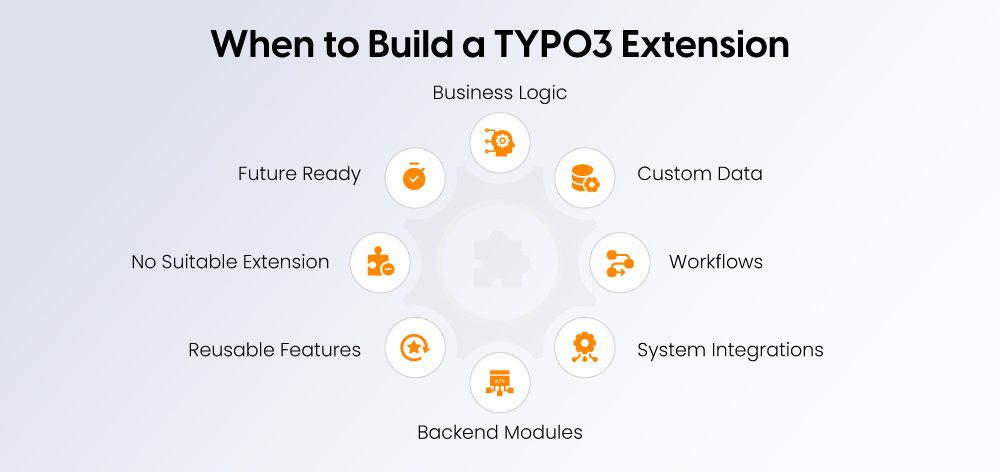
Build a custom TYPO3 extension when the requirement has its own logic, data, workflow or integration needs. It is best suited for long-term business functionality, not one-time visual changes.
A custom extension is usually the right choice when:
- The feature is long-term, not a short campaign or one-off change
- It needs its own data model, records, fields or permissions
- It includes workflows such as booking, events, memberships, products or portals
- It connects TYPO3 with CRM, ERP, payment, search or translation systems
- It needs backend modules for editors or administrators
- It will be reused across multiple TYPO3 Websites or projects
- No maintained extension can solve the need without heavy overrides
- The code must be testable, maintainable and upgrade-ready
Avoid custom development when the requirement is only visual, when a site package can handle the layout, when TYPO3 core already covers the use case, or when a maintained third-party extension fits cleanly. For example, building a full custom event system may be unnecessary if a maintained event extension plus light configuration can solve the requirement.
The decision is not just about what works today. Every custom extension should be planned with future testing, refactoring and TYPO3 Upgrades in mind. TYPO3 v14 continues the platform’s modernization with backend improvements, Fluid 5, Extbase updates and the removal of deprecated functionality, so clean architecture matters from the start ( TYPO3 v14 Release Notes).
A simple rule works well: design needs belong in a site package, common features can often use existing extensions, and business-specific workflows belong in a custom extension.
TYPO3 Custom Extension vs Site Package vs Existing Extension
Before building custom functionality, compare the available options. This helps avoid unnecessary development, keeps the project architecture clean and makes long-term maintenance easier.
Option | Best For | Maintenance Owner | Avoid When |
Site package | Themes, templates, assets, TypoScript, and page layouts | Frontend or integrator team | You need custom data, business logic, or workflows |
Existing extension | Common features such as forms, redirects, SEO, search, or news | Upstream maintainer + your integration team | It requires heavy patches, unstable forks, or core overrides |
Custom extension | Unique workflows, integrations, backend modules, and data models | Your team or TYPO3 Agency | The requirement is unclear or can be solved through configuration |
Custom extension with security review | Business-critical or compliance-sensitive functionality | Your team, agency, and security reviewer | A trusted core feature or maintained extension already meets the need |
Scenario | Best Choice | Why |
New website design | Site package | Keeps templates and assets separate |
Contact form | Core feature or existing extension | No custom logic needed |
Product configurator | Custom extension | Needs custom data and frontend logic |
CRM sync | Custom extension | Requires API handling, logging, and error management |
Blog layout changes | Site package | Mostly presentation-level work |
Event registration system | Custom extension | Needs records, workflows, and permissions |
Dealer locator | Custom extension | Needs structured data, search, and map integration |
Sensitive user workflow | Custom extension with security review | Allows stricter control over access, validation, and security review |
If an existing extension needs heavy patching, forking or constant overrides, custom development can be cleaner and safer in the long run. This is especially important for projects with security, compliance or audit requirements, where code ownership and review matter.
TYPO3 also publishes official security advisories, so maintained and reviewable code should be part of the decision.
Rule of thumb: use a site package for design, an existing extension for common features, and a custom extension when the project needs unique, business-critical functionality with its own lifecycle.
What Changes in Extension Development with TYPO3 v14?
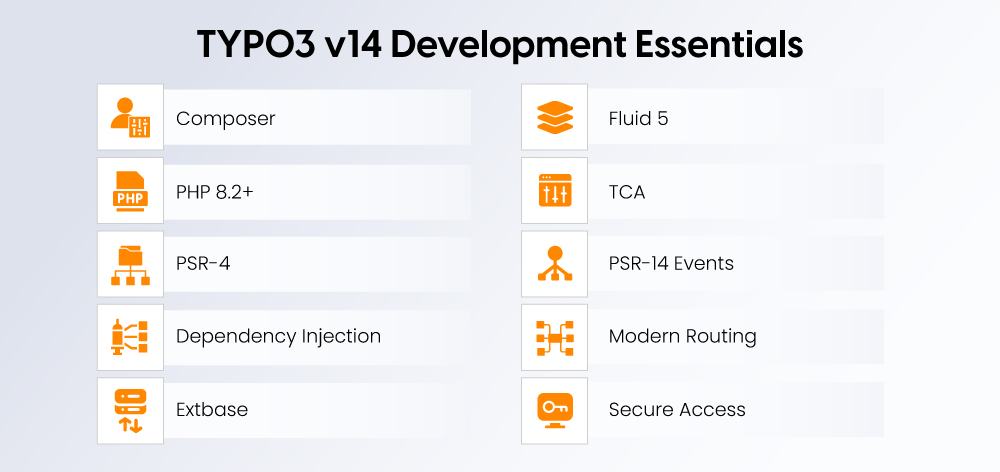
TYPO3 v14 keeps the familiar extension model, but modernizes the environment around it. For extension developers, the biggest shift is cleaner architecture, stronger typing, newer Fluid capabilities and closer alignment with Composer-based workflows.
TYPO3 v14 development should focus on:
- Composer-based installation and package management
- PHP 8.2+ compatible code with proper type declarations
- PSR-4 autoloading
- Dependency injection through services
- Extbase for structured MVC-based plugins and backend modules
- Fluid 5 for template rendering and modern ViewHelper behavior
- TCA for backend forms and database table configuration
- PSR-14 events instead of older hook-based patterns where suitable
- Clean routing and URL handling
- Strong backend permissions and access checks
- Regular review of deprecations, changelogs and core changes
TYPO3 v14 also includes major modernization work, including backend UI improvements, Fluid 5, updated Extbase validation, and removal of long-deprecated functionality (TYPO3 v14 release notes). Some lower-level APIs have stricter typing too, such as cache backend and frontend interfaces, which means custom implementations must match updated method signatures carefully (TYPO3 v14 cache changes).
The result is a cleaner, more future-ready development environment. Custom extensions should feel native inside the modern TYPO3 Backend and be built with upgrade safety in mind from day one.
Technical Requirements for TYPO3 v14 Extensions
A TYPO3 v14 extension should be built on a modern, maintainable technical setup. TYPO3 v14 supports PHP 8.2, 8.3, 8.4 and 8.5 and modern database versions such as MySQL 8.0.17+, MariaDB 10.4.3+, PostgreSQL 10+ and SQLite 3.8.3+.
Area | Recommendation |
TYPO3 version | TYPO3 v14 |
PHP version | PHP 8.2+ |
Database | MySQL 8+, MariaDB 10.4+, PostgreSQL, or SQLite |
Package management | Composer |
Autoloading | PSR-4 |
Architecture | Extbase, services, controllers, and repositories where needed |
Templates | Fluid |
Backend configuration | TCA |
Events | Prefer PSR-14 events where suitable |
Code quality | PSR standards, static analysis, and TYPO3 coding guidelines |
CI/CD | Git workflow with automated tests and code checks |
Testing | Unit, functional, and integration tests |
Documentation | Setup, configuration, changelog, and upgrade notes |
The goal is not just to make the extension work today. It should remain understandable, testable and upgrade-ready for future TYPO3 and PHP versions.
Extension Architecture: What Goes Inside?
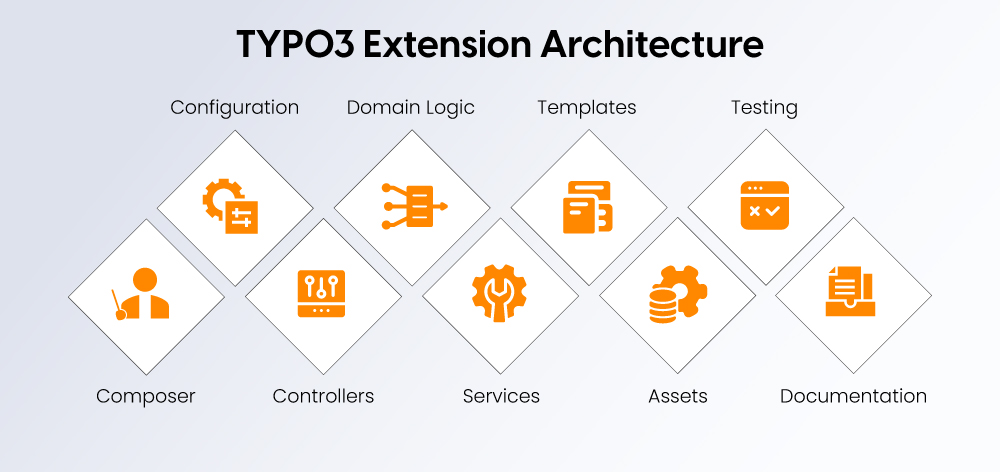
A well-built TYPO3 extension follows a clear structure, making it easier to debug, document, upgrade and hand over.
File or Folder | Purpose |
| Package name, dependencies, PHP constraints, autoloading, and extension metadata |
| Runtime configuration and plugin registration |
| Dependency injection and service registration |
| Backend forms and database field configuration |
| Route configuration where needed |
| TypoScript setup and constants |
| Request handling and responses |
| Business objects |
| Data access and queries |
| Business logic, API clients, and processors |
| Fluid templates |
| Reusable template fragments |
| Public CSS, JS, icons, and frontend assets |
| Unit, functional, and integration tests |
| Setup notes and handover documentation |
In modern TYPO3 projects, composer.json is central. TYPO3 v14.2 also allows more extension metadata to live in composer.json, reducing the old dependency on ext_emconf.php in classic mode.
A basic composer.json may look like this:
{
"name": "vendor/custom-extension",
"type": "typo3-cms-extension",
"description": "Custom TYPO3 v14 extension for project-specific functionality.",
"require": {
"php": "^8.2 || ^8.3 || ^8.4 || ^8.5",
"typo3/cms-core": "^14.0"
},
"autoload": {
"psr-4": {
"Vendor\\CustomExtension\\": "Classes/"
}
},
"extra": {
"typo3/cms": {
"extension-key": "custom_extension"
}
}
}
The main goal is separation of concerns: configuration stays in configuration files, data structure in TCA and models, business logic in PHP services, and output in Fluid templates.
Step-by-Step: How to Build a Custom TYPO3 v14 Extension
Building a custom TYPO3 v14 extension works best when you move from business requirement to architecture, then into code, testing and maintenance. The process below follows the same logic used in TYPO3’s official extension development flow: define the feature, model the data, configure TCA, build controllers and services, then test and package it properly.
1. Define the Business Requirement
Start with the business problem, not the code. Before creating the extension, define what the feature should do, who will use it and what data it needs to manage.
Ask:
- Who will use it: visitor, editor, admin or external system?
- What records, fields and relations are needed?
- Does it need frontend output or a backend module?
- Does it require API integration?
- Does it support multiple languages?
- What permissions are required?
- What should happen when something fails?
For example, an event registration extension may need event records, speaker records, registrations, emails, capacity limits, payment integration and editor approval. That is extension territory.
2. Choose the Right Extension Type
Not every extension needs the same structure. Choose the type based on the feature.
Need | Recommended Type |
Display dynamic content | Frontend plugin |
Give editors a custom interface | Backend module |
Connect TYPO3 to another platform | Integration extension |
Run recurring tasks | Scheduler task or CLI command |
Store custom records | Data model extension |
Combine frontend, backend, and API logic | Hybrid extension |
A dealer locator, for example, may combine custom records, a backend management module, frontend search, map integration and an API sync service.
3. Design the Data Model
The data model is the foundation of the extension. Plan database tables, field types, relations, language behavior, permissions, slugs, sorting, filtering, search indexing, imports, exports and deletion rules.
Use TCA to define how records appear in the TYPO3 backend. Good TCA improves editor productivity by showing the right fields in the right order with clear labels, validation and grouping.
4. Create the Extension Skeleton
Build the extension using TYPO3 conventions. A good skeleton should include:
- Composer setup
- Extension key
- PSR-4 namespace
- Configuration files
- Controllers
- TCA configuration
- Fluid template folders
- Service registration
- Tests
- Documentation starter files
You can create the structure manually or use a generator if it supports TYPO3 v14 and matches your coding standards. Scaffolding is only the starting point. The real quality comes from the architecture you build after that.
5. Build the Business Logic
Keep controllers focused. A controller should receive the request, coordinate services and return the response.
Use service classes for API communication, validation, data transformation, imports, exports, emails, workflow transitions, logging and error handling. Use repositories for data access, models for business objects and Fluid for rendering output.
If logic would be painful to test inside a template, it does not belong in a template.
6. Configure Backend Editing
A custom extension should make editor work easier. Use TCA to configure labels, input types, required fields, select fields, inline relations, file relations, palettes, tabs, validation, language fields, workspace fields and permissions.
For backend modules, keep the interface focused so editors only see what they need to complete the task.
7. Add Routing and Frontend Output
If the extension creates frontend pages, plan routing early. Clean URLs improve SEO, usability and analytics.
Avoid:
/events?tx_events_show[event]=123
Use cleaner URLs such as:
/events/typo3-developer-conference-2026
Plan slug fields, route enhancers, canonical URLs, pagination, filters, language URLs, 404 handling and cache behavior. Keep Fluid templates clean with layouts and partials.
8. Integrate External APIs Carefully
Many TYPO3 Extensions connect with CRMs, ERPs, payment providers, search tools or marketing platforms.
For API integrations, include API client services, secure credentials, timeouts, retries, rate limit handling, error logging, manual sync, scheduled sync, backend status messages and data validation.
Never hardcode API keys inside extension files. Use environment variables, site configuration or secure project-level configuration.
9. Test the Extension
Testing helps move the extension from “it works” to “it can be trusted.”
Test Area | What to Check |
Frontend | Output, routing, caching, filters, and pagination |
Backend | Forms, modules, permissions, and validation |
Language | Translation overlays and fallback behavior |
Workspaces | Draft, preview, and publishing behavior |
API | Timeouts, invalid responses, and failed synchronizations |
Performance | Query count, caching, and large datasets |
Security | Access checks, input validation, and file handling |
Upgrade | Deprecations, PHP compatibility, and core changes |
Use functional tests for critical workflows, unit tests for reusable logic and failure-mode tests for integrations. Also review deprecation logs and TYPO3 changelogs before core upgrades, especially because TYPO3 v14 removes older deprecated functionality and tightens several APIs.
10. Package, Document and Maintain
Treat the extension like a product. Document installation steps, Composer requirements, configuration options, environment variables, backend usage, scheduler tasks, CLI commands, API credentials, known limitations, changelog and upgrade notes.
Use versioning so future updates are traceable during TYPO3 upgrades, PHP version changes and security reviews. A good extension is not only built well; it is easy to understand, test and improve later.
Best Practices for TYPO3 v14 Custom Extension Development
A strong TYPO3 v14 extension is not judged only by whether it works. It is judged by how safely it can grow, scale and stay maintainable.
Follow these best practices:
- Use Composer for installation and dependency management
- Follow TYPO3 naming conventions and file structure
- Use PSR-4 autoloading
- Use typed PHP wherever practical
- Register services through dependency injection
- Prefer PSR-14 events over legacy hooks where suitable
- Keep controllers focused and lightweight
- Move reusable business logic into services
- Keep Fluid templates focused on markup
- Use TCA for editor-friendly backend forms
- Plan language and workspace behavior early
- Avoid hardcoded page IDs, language IDs and storage PIDs
- Use configuration instead of environment-specific logic
- Add logging for critical processes
- Validate external API data before storing it
- Use TYPO3 APIs for file handling, permissions, routing and caching
- Add tests for important workflows
- Track deprecations and security advisories
- Write clear documentation before handover
Best Practice | Why It Matters |
Composer-first setup | Cleaner deployment and updates |
Strong typing | Better PHP 8.2+ compatibility |
Service layer | Easier testing and maintenance |
Clean TCA | Better editor experience |
Logging | Faster debugging |
Tests | Safer upgrades |
Documentation | Easier handover and long-term support |
Common Mistakes to Avoid
Even experienced teams can create extension debt when speed beats structure.
Avoid these common mistakes:
- Building a custom extension for a simple layout change
- Putting business logic inside Fluid templates
- Modifying core or vendor files
- Using abandoned third-party extensions without a fallback plan
- Ignoring backend permissions
- Hardcoding page IDs, storage PIDs or language IDs
- Forgetting multilingual or workspace behavior
- Skipping cache planning
- Missing logs for imports or API calls
- Storing API credentials directly inside code
- Creating one large extension for unrelated features
- Ignoring TYPO3 deprecations before upgrades
- Testing only the happy path
- Leaving scheduler tasks, CLI commands or configuration undocumented
The biggest risk is not a single bug. It is an extension where nobody understands where the logic lives or how it should be maintained.
Example Use Cases for Custom TYPO3 v14 Extensions
Custom TYPO3 extensions are useful when a project needs business-specific functionality that goes beyond standard content management.
Use Case | What the Extension Handles |
Dealer locator | Locations, filters, maps, and backend management |
Event registration | Events, speakers, tickets, forms, and emails |
Product catalog | Product records, categories, filters, and downloads |
Membership portal | User roles, protected content, and renewals |
CRM integration | Lead synchronization, contact updates, and form routing |
ERP integration | Product data, inventory, and order status |
Job portal | Job records, applications, and backend review |
Document library | Files, permissions, and filters |
Multisite tools | Shared records across installations |
Reporting dashboard | Custom backend data views |
These features are ideal for custom extensions because they reduce manual work and make the TYPO3 installation easier to manage.
How Custom Extensions Support SEO, AEO and GEO
Custom TYPO3 extensions can support SEO, AEO and GEO when search visibility is planned from the beginning.
For frontend features, plan:
- Clean URLs and slug-based detail pages
- Canonical tags and metadata fields
- Structured data and schema markup
- Indexable content
- XML sitemap inclusion
- Pagination and filter URL rules
- Internal linking
- Performance and caching
For example, a product catalog extension should support product names, descriptions, categories, schema markup, SEO titles, meta descriptions, canonical URLs and internal links, not just display product records.
Custom extensions also help AEO and GEO by making structured content easier to create, connect and understand. Useful fields may include FAQs, how-to steps, author data, reviews, product attributes, event details and location information.
This is where TYPO3 becomes powerful: structured backend content turns into structured frontend meaning.
Security Considerations for TYPO3 v14 Extensions
Security should be planned from the beginning, especially for extensions that handle users, payments, personal data or business-critical workflows.
Important areas include:
- Backend access checks
- Frontend user permissions
- Input validation and output escaping
- Secure file upload handling
- CSRF protection for forms
- Safe API credential storage
- Logging without exposing sensitive data
- Rate limiting where needed
- Dependency updates
- Third-party package review
- Secure error handling
If the extension handles sensitive data or critical processes, security review is part of the build, not an optional final step.
Performance Considerations
A custom TYPO3 extension should support performance from the start, especially when it handles catalogs, event lists, search filters or external data.
Plan performance around:
- Efficient database queries
- Proper indexes
- TYPO3 caching and cache tags
- Pagination for large datasets
- Lazy loading where suitable
- Background jobs for imports or syncs
- Optimized Fluid templates
- Monitoring for slow queries
- Avoiding unnecessary API calls during page rendering
NITSAN’s TYPO3 development approach focuses on high code standards, performance, security and long-term maintainability, aligned closely with the TYPO3 Core.
Migrating Old Extensions to TYPO3 v14
Migrating an old TYPO3 extension to TYPO3 v14 usually means more than updating a version number. A proper migration review should check:
- PHP compatibility
- Composer setup
- Deprecated TYPO3 APIs
- Extbase and Fluid changes
- TCA configuration
- Routing setup
- Backend module registration
- Hooks that should move to PSR-14 events
- Database schema changes
- Language and workspace handling
- Third-party package compatibility
- Test coverage and security risks
Migration is also a good chance to remove old workarounds and simplify the architecture.
How NITSAN Approaches TYPO3 v14 Extension Development
NITSAN treats TYPO3 extension development as long-term software engineering, not quick patchwork. As a TYPO3 Association Gold Member, NITSAN brings deep TYPO3 expertise across custom extensions, templates and tailored applications.
A typical NITSAN workflow includes:
- Requirement discovery and technical consultation
- Extension architecture planning
- Data model and TCA design
- Frontend plugin or backend module development
- Extbase, Fluid and service-layer implementation
- API and third-party system integration
- Testing across frontend, backend, language and permission scenarios
- Performance and security review
- Deployment support
- Documentation, maintenance and upgrade planning
NITSAN has already implemented 50+ TYPO3 extensions, including AI, HubSpot integration, events, PWA, backup and gallery extensions. This experience helps turn custom TYPO3 requirements into stable, maintainable and future-ready functionality.
Conclusion
Custom TYPO3 extensions help turn project-specific logic into stable, structured and maintainable functionality.
TYPO3 v14 gives developers a modern foundation with Composer, PHP 8.2+, Extbase, Fluid, TCA, dependency injection and current TYPO3 APIs. But the quality of the final extension still depends on clear planning, clean architecture, testing and long-term maintenance.
If the need is visual, a site package may be enough. If a maintained extension fits cleanly, use it. But when your project needs custom workflows, structured records, backend modules, integrations or upgrade-safe business logic, a custom TYPO3 v14 extension is the right choice.
A well-built extension reduces technical debt, improves editor workflows, supports SEO and structured data, and gives your TYPO3 project a stronger future. Need a custom TYPO3 v14 extension planned, audited or migrated? NITSAN can help you build it with clean architecture, upgrade safety and long-term maintainability.
FAQs
A custom TYPO3 extension is a package of code, configuration and templates that adds project-specific functionality to TYPO3, such as plugins, backend modules, custom records, API integrations and business logic.
Yes. TYPO3 v14 supports modern PHP, Composer-based workflows, Extbase, Fluid, TCA and current TYPO3 APIs, making it a strong base for custom extension development.
TYPO3 v14 extensions should be built for PHP 8.2+ compatibility, using modern PHP syntax, typed code where practical and current coding standards.
Use an existing extension if it is maintained and fits cleanly. Build a custom extension when you need unique workflows, custom records, API integrations, backend modules or custom business logic.
A site package handles design, templates, assets, TypoScript and layouts. A custom extension handles business logic, structured data, frontend plugins, backend modules and integrations.
Yes. Older extensions can be migrated to TYPO3 v14, but they may need updates for PHP compatibility, Composer setup, Extbase, Fluid, TCA, routing, deprecated APIs and security improvements.

Contact for project management and team coordination
Mihaela Angelova
Project Manager - Germany

Mihaela Angelova
Project ManagerMihaela keeps technology projects on track and ensures to meet business goals. She specializes in coordinating teams, optimizing workflows, and delivering projects. At NITSAN, she works closely with clients to transform ideas into actionable solutions. Outside of work, she enjoys exploring new hiking trails.
Be the First to Comment