


TYPO3 Enterprise: Criteria and Check for Businesses
TYPO3 Enterprise explained: seven criteria for multisite, languages, roles, workflow, security, integration and operations, plus a scoring method, costs and a check of whether TYPO3 fits you.
Summary
Summary: TYPO3 Enterprise means running TYPO3 as an enterprise CMS: a content management system for organizations that manage multiple websites, languages, editorial teams and approval processes in one installation and maintain it for the long term. According to typo3.org, a single installation runs any number of websites and content languages. Whether TYPO3 Enterprise fits you is decided by the seven criteria below, including a scoring method you can apply to your own project right away.
The Key Points in Short
- "Enterprise" is not a quality seal but a requirement: the system must carry many sites, languages and teams.
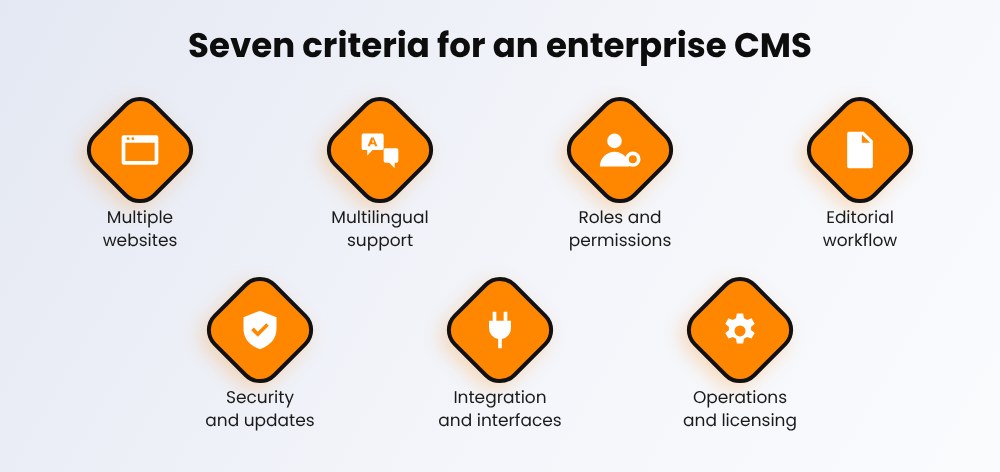
- Check seven criteria: multisite, multilingual support, roles and permissions, workflow, security and updates, integration, operations and licensing.
- Calculate total cost, not just licenses: development, hosting, maintenance and exit all count.
- TYPO3 is open source ("Professional Open Source" with enterprise support from service providers) and includes multisite and multilingual support.
- For small websites with few pages, an enterprise CMS is often oversized.
For planning, implementation and operation of TYPO3 Enterprise projects, our TYPO3 agency can support you.
As of 16 November 2026. Technical details about TYPO3 come from typo3.org.
What Is an Enterprise CMS and What Does TYPO3 Enterprise Mean?
An enterprise CMS manages content for organizations where many people work on many sites. TYPO3 Enterprise is not a separate product version, but the use of TYPO3 under these requirements. Typical signs are multiple brands or country sites, fine-grained rights for editors, approval processes and interfaces to other systems. What matters is not the name, but whether the system carries these requirements in daily operation.
CMS, ECM and DMS: What Is the Difference?
- CMS: manages and publishes website content, usually for editorial and marketing teams.
- ECM (Enterprise Content Management): the broader approach that manages company content across its entire lifecycle, up to archiving.
- DMS: document management focused on storing, versioning and archiving documents.
How to Tell You Need an Enterprise CMS
- You run several brands, countries or languages and maintain several separate systems today.
- Several teams work on content in parallel and need different permissions.
- Content must be reviewed and approved before publishing.
- Simple changes wait for developers because the system offers no editorial tools.
- Shop, CRM or search must be connected cleanly.
The Seven Criteria for TYPO3 Enterprise in Detail
Use these seven questions to check any CMS, whether open source or proprietary.
| Criterion | Key question | Typical stumbling block |
| 1. Multiple websites | Can brands, countries and microsites run in one installation? | One system per brand: duplicated maintenance, inconsistent standards |
| 2. Multilingual support | How many languages are possible, and how does translation work? | Translations handled as a silo outside the CMS |
| 3. Roles and permissions | Can access be controlled per team, page area and function? | Every editor may do everything |
| 4. Editorial workflow | Is there draft, review and approval? | Approval happens by email instead of in the system |
| 5. Security and updates | Who delivers security updates, and how long is a version supported? | Updates are postponed until they become urgent |
| 6. Integration | Are there extensions and interfaces to shop, CRM, search and PIM? | Every connection becomes custom development |
| 7. Operations and licensing | Open source or license model? How free are hosting and service providers? | Vendor dependency and high exit costs |
How to Score Your Options
Give each criterion points: 0 = not met, 1 = met with extra effort, 2 = standard or proven. Weight the criteria for your project, for example give multilingual support more weight if you operate in many markets. This is our practical method from projects, not an official standard.
TYPO3 Enterprise: How TYPO3 Meets the Criteria
TYPO3 is an open-source CMS that typo3.org describes as "Professional Open Source" with enterprise support from service providers. Here is how the criteria map to TYPO3:
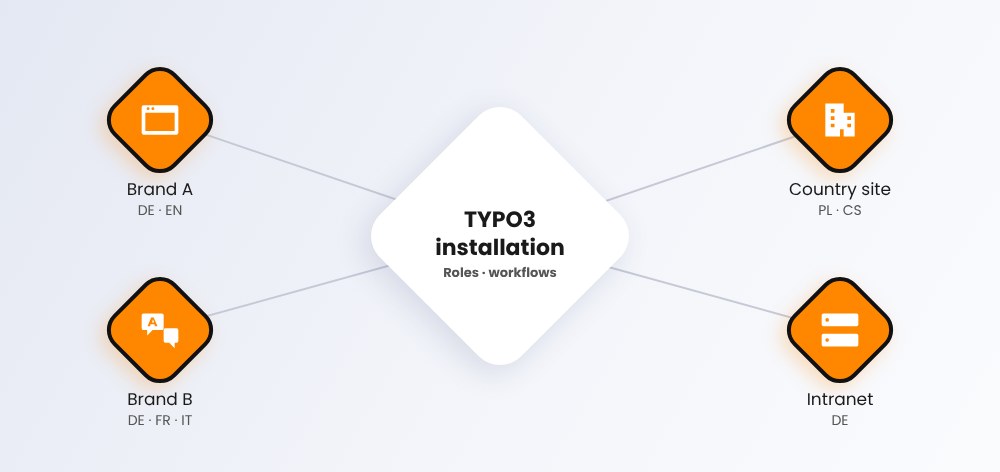
- Multiple websites and languages: According to typo3.org, a single installation runs any number of websites and content languages. This saves maintenance when you look after many brands or countries.
- Roles and permissions: In the backend you create user groups with targeted access rights, for example per page tree.
- Editorial workflow: The Workspaces system extension lets you prepare changes as drafts before they go live.
- Security and updates: The TYPO3 Security Team publishes security advisories. Long-term support (LTS) versions receive updates for years. TYPO3 v13.4 LTS was released on 15 October 2024, TYPO3 v14 LTS in April 2026. Check typo3.org for current support periods.
- Integration: Extensions and interfaces connect shop, CRM or search. TYPO3 can also run headless when content is delivered by API to apps or shops. For an example, see our article on TYPO3 for Enterprise E-Commerce.
- Operations and licensing: You choose hosting and service provider freely and are not tied to a single vendor.
If you are planning an upgrade, our TYPO3 upgrade service page can help.

Is Your TYPO3 Website Properly Secured?
Learn how to review system updates, user permissions, hosting security, and configuration settings.
TYPO3 Enterprise Cost: Open Source or Proprietary?
The license is rarely the biggest item. Compare total cost over several years instead.
These Cost Factors Belong in Every Calculation
- License or subscription: open source has no license fees, proprietary systems charge continuously.
- Development and customization: design, templates and custom features.
- Integrations: connecting shop, CRM, search and other systems.
- Hosting and operations: servers, monitoring and backups.
- Maintenance: updates, security patches and version changes.
- Training: onboarding your editorial team.
- Exit: effort for export and migration if you switch later.
The Arguments on Both Sides
- Open source (for example TYPO3): The source code is open, you choose hosting and service providers freely, and license fees do not apply. In return, you or your service provider carry updates, operations and integration.
- Proprietary: One vendor provides support and responsibility from a single source. In return, you pay ongoing license costs and depend on the vendor's roadmap and contract.
Both models can meet enterprise requirements. What matters is who is responsible for maintenance and further development in the long run.
Free TYPO3 Maintenance Checklist
Monthly, quarterly and yearly tasks for TYPO3 support and maintenance: updates, backups, security, performance and monitoring. Get the PDF by email.
When TYPO3 Enterprise Is Not the Right Choice
TYPO3 pays off when your requirements go beyond a single website. In these cases, check honestly whether it is a size too big:
- You run a small website with few pages and one editor.
- Your team has no TYPO3 experience and plans no service provider.
- You need a finished solution within a few weeks without customization.
- You want a pure site-builder system that needs no development effort at all.
In larger projects, the choice of partner matters most. What to look for is covered in our article Enterprise TYPO3 Projects: Choose the Right TYPO3 Agency.
Decision Guide: Does TYPO3 Enterprise Fit You?
Five Questions Before You Decide
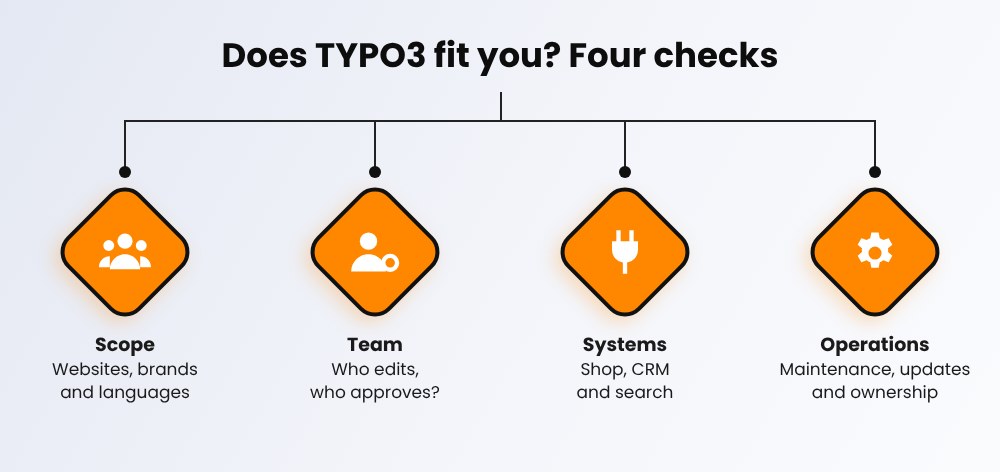
- How many websites, brands and languages do you run today and in three years?
- Who may change what, and who approves content?
- Which systems must be connected?
- Who maintains the system: your team or a service provider?
- How do you plan updates and version changes?
Five Steps to the Right System
- Document requirements: Write down what editorial, IT and marketing really need.
- Build a shortlist: Score two or three systems with the points method above.
- Proof of concept: Test with real content and real editors.
- Calculate total cost: Look at several years, not just the first quote.
- Define partner and operations: Clarify maintenance, updates and responsibility before the start.
If you want to clarify operations and maintenance, our TYPO3 agency is happy to talk.
Conclusion: Choose TYPO3 Enterprise by Requirements
An enterprise CMS is the answer to requirements, not to a product category. Check multisite, languages, permissions, workflow, security, integration and operations, and calculate total cost over several years. TYPO3 Enterprise fits when you want to bundle many websites, languages and teams in one system and plan maintenance for the long term. For small websites, a leaner solution is often enough.
Get in touch if you want to assess your requirements together with our TYPO3 agency for enterprise projects.
Sources and date (16 November 2026): typo3.org: Features.
Frequently Asked Questions (FAQ)
Document your requirements, score two or three systems against seven criteria, test with real content, calculate total cost over several years and define maintenance and responsibility.
Security depends mainly on updates and operations. TYPO3 publishes security advisories through the TYPO3 Security Team, and long-term support versions receive updates for years. What matters is that you apply updates promptly.
It depends on the license model, operations and project scope. TYPO3 has no license fees, but there are costs for development, integration, hosting, maintenance and training. Compare total cost over several years.
According to typo3.org, a single installation runs any number of websites and content languages.
Yes. TYPO3 Enterprise means TYPO3 includes multisite, multilingual support, user permissions and Workspaces. typo3.org describes it as Professional Open Source with enterprise support from service providers.
A CMS manages website content. ECM is the broader approach for company content across its entire lifecycle. A DMS focuses on documents, storage and archiving.
The difference is scope: an enterprise CMS carries many websites, languages and teams with fine-grained permissions, workflows and integrations. A simple CMS is enough for a single website with a small team.
An enterprise CMS manages multiple websites, languages and editorial teams with roles, approval workflows and interfaces in one system, and is operated and maintained for the long term.
Contact for Internet agency and TYPO3 projects
Sven Thelemann
Service Partner - Germany


Sven Thelemann
Client Service LeadSven Thelemann serves as the Client Service Lead at NITSAN, focusing on delivering TYPO3 solutions that meet client goals. With a strong understanding of technology and client expectations, he ensures smooth communication and project execution. Outside of work, Sven enjoys cycling and experimenting with homemade recipes.
Be the First to Comment