


TYPO3 Brief Template: 8 Building Blocks and Question List
Template for a TYPO3 project brief with eight building blocks, copy-paste text, 20 vendor questions and a scoring guide for proposals.

In short: A TYPO3 brief is the written task description you use to ask vendors for a proposal. It records goals, scope, existing system, budget range and schedule. That way all proposals rest on the same assumptions and can be compared.
If you ask without a brief, the proposals do not fit together: each vendor estimates differently what you mean, and leaves out assumptions or adds its own. A good brief is short, two to four pages are usually enough. This page contains everything you need:
- a template with eight building blocks and guiding questions,
- a copy-paste text with placeholders and a fictional filled-in example,
- a question list with 20 questions for vendors,
- a scoring guide to compare answers and proposals.
The template works for new builds, relaunches, upgrades, extensions and maintenance. There is a separate section for the case that your TYPO3 version is reaching its end of support.
What is a TYPO3 brief – and what is it not?
The brief describes what you want to achieve and under which conditions. It does not have to fix every detail. The details emerge later together with the vendor. It differs from related documents like this:
| Document | Who writes it? | Purpose | Level of detail |
|---|---|---|---|
| Brief | Client | Enquiry and first assessment | Goals, range, conditions |
| Requirements specification (Lastenheft) | Client | Formal requirements | All requirements from the client's view |
| Functional specification (Pflichtenheft) | Contractor | Description of the implementation | How the requirements are implemented |
| Tender | Client, often public | Formal award procedure | Rules, deadlines, scoring criteria |
For most TYPO3 projects in mid-sized companies, a brief is enough to start. A requirements specification pays off for large projects or when a tender is required. The brief can later be expanded into one.
When do you need a TYPO3 brief?
Whenever you ask a vendor for a proposal. The focus shifts with the type of project:
| Project type | What matters in the brief |
|---|---|
| New build | Goals, target groups, content and functions. There is no existing system, but many open decisions. |
| Relaunch | What stays (content, URLs, rankings), what changes (design, structure)? Redirects and data migration belong in it. |
| Upgrade | Current version, extensions, custom code, hosting. The existing system is the most important block. |
| Extension | The new function, interfaces and dependencies on existing pages and extensions. |
| Maintenance and support | Response paths, security updates, responsibilities and scope of care. |
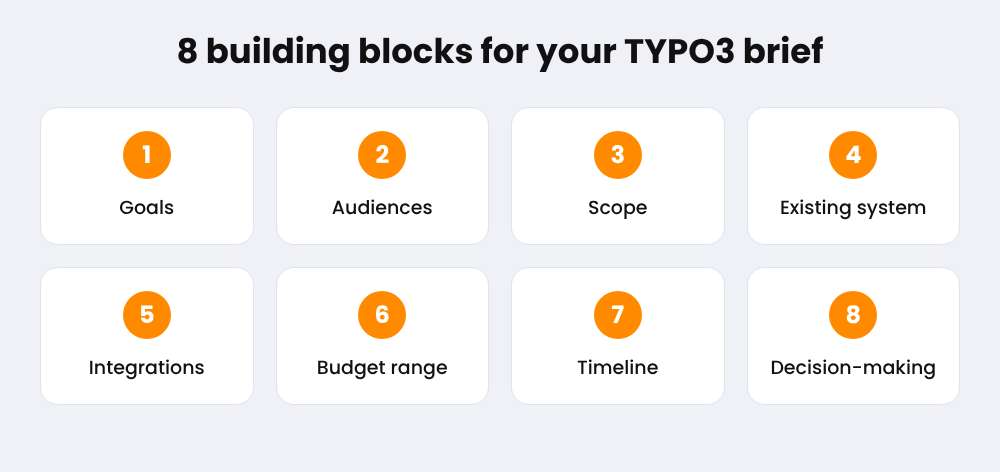
The template: 8 building blocks for your TYPO3 brief
Each block answers a question that vendors would otherwise have to guess. The guiding questions help you fill it in.
| Block | What belongs in it | Guiding questions |
|---|---|---|
| 1. Goals | What should the website achieve? For example enquiries, applications, sales or less support load. | How will you know in twelve months that the project paid off? Which metric do you use? |
| 2. Target groups | Who uses the website? Which tasks should visitors complete quickly? | Which three tasks matter most to visitors? What annoys them today? |
| 3. Scope | New build, relaunch, upgrade or extension? Number of page types, languages and functions. | What is a must, what is a should, what is a could? |
| 4. Existing system and versions | Current TYPO3 version, PHP version, installed extensions, custom code, hosting. | Who built the site? Is there documentation? Which extensions are in use? |
| 5. Integrations | Connections to CRM, shop, newsletter, search, single sign-on or other systems. | Which data flows in which direction? Who maintains the other system? |
| 6. Budget range | A range or span. It helps the vendor propose a fitting approach. | Which amount is planned? Is there an upper limit or funding? |
| 7. Schedule | Preferred date, fixed dates (for example trade fair, campaign, end of support periods), time for coordination and approvals. | Which date is fixed, which can move? How fast can you deliver content? |
| 8. Decision paths | Who decides, who approves, who is the contact? Which departments are involved? | Who has the final say? How long do approvals take? |
Copy-paste template: your TYPO3 brief
Copy the text into a document and replace the placeholders in square brackets.
1. Goals
The website should achieve [goal]. We measure success by [metric] by [date].
2. Target groups
Main target groups are [group 1] and [group 2]. Key tasks: [task 1], [task 2], [task 3].
3. Scope
Project type: [new build / relaunch / upgrade / extension]. Languages: [number]. Must: [list]. Should: [list]. Could: [list].
4. Existing system
TYPO3 version: [version]. PHP: [version]. Extensions: [list]. Custom code: [yes/no, where]. Hosting: [provider, type].
5. Integrations
[system] ↔ [system]: [data direction, purpose].
6. Budget range
[amount or range], [upper limit yes/no].
7. Schedule
Fixed date: [date, reason]. Preferred date: [date]. Approvals take us [period].
8. Decision paths
Decision maker: [name, role]. Contact: [name, contact]. Involved: [departments].
Example (fictional)
A machine builder with 120 employees wants to renew its TYPO3 website in two languages. Goal: more enquiries through the contact form. Existing system: TYPO3 version 11, eight extensions, one custom product module. Integration: CRM connection for the form. Budget: a range set by management. Fixed date: a trade fair in autumn. Approval: head of marketing, then management. With this information, vendors can give a reasoned estimate instead of guessing.
What is different for a TYPO3 upgrade
In an upgrade, the existing system decides scope and risk. In building block 4, add the starting version, PHP version, a list of all extensions (with their origin), custom code, hosting and a test environment. This overview shows whether your version is still supported (as of November 2026):
| TYPO3 version | Support |
|---|---|
| v14 LTS | Version 14.3 LTS was released on 21 April 2026. Security updates are planned until 30 June 2029. |
| v13 LTS | Regular support until 31 December 2027. |
| v12 LTS | Free support ended on 30 April 2026. |
Check the dates on typo3.org before you start. You can find more about the process in the guide to TYPO3 update and upgrade. The TYPO3 Version Check shows whether your version is affected. For costs, read TYPO3 update costs; for the target system, see TYPO3 v14 LTS.
TYPO3-specific details vendors will ask about
Vendors almost always clarify these points in their first follow-up. If they are already in the brief, you save a round:
| Topic | Why it matters | What you provide |
|---|---|---|
| Installation and deployment | Composer setup, staging and version control determine how safely changes are rolled out. | Current setup, access to repository and hosting |
| Several languages and sites | Every language and domain adds effort for structure, translation and testing. | List of languages, domains and countries |
| Editors and permissions | Roles and approval workflows affect backend configuration and training. | Number of editors, roles, approval path |
| Accessibility | Requirements such as the German Accessibility Strengthening Act (BFSG) can affect design and implementation. | Your assessment of whether the site is affected, and any existing audit reports |
| Data protection and tracking | Consent tools, forms and interfaces process personal data. | Tools in use, consent solution, data protection contact |
| Search engines and URLs | In a relaunch or upgrade, good rankings must not be lost. | Key URLs, access to Search Console and analytics |
You do not need to know every answer. Write "unknown" and the vendor can plan the analysis.
Question list: 20 questions for vendors
Send these questions together with the brief to every vendor and ask for written answers. That way you can compare answers line by line.
Experience and team
- Which TYPO3 projects of comparable size have you delivered, and with which versions?
- Can you name contacts from reference projects?
- Who works on my project, and who is my fixed contact?
- What role do subcontractors or freelancers play?
- How do you keep up with TYPO3 versions and security updates?
Approach and quality
- How does the project run, from analysis to go-live?
- How and when do you involve us in decisions?
- How do you test, and which test environment do we get?
- How do you ensure accessibility, performance and SEO?
- How do you document the result, and how do you train our editors?
Proposal and costs
- Which services are included in the proposal, and which are not?
- Fixed price, effort-based or a range: how do you handle change requests?
- Which running costs arise after go-live (hosting, updates, support)?
- Which assumptions does the proposal rest on?
- How does billing work, and when are payments due?
Operations and future
- Who owns the source code, content and access credentials after the project?
- How does a change of vendor work if we want one later?
- What does support look like after go-live, and how fast do you respond to incidents?
- How do you plan future upgrades when a TYPO3 version reaches its end of support?
- Which personal data do you process for us, and how do you handle data protection?
How to score the answers
The answers to the question list show how a vendor works. This table helps you rate them:
| Criterion | Good answer | Warning sign |
|---|---|---|
| References | Concrete projects with TYPO3 version and a contact person | Only logos, no details |
| Price | Services described one by one, assumptions stated | Lump sum without a description of services |
| Schedule | Milestones, plus what is needed from you | Dates unrelated to your approvals |
| Questions | Asks its own questions about the brief | Names a final price right away |
| Ownership | Source code and content belong to you | Unclear rights, dependence on the vendor |
| Operations | Clear support and response paths after go-live | No word on updates and support |
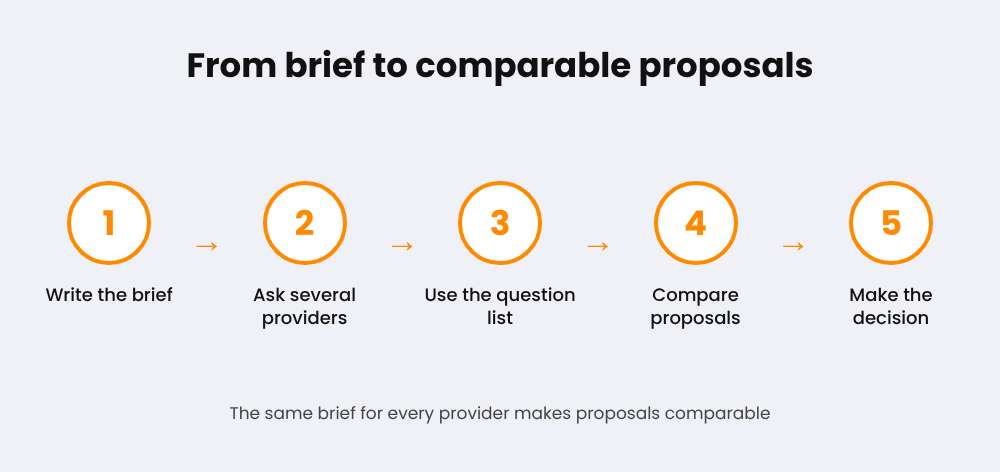
How to compare proposals at a glance
You recognize a good proposal less by its price than by its clarity. Proceed like this:
- Same starting point: All vendors receive the same brief and the same question list.
- Same structure: Create a table. Rows are services, columns are vendors.
- Compare assumptions: Different prices often rest on different assumptions, for example the number of page types or testing.
- Clarify gaps in writing: Ask what is missing and keep the answer on record.
- Talk to two or three vendors: Check whether contacts and way of working suit you.
Common mistakes in a brief
- Only wished-for features, no goals: Without a goal, no vendor can judge what matters.
- Hiding the budget: Vendors then propose solutions that do not fit your range.
- Forgetting the existing system: Version, extensions and custom code drive the effort of an upgrade or relaunch.
- No named decision maker: Approvals stall when it is unclear who decides.
- No priorities: Without must, should and could, every requirement looks equally important.
- A different brief for each vendor: Then the proposals cannot be compared.
Checklist: is your brief ready to send?
- One sentence describes the goal, and a metric makes it measurable.
- The main target groups and their tasks are named.
- Must, should and could are separated.
- TYPO3 version, PHP version, extensions and hosting are stated (or marked "unknown").
- All interfaces to other systems are listed.
- The budget range, or at least the priority (scope, date, cost), is included.
- Fixed dates and the reason for them are named.
- Decision maker and contact person are named.
- The question list is attached and the response deadline is set.
- All vendors receive the same document.
Conclusion: brief first, proposals second
A good brief saves follow-up questions, makes proposals comparable and shows how a vendor thinks. Start with the eight building blocks, add your existing system and send the same document to two or three vendors.
Want to discuss your brief with a vendor? You can find the services and way of working of NITSAN GmbH on the page TYPO3 agency.
Frequently asked questions about the TYPO3 brief
Yes. Goals, target groups, budget, schedule and decision paths apply to any CMS. Only the TYPO3-specific details, such as version, extensions and support periods, are replaced by those of your system.
Ideally together: the business side describes goals and target groups, IT provides details on the existing system, hosting and integrations. One person merges the parts.
Two to three vendors are usually a good middle ground. You get a comparison without too much effort for follow-ups and calls. All of them receive the same brief.
Yes. In an upgrade, starting version, extensions, custom code and hosting determine the effort. Without them, vendors cannot size the scope reliably.
The brief describes goals and range and serves as the basis for proposals. A requirements specification (Lastenheft) lists the client's requirements formally and in detail. For many projects, a brief is enough at first.
A range or span makes sense. Vendors can then propose an approach that fits, instead of guessing. If you prefer not to name an amount, at least say what matters more: scope, date or cost.
Two to four pages are usually enough. What matters is that goals, existing system, budget range and schedule are in it. Details can be clarified later together with the vendor.
Eight building blocks: goals, target groups, scope, existing system and versions, integrations, budget range, schedule and decision paths. For an upgrade, add extensions, custom code and hosting.
Contact for Internet agency and TYPO3 projects
Sven Thelemann
Service Partner - Germany


Sven Thelemann
Client Service LeadSven Thelemann serves as the Client Service Lead at NITSAN, focusing on delivering TYPO3 solutions that meet client goals. With a strong understanding of technology and client expectations, he ensures smooth communication and project execution. Outside of work, Sven enjoys cycling and experimenting with homemade recipes.


Be the First to Comment