---
title: "Publish TYPO3 Extensions to TER with Composer, Git & Packagist"
url: "https://nitsantech.de/en/publish-and-maintain-your-ter-typo3-extensions-with-composer-git-packagist"
description: Learn how to publish and manage your TYPO3 extensions in TER using Composer, Git, and Packagist. Step-by-step guide for TYPO3 developers.
image: "https://nitsantech.de/fileadmin/_processed_/c/1/csm_Publish-and-Maintain-your-TER-Typo3-Extension-with-Composer_git_packagist_v_06d4a8d7b9.jpg"
author: Sanjay Chauhan - TYPO3 Technopreneur
date: 2019-10-04
modified: 2025-11-07
lastUpdated: 2026-02-25
categories:
- Extensions
---
# Publish TYPO3 Extensions to TER with Composer, Git & Packagist
Publish and Maintain your TER TYPO3 Extensions with Composer + Git + Packagist
==============================================================================
01 Aug 2019
[](https://nitsantech.de/en/blog/author/mihaela-angelova)
[Mihaela Angelova](https://nitsantech.de/en/blog/author/mihaela-angelova)
[ Extensions ](https://nitsantech.de/en/categories/extensions)
Are you developing, publishing and maintaining TYPO3 extension at TER and interested to know, the best practice and standards for your TYPO3 Extensions? Then, you are in the right place. Keep reading!

Table of content
*Our App Store is Called TER - and It's Free!* ~ [TYPO3 GmbH](https://extensions.typo3.org/)
According to the current trend of product and extension development, the Composer is one of the most popular dependencies techniques in PHP Open Source that will help you to develop, publish and maintain your extension easily.
Advantages like; Release management, Accurate dependencies, Easy installation, and upgradation, etc.,
Nowadays, most of the OpenSource CMS and Frameworks are used as the “ideal model”.
Do you want your TYPO3 extension to be easily installed with magic composer command?
No need to go TER site, download the extension, install from Extension manager, etc., Just write simple command eg.,
composer require nitsan/ns-news-comments
Once you complete your extension with well QA testing and code review. Setup composer.json at the root of your extension.
You must consider the following most important things:
- **Name:** vendor-name/extension-name
- **Type:** typo3-cms-extension
- **Must requirement:** Make sure to define exact dependencies of your extension, for eg., [**TYPO3 CMS**](https://nitsantech.de/en/blog/typo3-perfect-cms-for-everyone) core, Other TER extensions, PHP version dependencies, etc.,
- **Autoload:** It is highly recommended to set it up because your extension should run without composer mode too. VendorName\\\\ExtensionsName (you may find exact words from your any controller file from \\Controller\\ folder.
Sample composer.json of our popular TYPO3 [EXT:ns\_news\_comments](https://extensions.typo3.org/extension/ns_news_comments/). Composer at Step by step guide to [**TYPO3 Composer**](https://nitsantech.de/en/blog/typo3-composer) and dedicated [**TYPO3 website**](https://nitsantech.de/en/blog/typo3-website).
```json
{
"name": "nitsan/ns-news-comments",
"type": "typo3-cms-extension",
"description": "This extension allows user to post comment on particular news, reply to the comments. This extension is compatible only with News system Extension.",
"homepage": "https://extensions.typo3.org/extension/ns_news_comments/",
"license": "GPL-3.0+",
"keywords": [
"TYPO3 CMS",
"News Comment"
],
"support": {
"issues": "https://github.com/nitsan-technologies/ns_news_comments/issues"
},
"require": {
"typo3/cms-core": ">=6.2.0",
"georgringer/news": ">=3.0.0"
},
"autoload": {
"psr-4": {
"Nitsan\\NsNewsComments\\": "Classes/"
}
},
"replace": {
"ns_news_comments": "self.version",
"nitsan/ns-news-comments": "self.version"
},
"extra": {
"typo3/cms": {
"extension-key": "ns_news_comments"
}
}
}
```
As you are aware of the power of Git, Choose your favorite Git platform like Gitlab, Github, BitBucket, etc.,
We prefer Gitlab, but since a long time we are maintaining our extension at Github so let us give you an overview of it.
### Initiate your Git repository
**Step 1:** Register and log-in at
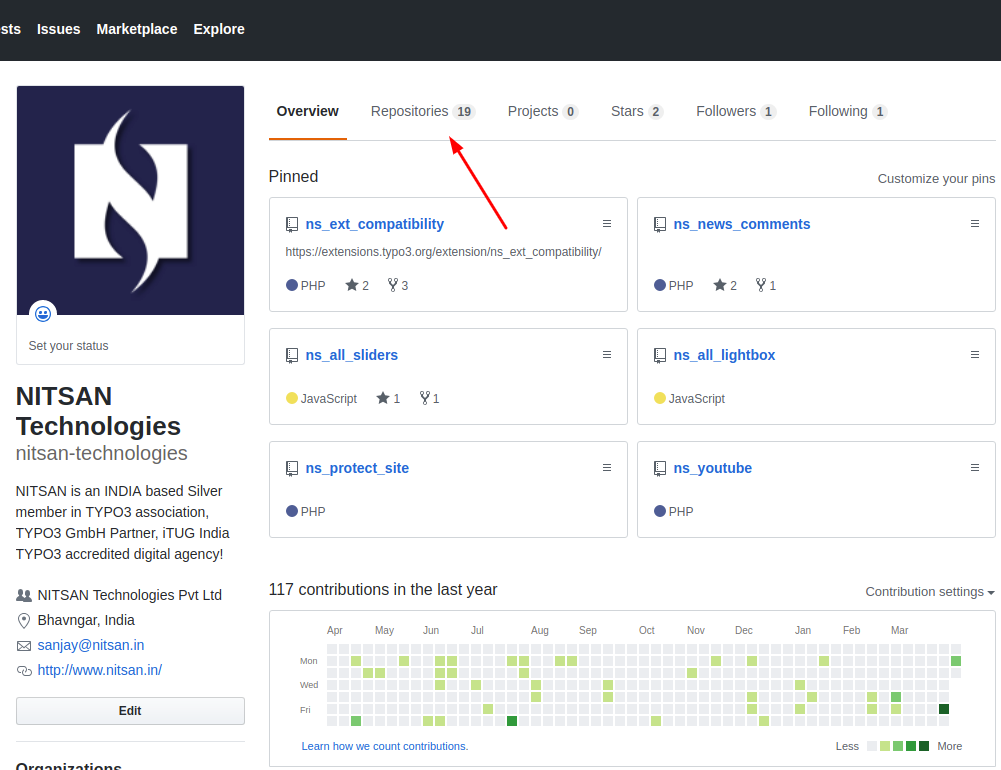
**Step 2:** You will have your personal landing page like
**Step 3:** Go to Dashboard > Repositories tab > Click on “New” button. Or, you may simply go here to create a new repository.
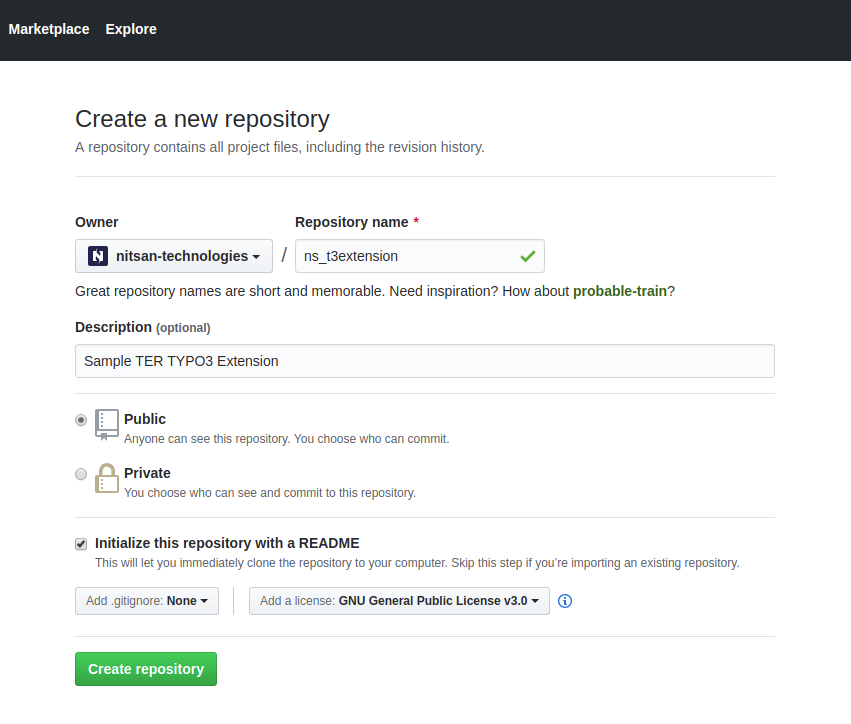
**Step 4:** Create a new repository by filling-up details in the form, and your public repository will be ready.
You’ll have to fill up the following fields:
- **Repository name:** Enter your extension key
- **Description:** You can simply put a description from your ext\_emconf.php
- **Permission:** Choose Public, because it’s TER.
### Connecting code with Git
Now, let’s setup Git repository to your local environment and maintain & upload code only through “Git”.
#### **\# Git global configuration**
git config --global user.name "YOUR\_USERNAME"
git config --global user.email "your\_email\_address@example.com"
#### **\# Clone your repository**
git clone [https://github.com/nitsan-technologies/ns\_news\_comments/issues](https://github.com/nitsan-technologies/ns_news_comments/issues)
#### **\# Checkout, pull and see a status**
git checkout master
git pull origin master
git status
#### **\# Push your code**
Move your extension’s code at git this repository folder.
git diff
git add.
git commit -m "Initial TYPO3 alpha version"
git push origin master/develop
Now you’ll have an up-to-date repository at your local and Github. Now onwards, keep maintaining code and changes between your local Git and Github.
Now it is time to configure composer, Packagist.org provides very easy configuration to connect between your Git repository and Composer. Of course, Packagist also support other Git platform like Gitlab ;)
### Submit Git repo at Packagist
**Step 1:** Go to
**Step 2:** To sign-up, you may use either or use “Login with Github” at
**Step 3:** Now, Let’s submit our package/extension, Click on “Submit”
**Step 4:** Enter your Github repository URL, and click on the “Check” button. Verify it once and then submit your package.
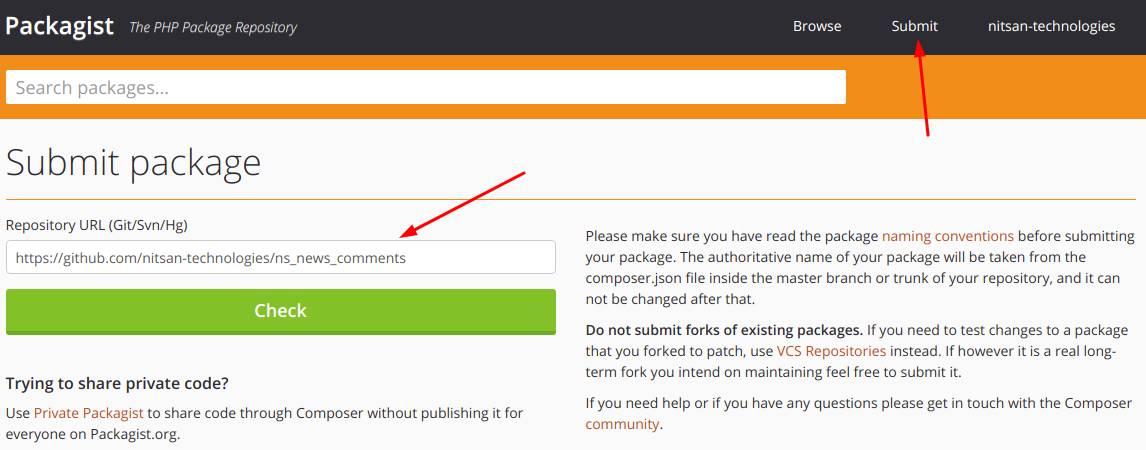
If you are getting some errors, then cross-verify your composer.json at your Git repository.
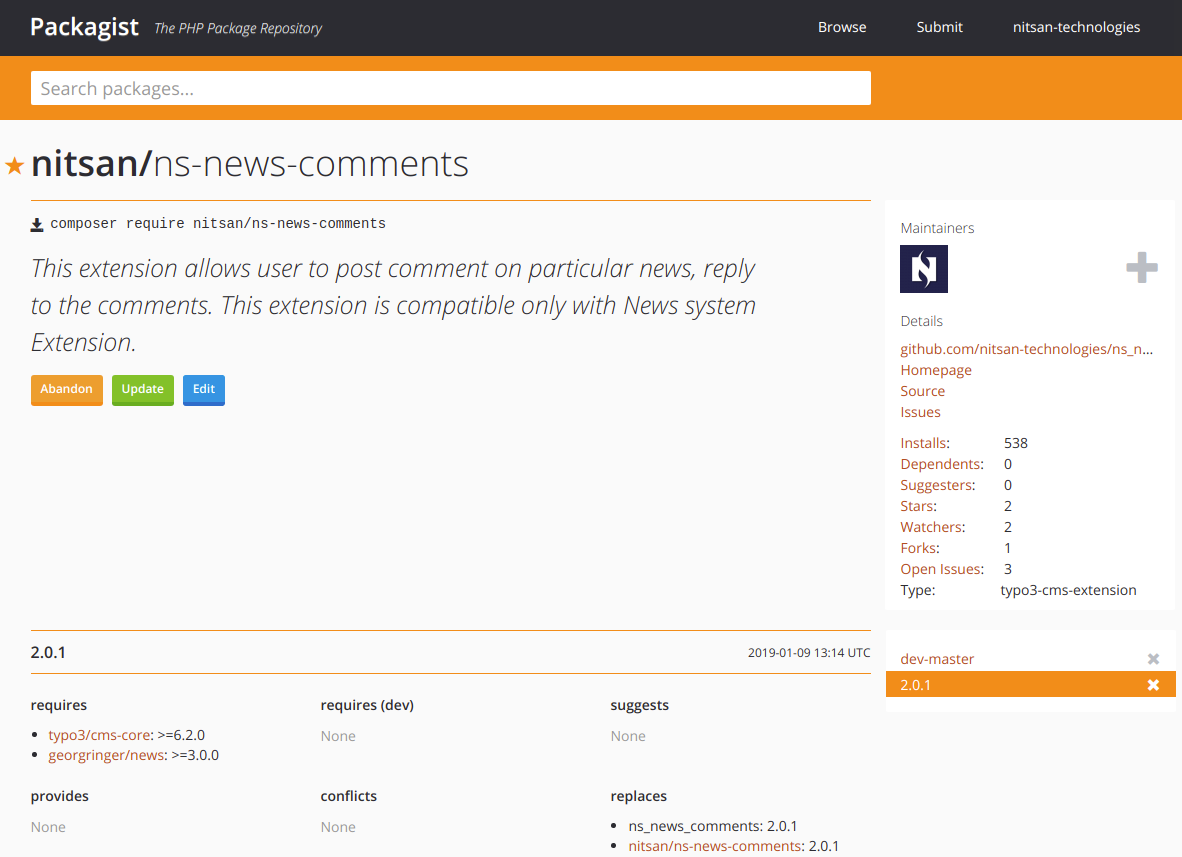
**Step 5:** Now you will be redirected to your package landing page eg., Here you can see, all the information is grabbing from your Github’s composer.json file.
**Tips:**
Packagist also provide paid-services for your private projects, Checkout
### How Packagist and Git will communicate?
Whenever you’ll make any change or release a new version at Github, how they will communicate to take the latest code at composer? Perform the following steps.
Get API Token from Packagist
**Step 1:** Go to your profile
**Step 2:** Click on “Show Token API” button
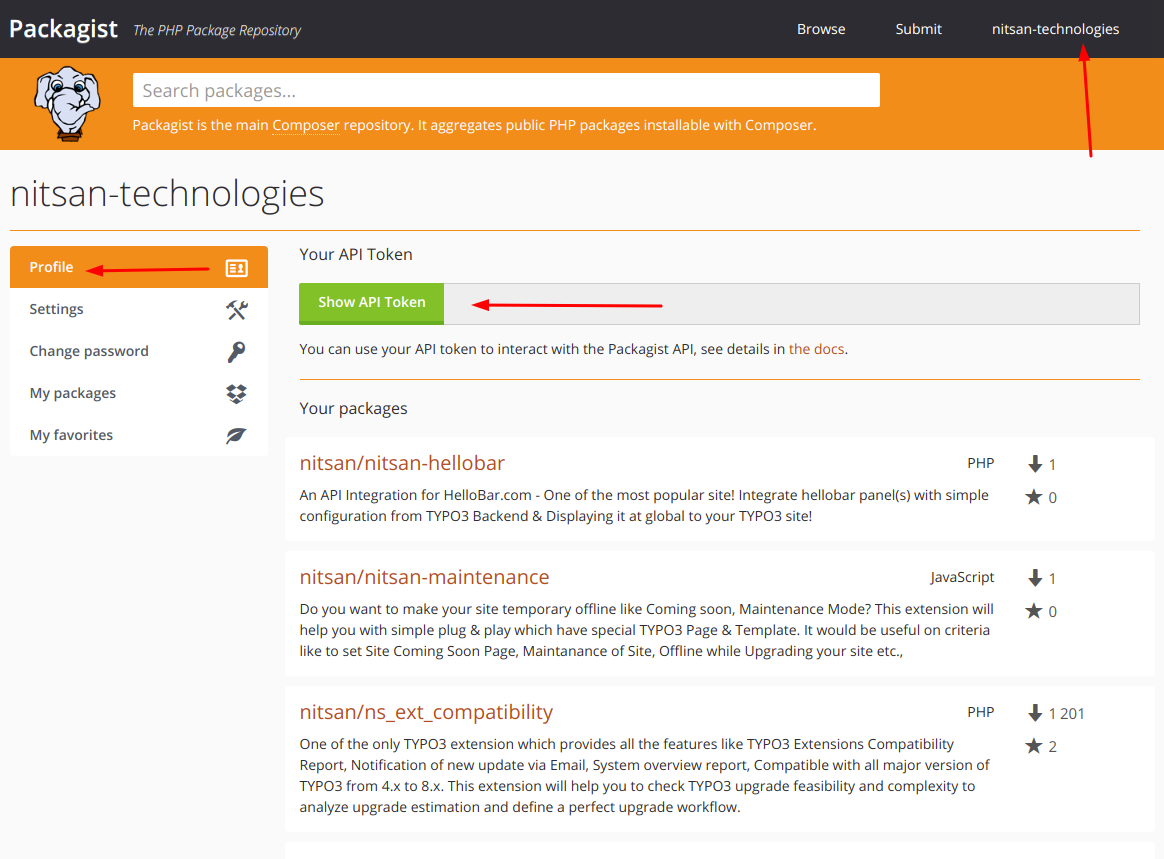
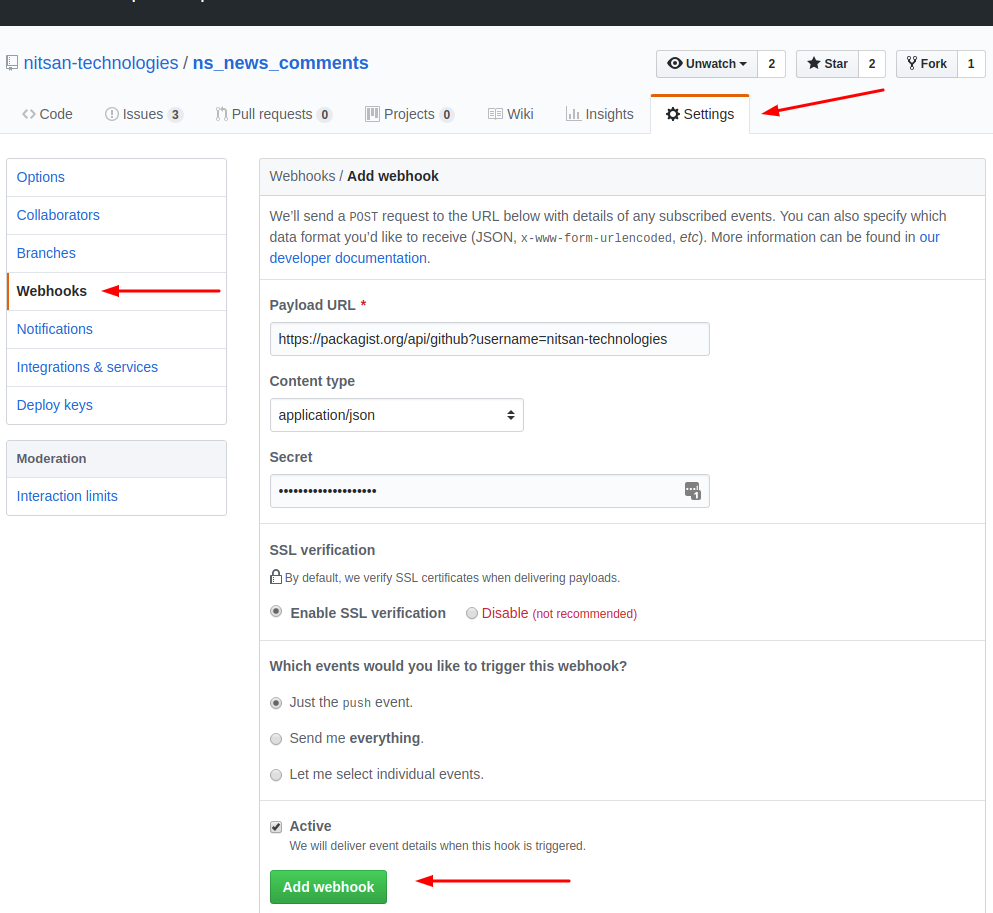
**Step 3:** Go to your Github repository > Settings > Webhooks > Click on Add webhook button
**Step 4:** Fill-up details
- **Payload**
- **Content type:** application/json
- **Secret:** Add your API token key from Packagist
Finally, it’s time to publish it to [**TYPO3 Extensions**](https://nitsantech.de/en/blog/typo3-extensions) Repository TER - An app store for [**TYPO3**](https://nitsantech.de/en/blog/typo3). You can easily do it by following any one of the following ways:
### Option 1: Directly publishing to TYPO3.org
**Step 1:** Landing to and Login with your user id.
**Step 2:** Go to My Extensions.
**Step 3:** Click on Register extension key and it is highly recommended to do it before you start the development to make sure you have a unique key.
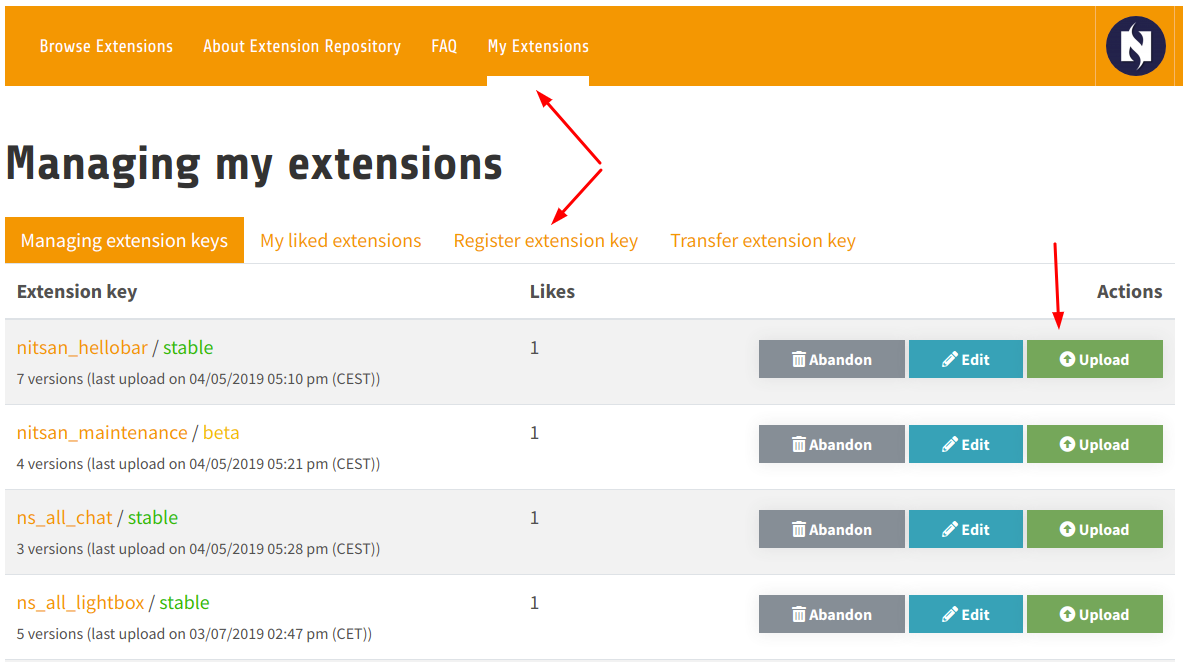
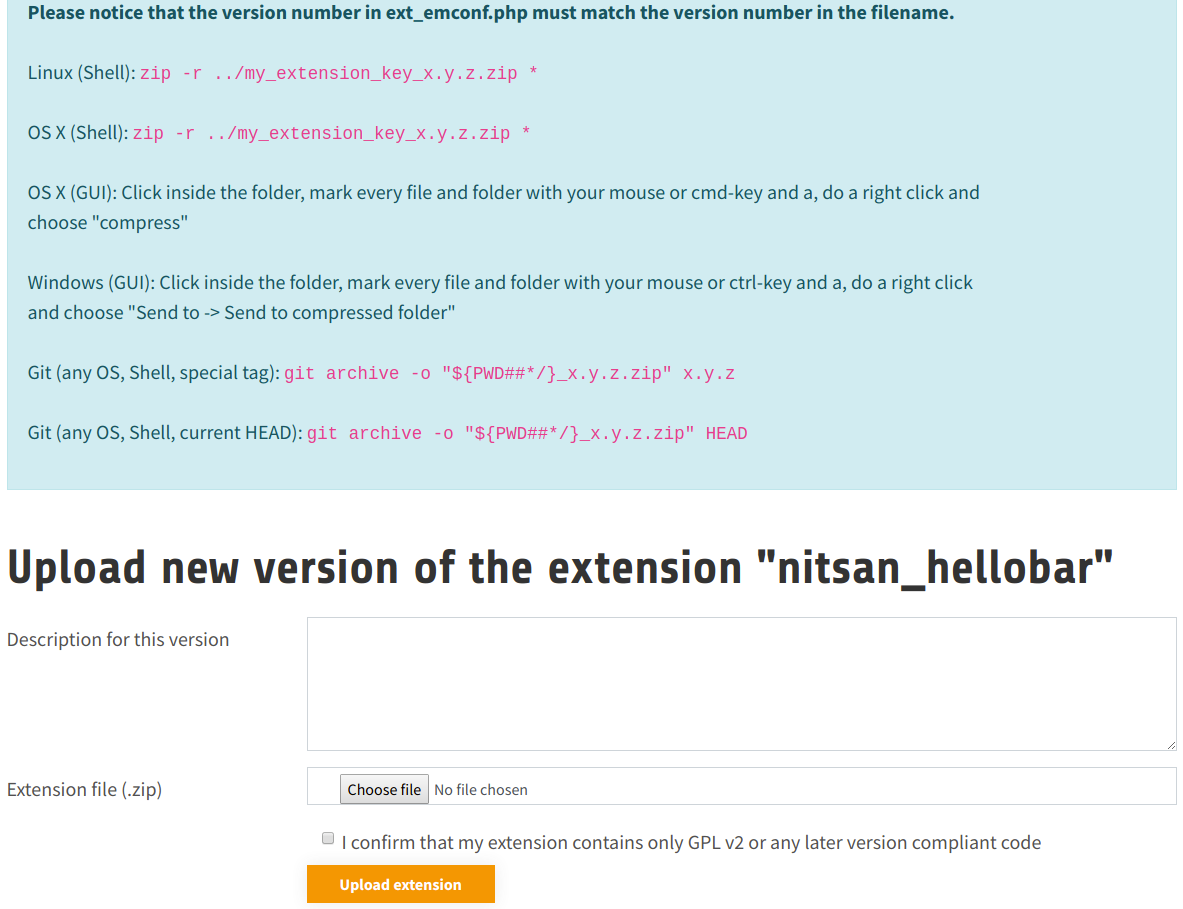
**Step 4:** Go to Managing extension keys and click on the “Upload” button. And submit your extension with a description of your version and upload extension file (zip).
### Option 2: TYPO3 Extension Utils
T3EXT Utils is a collection of CLI utilities for TYPO3 CMS Extension.
**Step 1:** Install and configure through Git at
**Step 2:** Upload extension to TER through
### Option 3: Automatic publishing from Github to TER
One of the most awesome solution by [@NamelessCoder](https://twitter.com/NamelessCoder) to automatic upload your extension from Github repository to TER. Recommend to see a complete solution at (It’s free and secure).
### Option 4: Automatic publish through Travis CI
Check out detail solution and article by [@helhum](https://twitter.com/helhum) at
**Tips:**
To display composer support and command, Go to My Extension and click on the **“Edit”** button for your particular extension. Tick **“Published to Packagist”** checkbox and set your composer name of the extension.
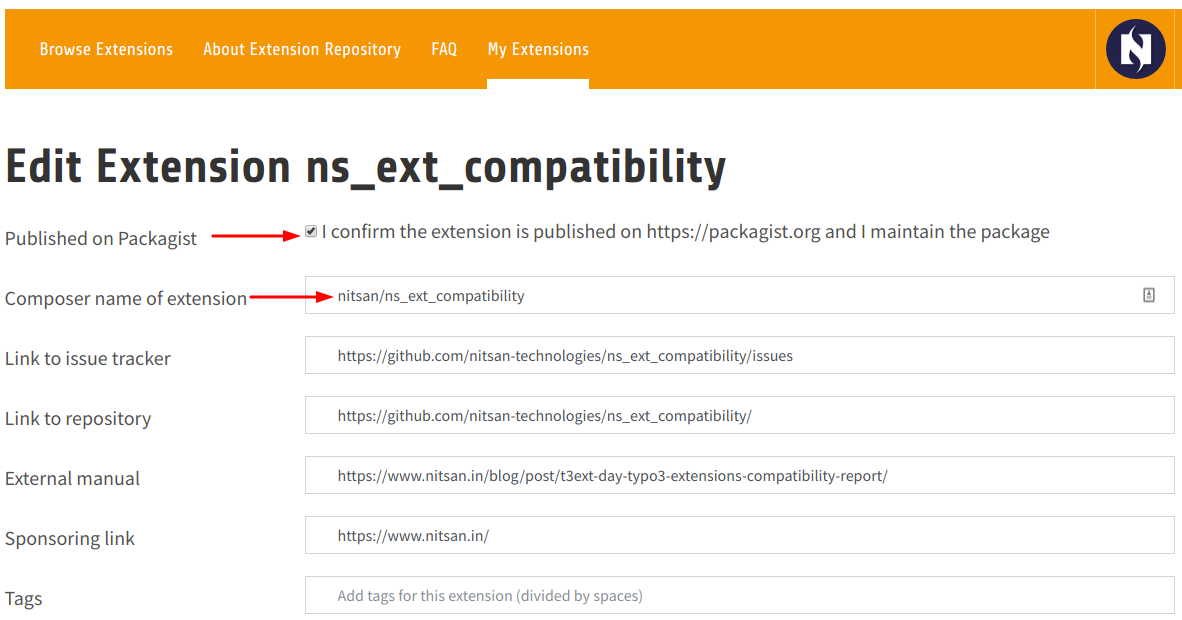
*Hurray!*
Your [TYPO3 Extension can now be easily installed](https://nitsantech.de/en/blog/how-to-install-and-uninstall-typo3-extensions) with a simple composer command, eg,
composer req nitsan/ns\_ext\_compatibility
To maintain and contribute to the community, the versioning of the extension is very important.
### How versioning should be?
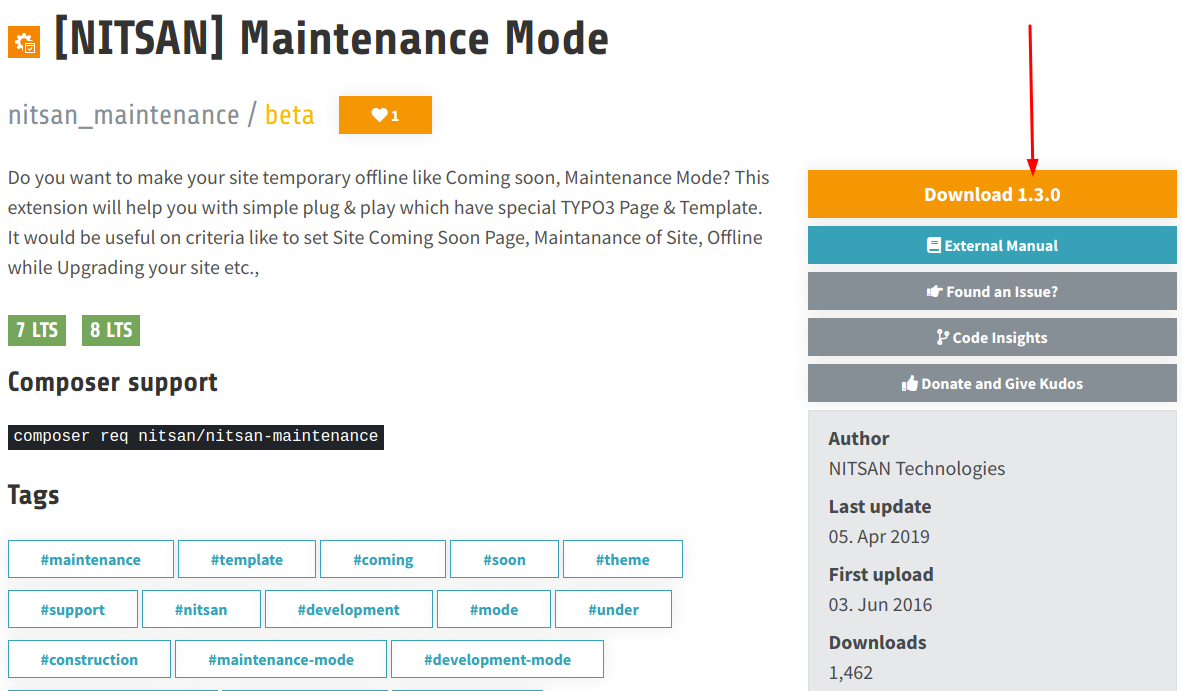
Do you know Semantic Versioning?
Example extension version: 1.1.2.
Given a version number MAJOR.MINOR.PATCH, increment the:
- MAJOR version when you make incompatible API changes,
- MINOR version when you add functionality in a backwards-compatible manner, and
- PATCH version when you make backward-compatible bug fixes.
Additional labels for pre-release and to build metadata are available as extensions to the MAJOR.MINOR.PATCH format.
Read more details at
### One version at all places
Let’s make sure and care about “same version number” at all the places. Sometimes, in hurry up you may be misconfigured version number at extension, git, and composer.
#### **TER Extension**
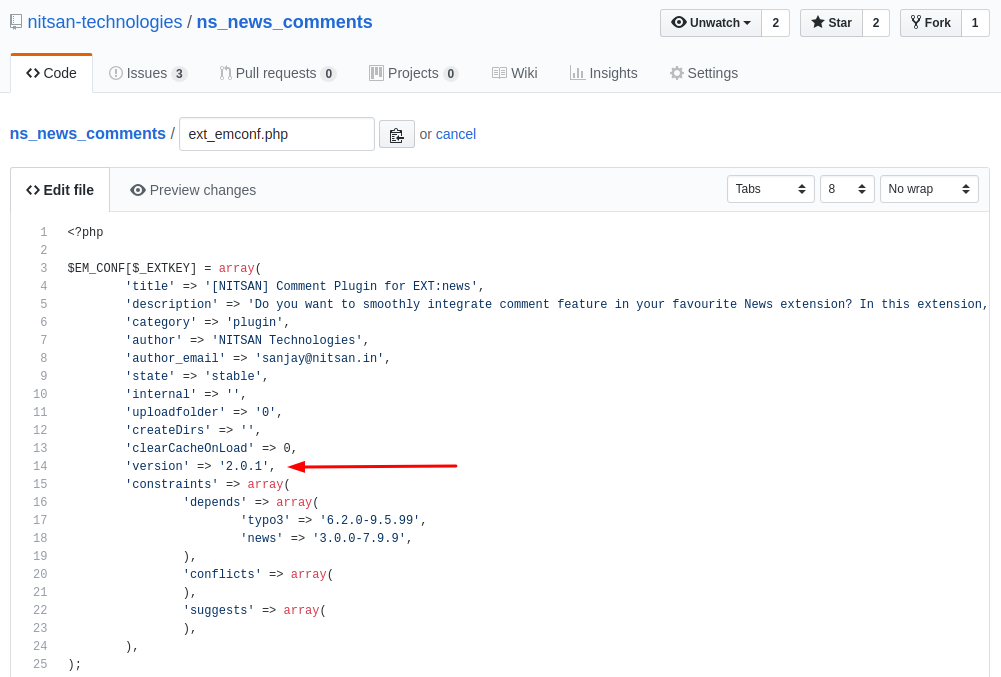
At ext\_emconf.php, Set 'version' => 'x.x.x',
#### **Git version release**
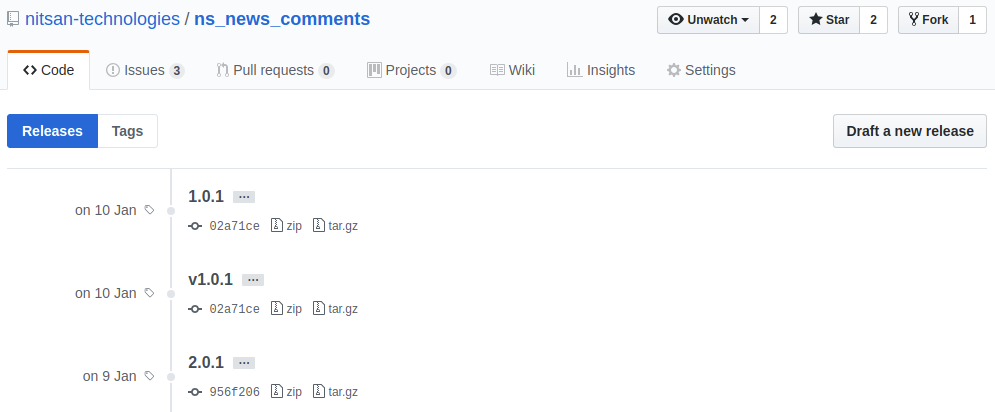
Let’s release the same version code at Github.
#### **Packagist/Composer version**
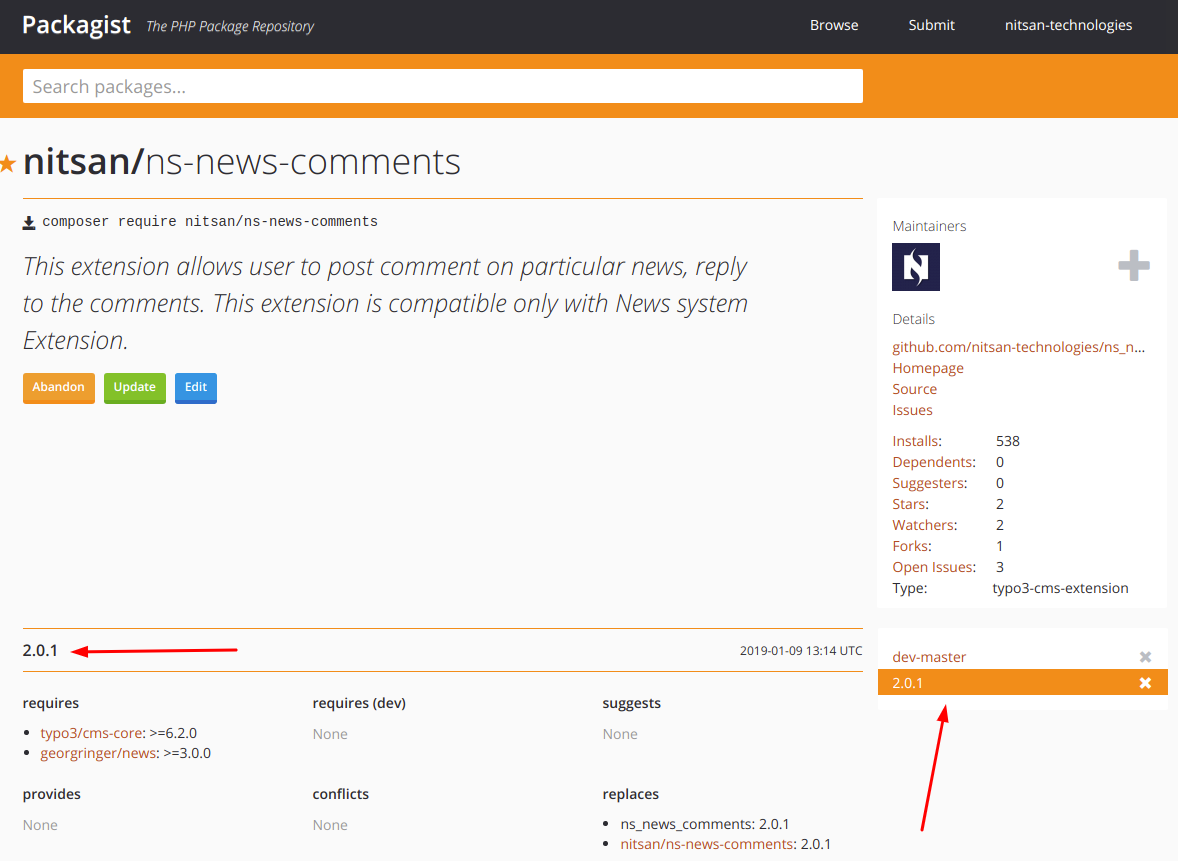
The Packagist will automatically fetch the version number from Git. If you are not able to see the latest release version, then click on the “Update” button.
### Dependency Management
One of the important things is, We need to create and well-defined the dependencies at each release of our extension. There could be multiple dependencies like:
1. TYPO3 core version
2. Other [TYPO3 extensions](https://t3planet.de/en/typo3-extensions)
3. PHP version
##### **At ext\_emconf.php**
Setup proper dependency versions at constraints with defining TYPO3 and other extensions version.
'constraints' => array(
'depends' => array(
'typo3' => '6.2.0-9.5.5',
'news' => '3.0.0-7.1.0',
),
'conflicts' => array(
),
'suggests' => array(
),
),
##### **At composer.json**
Similar way, you will need to define dependencies at composer.json
"require": {
"typo3/cms-core": ">=6.2.0 || <=9.5.5",
"georgringer/news": ">=3.0.0"
},
Read more about dependency version management with composer at
### Setup Local Environment
To initiate and develop [**TYPO3 extensions**](https://nitsantech.de/en/blog/installing-typo3), we would highly recommend using the following tools and techniques;
- Practice with Docker and DDEV
- Install Composer
- Setup Git
- Use PHPStorm IDE
### TYPO3 Extension Development
To contribute the best quality of extension to the TYPO3 community, make sure you do your best to develop TYPO3 extension following all the industrial standards like:
- Read and go through [creating a first extension](https://docs.typo3.org/m/typo3/reference-coreapi/main/en-us/ExtensionArchitecture/Extbase/Index.html) from TYPO3 docs.
- To start-up your extension quickly, You can use the most popular [EXT:extension\_builder](https://docs.typo3.org/typo3cms/CoreApiReference/ExtensionArchitecture/CreateNewExtension/Index.html).
- Read ExtbaseFluid book from TYPO3 docs.
- State-of-the-art work and code review with industrial standards like PHP PSR standards, Unit testing, etc.,
As you know, “TER” is our app-store, so let’s do our best to keep it healthy and give back well to the community. Let’s do our best with [**TYPO3 Agency**](https://nitsantech.de/en/typo3-agency) to make well-developed, smooth publishing, and healthy maintenance of our TYPO3 extensions.
Here is the quick sum up:
- Understand the importance as well as the power of the Composer. Keep using it for the community and your private projects.
- Develop and well test your work and code.
- Understand versioning and dependencies.
- Setup composer.json
- Initiate Git and push it to your favorite git tool like Github, Gitlab, BitBucket, etc.,
- Create a connection between Packagist and Git
- Publish extension to TER
- Feel proud for your contribution and take beer to celebrate it :)
Have a Happy Coding and Keep Contributing to the great TYPO3 Community!
Inspiring People To Code!

### Mihaela Angelova
Project Manager
- [](https://www.linkedin.com/in/mihaela-n-angelova/ "linkedin")
Mihaela keeps technology projects on track and ensures to meet business goals. She specializes in coordinating teams, optimizing workflows, and delivering projects. At NITSAN, she works closely with clients to transform ideas into actionable solutions. Outside of work, she enjoys exploring new hiking trails.
Comments and Responses
----------------------
Thank you for your comment. Your Comment Added Successfully.
Thank you for your comment. Your Comment Will Be Visible After Approval.
Oops! Something went wrong, please try again later.
##### **Be the First to Comment**
### Related Blogs
[ 
#### TYPO3 Extensions Developed & Managed by NITSAN
](https://nitsantech.de/en/blog/typo3-extensions)
[ 
#### How to Install and Uninstall TYPO3 Extensions?
](https://nitsantech.de/en/blog/how-to-install-and-uninstall-typo3-extensions)