---
title: Top Reasons to Upgrade from TYPO3 v12 to v13
url: "https://nitsantech.de/en/blog/upgrade-typo3-v12-to-v13"
description: "Thinking about upgrading TYPO3? Read why upgrading from v12 to v13 brings best performance, new features, & strong security to your TYPO3 website."
image: "https://nitsantech.de/fileadmin/_processed_/9/2/csm_Upgrade-from-TYPO3-v12-to-v13_5fd5dd5370.jpg"
date: 2025-03-13
modified: 2026-03-30
lastUpdated: 2026-04-27
categories:
- Upgrade
---
# Top Reasons to Upgrade from TYPO3 v12 to v13
Top Reasons to Upgrade from TYPO3 v12 to v13
============================================
13 Mar 2025
[](https://nitsantech.de/en/blog/author/mihaela-angelova)
[Mihaela Angelova](https://nitsantech.de/en/blog/author/mihaela-angelova)
[ Upgrade ](https://nitsantech.de/en/categories/upgrade)
Still running your website on TYPO3 v12? It may be time to consider an upgrade. TYPO3 v13, released on October 15, 2024, introduces improvements that enhance performance, security, and usability.
Table of content
Keeping your CMS up to date is important for maintaining stability, protecting against security vulnerabilities, and staying compatible with modern technologies. Regular updates help ensure your website continues to run efficiently.
[**TYPO3 v13**](https://nitsantech.de/en/blog/typo3-v13-lts) builds on the strengths of earlier versions with a more user-friendly backend, stronger security mechanisms, and improved integration capabilities.
These updates make it easier for developers and content teams to manage websites while maintaining strong performance and scalability for enterprise-level projects.
Don’t know your current TYPO3
version?
Check it here and take action
---------------------------------------------------------------------
Your TYPO3 Version:13.4
Congratulations, your TYPO3 system is up to date with version 13! We would be happy to take over the maintenance and installation of regular system and security updates for you. [Contact us](https://nitsantech.de/en/inquire) now for a non-binding and individual offer!
Your TYPO3 Version:
With **TYPO3 version 12** you still have some time until support ends at the end of **April 2029**. Nevertheless, we recommend upgrading to the latest version 13 to keep your system up to date. You will also benefit from the latest TYPO3 functions. We would be happy to check your system for the possibility of an upgrade. [Contact us](https://nitsantech.de/en/inquire) now for a non-binding and individual offer!
You don't have a TYPO3 system or we can't identify your version.[ Contact us](https://nitsantech.de/en/inquire) for an individual review of your system and a non-binding initial consultation on your TYPO3 upgrade. The upgrade is particularly critical for TYPO3 systems that are older than version 8, as the lack of further development and support can lead to acute security gaps. Let's plan your next upgrade together!
Please enter a valid domain
Upgrading to TYPO3 v13 brings several improvements that help websites run faster, remain secure, and become easier to manage. The new version focuses on performance optimization, stronger security standards, and a better experience for both editors and developers.
Below are the key reasons why upgrading from [**TYPO3 v12**](https://nitsantech.de/en/blog/typo3-v12) to v13 is worth considering.
TYPO3 v13 introduces several optimizations that help websites load faster and handle traffic more efficiently.
- Improved database query handling for faster page loading
- Enhanced caching mechanisms for better performance
- More efficient processing for high-traffic websites
Security improvements in TYPO3 v13 help protect websites and sensitive data from potential threats.
- Multi-factor authentication (MFA) for stronger login protection
- Improved user permission and access management
- Regular security updates to address vulnerabilities
The TYPO3 v13 backend interface has been improved to provide a smoother experience for editors and content managers.
- Cleaner and more modern backend layout
- Easier navigation for managing content and pages
- Improved usability for everyday content tasks
TYPO3 v13 improves connectivity with external tools and digital platforms.
- Enhanced API support for third-party integrations
- Better compatibility with headless CMS architectures
- Support for Progressive Web Apps (PWA) and modern web technologies
The new version includes improvements that help websites perform better in search engines and manage content more efficiently.
- Improved URL routing and management
- Expanded metadata options for SEO optimization
- Built-in [**TYPO3 SEO**](https://nitsantech.de/en/blog/typo3-seo) tools for better search visibility
TYPO3 v13 simplifies development workflows and system maintenance for developers.
- Composer-based dependency management for easier upgrades
- Improved debugging and logging tools
- More efficient development workflows
TYPO3 v13 ensures long-term stability and support for enterprise websites.
- Long-term support (LTS) with regular updates
- Removal of outdated and deprecated features
- Better compatibility with modern technologies and frameworks
Understanding the differences between TYPO3 v12 and TYPO3 v13 helps organizations evaluate the benefits of upgrading. TYPO3 v13 introduces improvements across performance, security, usability, and developer workflows, making it more suitable for modern web projects.
### **Performance Improvements**
| **Feature** | **TYPO3 v12** | **TYPO3 v13** |
|---|---|---|
| Database Handling | Standard database queries | Optimized database queries for faster response |
| Caching | Standard caching mechanisms | Improved caching for better performance |
| Page Loading | Stable performance | Faster page loading and improved efficiency |
| High-Traffic Handling | Works well for medium traffic | Better performance for high-traffic websites |
### **Security Enhancements**
| **Feature** | **TYPO3 v12** | **TYPO3 v13** |
|---|---|---|
| Authentication | Standard login security | Multi-Factor Authentication (MFA) support |
| Permission Management | Basic role-based permissions | Improved access and permission control |
| Security Updates | Regular updates | Enhanced protection against modern threats |
### **Backend Interface Improvements**
| **Feature** | **TYPO3 v12** | **TYPO3 v13** |
|---|---|---|
| Backend Design | Traditional TYPO3 interface | Modernized and cleaner backend UI |
| Navigation | Functional but complex | Improved navigation and usability |
| Editor Experience | Standard content editing workflow | More intuitive editing environment |
### **Integration and API Capabilities**
| **Feature** | **TYPO3 v12** | **TYPO3 v13** |
|---|---|---|
| API Support | Basic API capabilities | Improved API support for integrations |
| Third-Party Tools | Limited integration flexibility | Better integration with external platforms |
| Headless CMS | Supported with configuration | Improved support for headless CMS and PWAs |
### **SEO and Content Tools Comparison**
| **Feature** | **TYPO3 v12** | **TYPO3 v13** |
|---|---|---|
| URL Management | Standard routing and URLs | Improved routing and URL handling |
| Metadata Options | Basic SEO metadata | Expanded metadata and SEO controls |
| SEO Tools | Built-in basic SEO tools | Enhanced built-in SEO optimization features |
### **Developer Workflow and Composer Support**
| **Feature** | **TYPO3 v12** | **TYPO3 v13** |
|---|---|---|
| Dependency Management | Composer supported | More streamlined Composer workflows |
| Debugging Tools | Standard debugging options | Improved debugging and logging tools |
| Development Efficiency | Conventional workflows | Simplified upgrade and development processes |
### **Language and Localization Support**
| **Feature** | **TYPO3 v12** | **TYPO3 v13** |
|---|---|---|
| Language Support | Multiple languages supported | Backend UI supports 60+ languages |
| RTL Language Support | Limited right-to-left support | Improved RTL support (Arabic, Hebrew, etc.) |
| Localization Tools | Standard translation workflows | Improved localization capabilities |
### **Media Management Improvements**
| **Feature** | **TYPO3 v12** | **TYPO3 v13** |
|---|---|---|
| Image Handling | Basic image processing | Improved image processing performance |
| File Format Support | Standard formats | Extended support for WebP and SVG |
| Media Library | Standard media management | Improved media organization |
### **Accessibility Improvements**
| **Feature** | **TYPO3 v12** | **TYPO3 v13** |
|---|---|---|
| Accessibility Standards | Basic accessibility features | Improved accessibility compliance |
| Backend Accessibility | Keyboard navigation improvements | Better accessibility features and usability |
| UI Options | Standard interface settings | Light/Dark mode and improved UI flexibility |
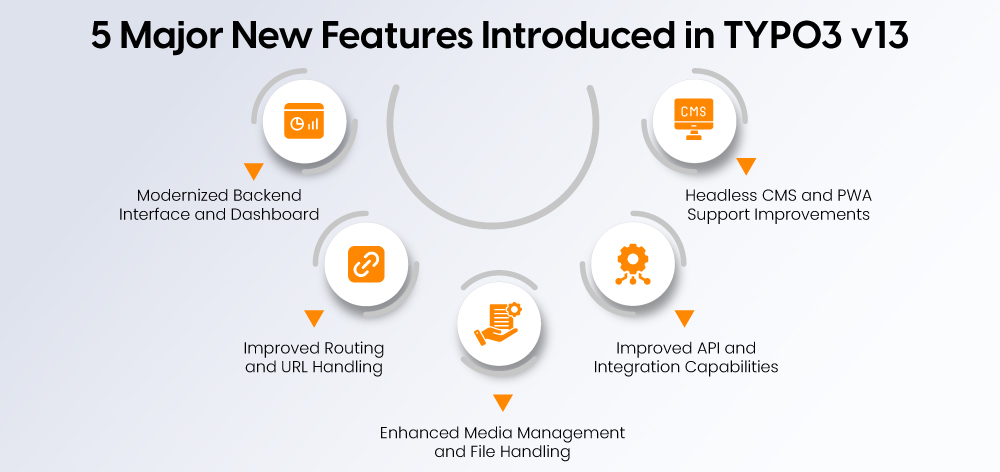
TYPO3 v13 introduces several new features that improve usability, performance, and flexibility for modern websites. These enhancements support both content teams and developers by simplifying workflows and enabling better integration with modern web technologies.
### **Modernized Backend Interface and Dashboard**
The backend interface in TYPO3 v13 has been refined to provide a cleaner and more intuitive experience for editors and administrators.
- Improved backend layout with a more modern design
- Enhanced dashboard widgets for better content and system overview
- Easier navigation for managing pages, content, and settings
### **Improved Routing and URL Handling**
TYPO3 v13 improves how URLs and routing are managed, making it easier to create clean and SEO-friendly URLs.
- Enhanced site routing configuration
- Better control over URL structures
- Improved handling of redirects and canonical URLs
### **Enhanced Media Management and File Handling**
Media management in TYPO3 v13 has been optimized to improve efficiency when working with images and files.
- Improved image processing performance
- Extended support for modern formats such as WebP and SVG
- Better organization and management of media files
### **Improved API and Integration Capabilities**
TYPO3 v13 strengthens its integration capabilities with external systems and digital platforms.
- Improved API support for third-party integrations
- Better compatibility with external services and tools
- More flexibility for integrating enterprise systems
### **Headless CMS and PWA Support Improvements**
TYPO3 v13 enhances support for modern web architectures such as headless CMS and Progressive Web Apps.
- Improved support for headless TYPO3 implementations
- Better compatibility with frontend frameworks
- Enhanced support for Progressive Web Applications (PWA)
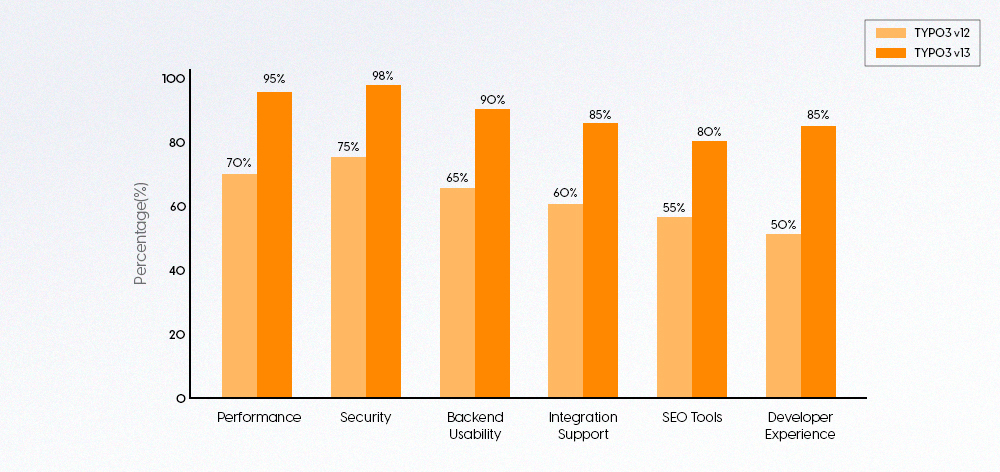
Upgrading to TYPO3 v13 offers advantages for different roles involved in managing and maintaining a website.
From editors and developers to integrators and administrators, the new version introduces improvements that simplify workflows, strengthen security, and support modern web development.
### **TYPO3 v13 Benefits for Editors**
TYPO3 v13 improves the content editing experience by making the backend easier to navigate and simplifying everyday publishing tasks.
- #### **Easier Content Editing Experience**
TYPO3 v13 simplifies the content editing workflow, making it easier for editors to manage and update website content.
- #### **Cleaner Backend Interface**
The redesigned backend interface provides a clearer and more intuitive experience for content teams.
- #### **Improved Media and Content Organization**
TYPO3 v13 improves how media assets and content are organized and managed within the CMS.
### **TYPO3 v13 Benefits for Developers**
TYPO3 v13 introduces improvements that make development workflows more efficient and easier to manage.
- #### **Composer-Based Dependency Management**
Dependency management becomes more structured with improved Composer support.
- #### **Improved Debugging and Logging**
TYPO3 v13 provides better tools for identifying and resolving technical issues during development.
- #### **Better API and Integration Support**
The platform offers stronger integration capabilities for connecting [**TYPO3**](https://nitsantech.de/en/blog/typo3) with external services and applications.
### **TYPO3 v13 Benefits for Integrators**
TYPO3 v13 provides more flexibility for integrators when configuring sites, templates, and extensions.
- #### **Flexible Site Configuration**
Site configuration and routing management are improved, making it easier to configure complex websites.
- #### **Improved Template and Layout Management**
TYPO3 v13 enhances template and layout handling, giving integrators better control over frontend structures.
- #### **Better Extension Compatibility**
Improved extension compatibility helps integrators manage and maintain third-party and custom extensions more efficiently.
### **TYPO3 v13 Benefits for Administrators**
TYPO3 v13 strengthens system management capabilities for administrators responsible for maintaining CMS installations.
- #### **Improved System Security**
Administrators benefit from stronger security features designed to protect websites and user data.
- #### **Simplified System Maintenance**
The platform simplifies maintenance tasks, making updates and system management more efficient.
- #### **Better System Monitoring and Control**
Improved monitoring and management tools help administrators maintain system stability and performance.
Understanding the TYPO3 support lifecycle helps organizations plan upgrades and maintain a secure website. Each Long-Term Support (LTS) version follows a defined timeline for feature updates and security patches.
### **TYPO3 LTS Lifecycle Explained**
TYPO3 releases Long-Term Support (LTS) versions that receive updates and maintenance for several years.
- LTS versions provide stability for enterprise websites
- Regular bug fixes and maintenance updates are released
- Organizations can plan upgrades according to the official lifecycle
### **Security Support Duration**
Security support ensures that websites remain protected against newly discovered vulnerabilities.
- TYPO3 v12 receives security updates during its official support period
- Security patches address vulnerabilities and system risks
- Once support ends, websites may become more exposed to threats
### **Extended Long Term Support (ELTS) Options**
For organizations that cannot upgrade immediately, TYPO3 offers Extended Long Term Support.
- ELTS provides additional security updates after standard support ends
- Helps maintain stability for legacy [**TYPO3 installations**](https://nitsantech.de/en/blog/installing-typo3)
- Gives organizations more time to plan a proper upgrade strategy
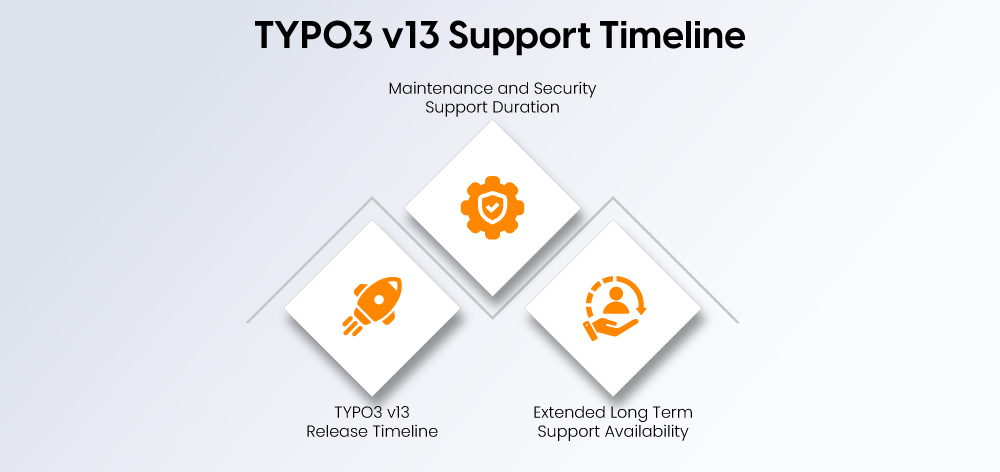
TYPO3 v13 is a Long-Term Support (LTS) release, designed to provide stability, security updates, and ongoing maintenance for enterprise websites. Understanding the lifecycle helps organizations plan upgrades and maintain a secure TYPO3 environment.
### **TYPO3 v13 Release Timeline**
TYPO3 v13 was officially released on **October 15, 2024**, marking the next major evolution of the [**TYPO3 CMS**](https://nitsantech.de/en/blog/typo3-perfect-cms-for-everyone) platform.
- Introduces improved performance, security, and backend usability
- Designed for enterprise-level websites and scalable digital projects
- Built with modern technologies to support future [**TYPO3 development**](https://nitsantech.de/en/services/typo3-development)
### **Maintenance and Security Support Duration**
As an LTS version, TYPO3 v13 receives regular maintenance updates and security patches for several years.
- Bug fixes and maintenance updates are provided during the early support phase
- Security updates continue after maintenance support ends
- Ensures websites remain stable and protected against vulnerabilities
### **Extended Long Term Support Availability**
Organizations that require additional time before upgrading can opt for **Extended Long Term Support (ELTS)**.
- ELTS provides continued security updates after the official LTS support ends
- Helps maintain older TYPO3 installations while planning future upgrades
- Useful for complex enterprise websites with long upgrade cycles
Before upgrading, it is important to ensure that your server environment meets the technical requirements for TYPO3 v13.
### **Supported PHP Versions**
TYPO3 v13 requires modern PHP versions to maintain performance and security.
- Compatible with PHP 8.2 and newer versions
- Recommended to use the latest supported PHP release for better performance
- Older PHP versions are not supported
### **Database Requirements**
TYPO3 v13 supports commonly used database systems that meet modern performance standards.
- MySQL or MariaDB databases are supported
- Compatible with PostgreSQL for advanced use cases
- Updated database versions improve stability and performance
### **Server and Hosting Requirements**
A compatible hosting environment ensures TYPO3 v13 runs smoothly.
- Support for Composer-based installations
- Adequate server resources for handling traffic and content management
- Modern hosting environments optimized for PHP-based CMS platforms
Deciding when to upgrade to TYPO3 v13 depends on your current system setup, extension compatibility, and long-term website goals. Evaluating your website’s performance, security requirements, and maintenance needs can help determine the right time to upgrade.
### **Signs Your TYPO3 Website Needs an Upgrade**
Certain indicators suggest that upgrading to TYPO3 v13 may be necessary to maintain performance and security.
- Your website is running on an outdated [**TYPO3 version**](https://nitsantech.de/en/blog/check-typo3-version)
- Performance issues such as slow page loading are increasing
- Extensions or integrations are becoming difficult to maintain
- Security updates for your current TYPO3 version are limited
### **Situations Where Immediate Upgrade Is Recommended**
In some cases, upgrading as soon as possible helps prevent technical risks and operational issues.
- Your TYPO3 installation is approaching end-of-life support
- Security vulnerabilities are becoming a concern
- Your server environment already supports the required PHP versions
- You want to take advantage of improved performance and modern CMS features
### **When It May Be Better to Delay the Upgrade**
While upgrading is generally beneficial, some situations may require additional preparation before migrating to TYPO3 v13.
- Your website relies heavily on custom extensions that need updates
- Critical integrations require compatibility testing
- Major redesign or platform changes are planned at the same time
- Your team needs time to prepare staging environments and test workflows
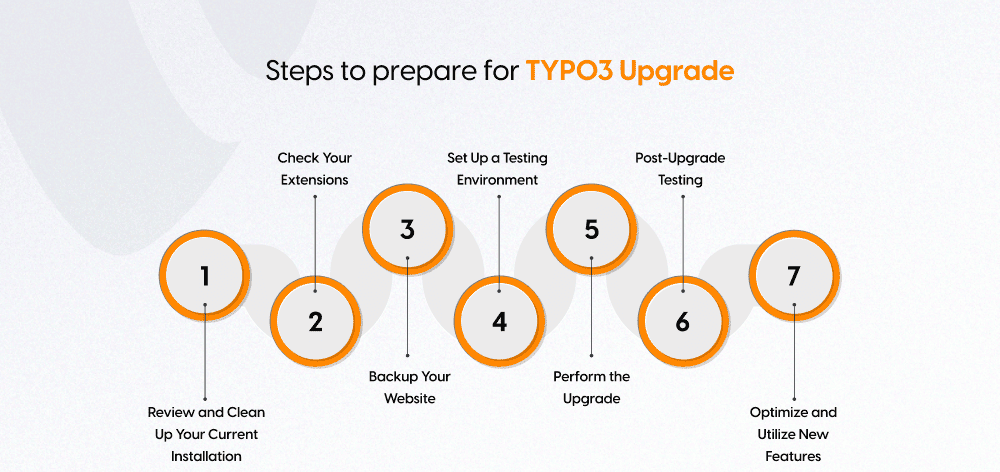
Upgrading to TYPO3 v13 requires proper preparation to ensure the process runs smoothly and avoids unexpected issues. By reviewing your current setup and following a structured upgrade process, you can minimize risks and maintain website stability during the transition.
### **Review and Clean Up Your Current Installation**
Before upgrading, make sure your existing TYPO3 installation is properly maintained and free of outdated configurations.
- Run [**TYPO3 Upgrade**](https://nitsantech.de/en/services/typo3-upgrade-service) Wizards to identify deprecated configurations
- Remove unused extensions or outdated settings
- Fix deprecated code that may cause issues during the upgrade
Cleaning up your TYPO3 installation beforehand helps prevent compatibility problems later.
### **Check Extension Compatibility**
Extensions play an important role in [**TYPO3 Websites**](https://nitsantech.de/en/blog/typo3-website), so compatibility should be reviewed before upgrading.
- Review all installed extensions in your TYPO3 system
- Check if updates are available that support TYPO3 v13
- Replace outdated or unsupported extensions with compatible alternatives
Ensuring extension compatibility helps avoid functionality issues after the upgrade.
### **Backup Your TYPO3 Website**
Creating a complete backup is a critical step before performing any major system upgrade.
- Backup your website files and database
- Store the backup securely in case restoration is needed
- Verify that the backup works properly before continuing
A reliable backup ensures you can quickly restore your website if anything goes wrong.
### **Set Up a Testing Environment**
Never upgrade directly on a live website. Instead, use a staging or testing environment to perform the upgrade safely.
- Clone your website to a staging environment
- Test the upgrade process without affecting live users
- Identify and fix potential issues before deployment
Testing in a controlled environment reduces the risk of downtime.
### **Perform the TYPO3 Upgrade**
Once the preparation steps are complete, you can proceed with the upgrade process.
- Follow the official TYPO3 upgrade documentation step by step
- Use Composer to manage dependencies and updates
- Monitor the upgrade process for potential warnings or errors
A structured upgrade process helps ensure everything runs correctly.
### **Post-Upgrade Testing**
After upgrading, thorough testing is necessary to confirm that the system works as expected.
- Test both frontend and backend functionality
- Verify forms, integrations, and extensions
- Check content editing workflows and website performance
Testing ensures the upgraded website remains fully functional.
### **Optimize and Utilize New Features**
Once the upgrade is complete, explore the improvements introduced in TYPO3 v13.
- Review new backend features and tools
- Optimize website performance using new capabilities
- Update workflows to benefit from improved TYPO3 functionality
Taking advantage of new features helps maximize the value of the TYPO3 v13 upgrade.
*Need help upgrading to TYPO3 v13? Our experts at* [***NITSAN***](https://nitsantech.de/en/) *–* [***TYPO3 Agency***](https://nitsantech.de/en/typo3-agency) *can handle the upgrade process smoothly so you can continue focusing on your business with confidence.*
[*Get started now*](https://nitsantech.de/en/services/typo3-upgrade-service)
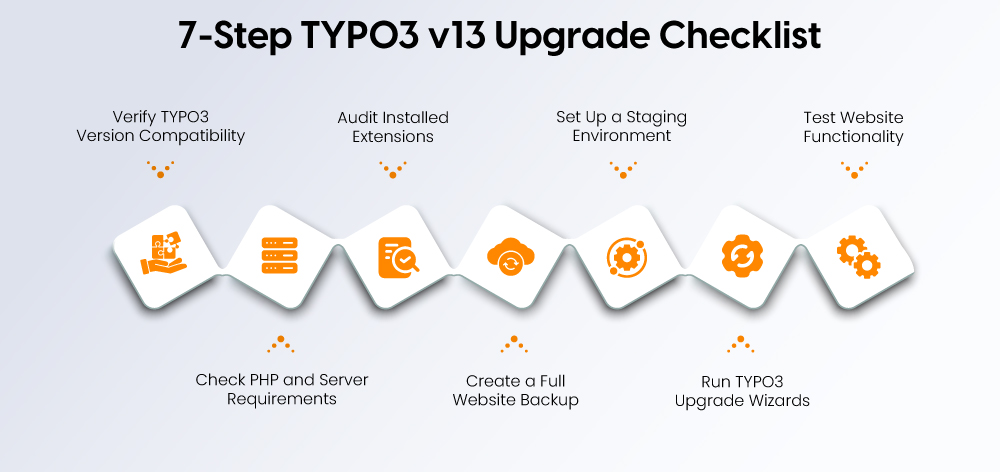
Before upgrading to TYPO3 v13, it is important to review key technical and operational factors to ensure a smooth transition. Following a structured checklist helps minimize risks and prepares your website for a successful upgrade.
### **Verify TYPO3 Version Compatibility**
Before starting the upgrade process, confirm that your current TYPO3 installation supports a direct upgrade path to v13.
- Check the currently installed TYPO3 version
- Review the official upgrade path for your TYPO3 version
- Ensure your installation meets the prerequisites for upgrading to TYPO3 v13
### **Check PHP and Server Requirements**
TYPO3 v13 requires a modern server environment to run efficiently.
- Confirm your server supports PHP 8.2 or newer
- Ensure your hosting environment meets TYPO3 system requirements
- Update server configurations if necessary before upgrading
### **Audit Installed Extensions**
Extensions should be reviewed to ensure they remain compatible with TYPO3 v13.
- List all installed extensions in your TYPO3 setup
- Check whether updated versions are available for TYPO3 v13
- Replace outdated or unsupported extensions where necessary
### **Create a Full Website Backup**
Backing up your website ensures you can restore the system if any issues occur during the upgrade.
- Create backups of website files and databases
- Store backups securely outside the production server
- Verify that the backup files can be restored if needed
### **Set Up a Staging Environment**
Performing the upgrade in a staging environment allows you to test the process safely.
- Clone the live website to a staging server
- Perform the upgrade process in the test environment
- Identify and resolve issues before deploying to production
### **Run TYPO3 Upgrade Wizards**
TYPO3 provides upgrade tools that help prepare the system for new versions.
- Use the TYPO3 Upgrade Wizards to detect required changes
- Apply recommended configuration updates
- Resolve warnings or compatibility issues identified by the system
### **Test Website Functionality**
After completing the upgrade, thorough testing ensures that the website works correctly.
- Test frontend pages and backend editing features
- Verify extensions, forms, and integrations
- Monitor website performance and functionality before going live
Upgrading a [**TYPO3 Website**](https://nitsantech.de/en/blog/typo3-website) can bring major improvements, but it may also introduce technical challenges if the system is not properly prepared. Understanding common upgrade issues helps teams plan better and avoid disruptions during the migration process.
### **Extension Compatibility Issues**
Extensions are a core part of many TYPO3 installations, but not all extensions are immediately compatible with newer versions.
- Some third-party extensions may not yet support TYPO3 v13
- Older extensions may require updates or replacements
- Custom extensions may need code adjustments to match the new version
### **Deprecated APIs and Removed Features**
TYPO3 regularly removes outdated APIs and legacy features to maintain modern standards.
- Certain APIs used in TYPO3 v12 may be deprecated in v13
- Older functions or configurations may stop working after the upgrade
- Developers may need to update code to align with the new TYPO3 architecture
### **Template or Theme Compatibility**
Frontend templates and themes may require adjustments during the upgrade.
- Fluid templates may need updates for compatibility
- Custom themes may require layout or configuration changes
- Integrations with frontend frameworks may require testing
Many upgrade issues occur because important preparation steps are skipped. Avoiding these common mistakes can help ensure a smoother TYPO3 upgrade process.
### **Upgrading Without a Backup**
A backup is essential before performing any CMS upgrade.
- Always create a full backup of files and databases
- Verify that the backup can be restored if necessary
- Keep multiple backup versions if possible
### **Skipping Staging Environment Testing**
Testing upgrades on a live website can lead to downtime and unexpected errors.
- Always perform upgrades in a staging environment first
- Test system functionality before deploying changes
- Fix issues in staging before applying updates to production
### **Using Outdated Extensions**
Extensions that are no longer maintained can cause major compatibility issues.
- Review all installed extensions before upgrading
- Update extensions to versions compatible with TYPO3 v13
- Replace unsupported extensions with maintained alternatives
### **Ignoring System Requirements**
Running TYPO3 v13 on unsupported environments can lead to performance or stability problems.
- Verify PHP and database compatibility before upgrading
- Ensure server configuration meets TYPO3 v13 requirements
- Update hosting environments if necessary
Upgrading to TYPO3 v13 provides several practical benefits that improve website performance, security, and long-term maintainability. These improvements help organizations manage websites more efficiently while supporting modern development standards.
### **Improved Speed and Performance**
TYPO3 v13 includes performance optimizations that improve website speed and responsiveness.
- Faster page loading through optimized database queries
- Improved caching mechanisms for better performance
- Better handling of high-traffic websites
### **Higher Security Standards**
Security enhancements help protect websites from vulnerabilities and cyber threats.
- Support for multi-factor authentication (MFA)
- Improved permission and access management
- Regular security updates and vulnerability fixes
### **Better Compatibility With Modern Technologies**
TYPO3 v13 is built to work smoothly with modern development tools and technologies.
- Compatibility with modern PHP versions
- Improved API support for integrations
- Better support for headless CMS architectures
### **More Editor-Friendly CMS Experience**
Editors benefit from a cleaner and easier-to-use backend environment.
- Improved backend navigation and layout
- Simplified content editing workflows
- Better media and content management tools
### **Reduced Maintenance Effort**
Newer TYPO3 versions reduce the complexity of maintaining websites.
- More efficient update and maintenance processes
- Better extension compatibility
- Improved system stability
### **SEO Advantages**
TYPO3 v13 includes improvements that help websites perform better in search engines.
- Improved URL routing and management
- Expanded metadata options for SEO optimization
- Built-in TYPO3 SEO tools for better search visibility
TYPO3 v13 introduces important improvements in performance, security, and usability, making it a valuable upgrade for organizations relying on the CMS. The new version helps websites run faster, improves system security, and provides a more efficient backend experience for both editors and developers.
Continuing to operate on outdated versions can lead to security risks, compatibility issues, and increased maintenance effort. Upgrading to TYPO3 v13 helps reduce these risks while ensuring your website remains stable and future-ready.
With faster load times, stronger security features, and a streamlined backend interface, TYPO3 v13 supports modern content management and scalable digital projects.
If you need assistance with planning or executing the upgrade, a professional [**TYPO3 agency**](https://nitsantech.de/en/typo3-agency) can help ensure a smooth and reliable transition while minimizing disruption to your website operations.
*Still managing a slow or outdated TYPO3 site? TYPO3 v13 **improves speed by up to 40%**, with stronger security, and makes content management easier. Don't wait for issues to gather.*
[Start Your Upgrade Project Now](https://nitsantech.de/en/services/typo3-upgrade-service)
FAQs
----
What is the latest version of TYPO3 CMS?
TYPO3 v13 LTS is the latest stable Long-Term Support version, released in October 2024.
What is the difference between TYPO3 v12 and v13?
TYPO3 v13 offers better performance, higher security, improved SEO tools, a revised backend and advanced accessibility compared to v12.
Is an upgrade from TYPO3 v12 to v13 necessary?
Yes, an upgrade ensures long-term support, more security, better performance and compatibility with modern technologies.
Do my current TYPO3 extensions work with v13?
Not all extensions may be compatible. Check each extension for updates or alternatives before upgrading.
What are the advantages of upgrading to TYPO3 v13?
Faster loading times, improved security, a modern backend interface, better API integrations and stronger SEO functions.
Is TYPO3 v13 stable for live websites?
Yes, TYPO3 v13 LTS is stable and intended for long-term use in production environments.
How do I find out which TYPO3 version I am currently using?
Log in to the TYPO3 backend. The version is usually displayed at the bottom of the dashboard or in the system information module.
Can I skip TYPO3 v12 and upgrade directly to v13?
Yes, but the system must meet the minimum requirements for TYPO3 v13 and be correctly prepared for the migration.
How do I prepare my TYPO3 website for an upgrade?
Create a backup, check the compatibility of the extensions, clean up outdated code, test in a staging environment and follow the official upgrade guide.
Which tools help with the TYPO3 upgrade process?
TYPO3 Composer, upgrade wizards and a test/staging environment are essential for a smooth upgrade.
Is the TYPO3 upgrade process manual or automatic?
This is a partially manual process. Composer simplifies the dependencies, but tests and adjustments are necessary.
How long does a TYPO3 upgrade take?
The duration depends on the complexity of the project, the extension compatibility and the current version. Simple upgrades take a few hours, complex upgrades can take several days.
Is TYPO3 v13 compatible with PHP 8.3?
Yes, TYPO3 v13 supports PHP 8.3 directly out of the box.
Does TYPO3 v13 support headless CMS or PWAs?
Yes, TYPO3 v13 offers improved API support for headless architectures and Progressive Web Apps (PWA).

#### Contact for project management and team coordination
#### Mihaela Angelova
Project Manager - Germany
[ mihaela@nitsantech.de ](mailto:mihaela@nitsantech.de) [ +49 30 914 555 10 ](tel:493091455510)

### Mihaela Angelova
Project Manager
- [](https://www.linkedin.com/in/mihaela-n-angelova/ "linkedin")
Mihaela keeps technology projects on track and ensures to meet business goals. She specializes in coordinating teams, optimizing workflows, and delivering projects. At NITSAN, she works closely with clients to transform ideas into actionable solutions. Outside of work, she enjoys exploring new hiking trails.
Comments and Responses
----------------------
Thank you for your comment. Your Comment Added Successfully.
Thank you for your comment. Your Comment Will Be Visible After Approval.
Oops! Something went wrong, please try again later.
##### **Be the First to Comment**
### Related Blogs
[ 
#### TYPO3 v13 Upgrade Checklist: What to Prepare Before You Start
](https://nitsantech.de/en/blog/typo3-v13-upgrade-checklist)
[ 
#### TYPO3 Update 13: What Does This Mean for Agencies?
](https://nitsantech.de/en/blog/typo3-13-update-for-agencies)