---
title: How to Create Your Website with TYPO3 (Brand Examples)
url: "https://nitsantech.de/en/blog/typo3-website"
description: Create a secure website with TYPO3 CMS. See how top brands build scalable and multilingual TYPO3 websites that manage complex content with ease.
image: "https://nitsantech.de/fileadmin/_processed_/1/6/csm_List_2841519ab9.jpg"
date: 2025-05-21
modified: 2026-01-29
lastUpdated: 2026-02-26
keywords:
- "Create website with typo3
typo3 website development
typo3 CMS tutorial
typo3 web design
typo3 for beginners"
categories:
- TYPO3 CMS
---
# How to Create Your Website with TYPO3 (Brand Examples)
How to Create Your Website with TYPO3 (Brand Examples)
======================================================
22 May 2025
[](https://nitsantech.de/en/blog/author/sven-thelemann)
[Sven Thelemann](https://nitsantech.de/en/blog/author/sven-thelemann)
[ TYPO3 CMS ](https://nitsantech.de/en/categories/typo3-cms)
TYPO3 may not be the best-known name among content management systems. However, it is a reliable backbone for many large websites. From governments to large companies, TYPO3 is the foundation for websites that require managing extensive content and multiple languages. They also have to cope with high traffic without running into problems.
Table of content
In this blog, we show you some great TYPO3 websites. They demonstrate how versatile and reliable this CMS is. We explain why it could be the right choice for your next project.
*Let's dive in and see why TYPO3 works so well!*
[**TYPO3**](https://nitsantech.de/en/blog/typo3) is a content management system developed for serious web projects. It is open source, meaning it can be used free of charge and is supported by a global community of developers.
It is known for being secure and stable. It offers many features that make it ideal for large, complex websites.
Many companies choose TYPO3. It supports multiple languages and manages many websites from one location. TYPO3 can grow with your needs. The system is modular, so you can add more features as needed.
TYPO3 is often used for websites of universities, government agencies, non-profit organizations [TYPO3 Agency](https://nitsantech.de/en/typo3-agency), and global companies. These users utilize TYPO3 to manage a large amount of content. It helps to create order, allowing visitors and editors to work efficiently.
Planning is the key to a successful website. Begin by defining clear goals: What do you want to achieve with your website? Then determine your target audience in order to tailor the content and design to their needs.
Organize your content logically. Think about how visitors will navigate the website and how your pages are connected. Choose the right edition depending on the size of your project and your needs.
The Long-Term Support (LTS) version is very important for stability and security. Also, look for extensions that offer necessary features such as forms, SEO tools, or multilingual support.
Before you [install TYPO3](https://nitsantech.de/en/blog/installing-typo3), you should make sure that your server fulfills the following basic requirements:
- PHP version 7.4 or higher
- MySQL or MariaDB database
- Web server such as Apache or Nginx
- Composer (optional, but recommended) to manage the TYPO3 packages
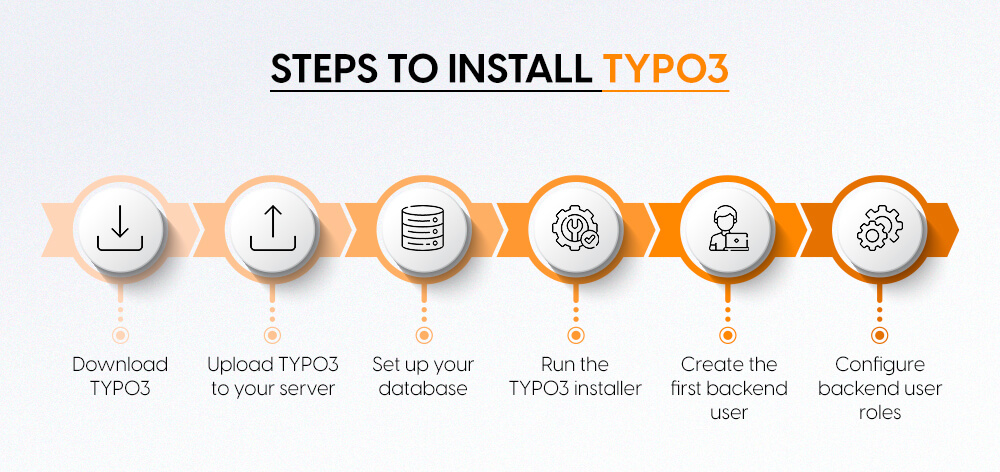
#### **Step-by-step TYPO3 installation process**
**Step 1: Download TYPO3**
Get the latest TYPO3 package from the official website. You can download the source code or use Composer for installation.
**Step 2: Upload TYPO3 to your server**
Once you have downloaded the source code, upload the files via FTP or your hosting control panel. Make sure you upload them to the root directory of your web server.
**Step 3: Set up your database**
Create a new database and a user with the appropriate rights. Use your hosting control panel or a database management tool for this.
**Step 4: Start the TYPO3 installation program**
Open the URL of your website in a browser. The installation program will start and help you with the setup. It connects to the database and configures the basic settings.
**Step 5: Create the first backend user**
During installation, you create the first admin user. This user then has full access to the website administration.
**Step 6: Configure backend user roles**
After installation, you define roles and permissions for other editors or administrators. This keeps content management secure and clear.
If you follow these steps, your website will be ready for creation and customization.
When designing your website, you want it to look good and work well on all devices. TYPO3 offers flexible options to help you create a website that meets your needs.
**Selecting and customizing TYPO3 templates**
TYPO3 comes with ready-made templates to get you started quickly. You can choose a [**TYPO3 Template**](https://nitsantech.de/en/blog/typo3-templates) that suits your style. Then you can customize colors, fonts, and layout to match your brand.
**Using TYPO3's Fluid Templating Engine**
For more control, TYPO3 uses the Fluid Templating Engine. It allows developers to easily create custom designs and layouts. This system separates design from content and makes updates smoother.
**Responsive design and mobile readiness**
With more and more people browsing on cell phones and tablets, your website needs to look good everywhere.[**TYPO3 supports**](https://nitsantech.de/en/services/typo3-support-and-maintenance) Responsive Design, so your pages automatically adapt to different screen sizes with no extra effort.
TYPO3 helps you create a professional website. It uses templates and Fluid. It also emphasizes responsive design. This website works well on desktop and mobile devices.
The [**TYPO3 Backend**](https://nitsantech.de/en/blog/typo3-backend) was developed to make content management easy and clear, even for large websites.
**Creating and organizing pages**
You can build your website structure by creating pages and subpages in the backend. The page tree allows you to see the layout of your website at a glance. You can rearrange the pages as needed.
**Adding content elements**
In TYPO3, you can add different types of content such as text, images, videos, and more. Simply select the desired content type, enter the details, and place it on your page. This allows you to create appealing pages even without technical knowledge.
**Multilingual content management**
If your website needs to support multiple languages, TYPO3 makes it easy. You can create language versions of pages and content, all managed through the same backend. This keeps your website consistent and easy to update in all languages.
With the TYPO3 backend, editors have all the tools they need. This keeps the website fresh and clear, no matter how large the project is.
TYPO3 is very flexible because you can add additional functions through extensions. These are like apps that add new tools or functions to your website.
#### TYPO3 extensions and plugins
There are many ready-made [**TYPO3 Extensions**](https://t3planet.de/en/typo3-extensions). They help, for example, with adding news areas, forms, galleries, or online shops. You can find these in the **TYPO3 Extension Repository (TER)** and install the desired extensions.
TYPO3 can be easily combined with other tools. For example, with Google Analytics to track visitors. Marketing platforms for automating emails and campaigns are also possible. These integrations help you get more out of your website.
If you need special features that don't yet exist, developers can create their own solutions using the TYPO3 API. This makes TYPO3 a powerful solution for websites with special requirements.
It is very important that your website is easy to find in search engines and loads quickly.
**Best search engine optimization (SEO) practices in TYPO3**
TYPO3 offers integrated tools and extensions that help with search engine optimization. The Yoast SEO extension for [**TYPO3 CMS**](https://nitsantech.de/en/blog/typo3-perfect-cms-for-everyone) helps you optimize your content. It also improves meta titles and descriptions.
You can also create clean URLs and easily manage redirects. **TYPO3 SEO** includes caching systems that make your website faster by caching pages and content.
**Ensuring accessibility and user-friendliness**
A good website is easy to use. This also applies to people with disabilities. TYPO3 accessibility supports standards such as [**WCAG**](https://nitsantech.de/en/accessibility-glossary/wcag). This means that your website is usable by a wider audience and complies with legal requirements.
Before going live, follow these important steps to ensure a smooth launch:
- Test your website on different browsers and devices to check the design and functionality.
- Back up all TYPO3 files and the database.
- Install the latest security updates and carefully set user permissions.
- Activate HTTPS with an SSL certificate.
- Check caching and optimize website speed.
- Add analytics tools to track visitors and set up monitoring.
- Point your domain to the server and inform your team.
Careful preparation will help ensure that your TYPO3 website runs smoothly from day one.
Regular maintenance of your TYPO3 website is important for security and smooth performance. Always keep the TYPO3 core up to date with the latest versions and security patches.
It is just as important to update the content of your website. Regularly review and update text, images, and other media to ensure that everything remains relevant and accurate. Good management of user roles and permissions helps you control who can make changes to your website.
Monitoring your website's performance helps you identify problems early on. Fix problems quickly to avoid interruptions. Check your current TYPO3 version now with our free [TYPO3 Version Checker](https://nitsantech.de/en/typo3-version-checker).
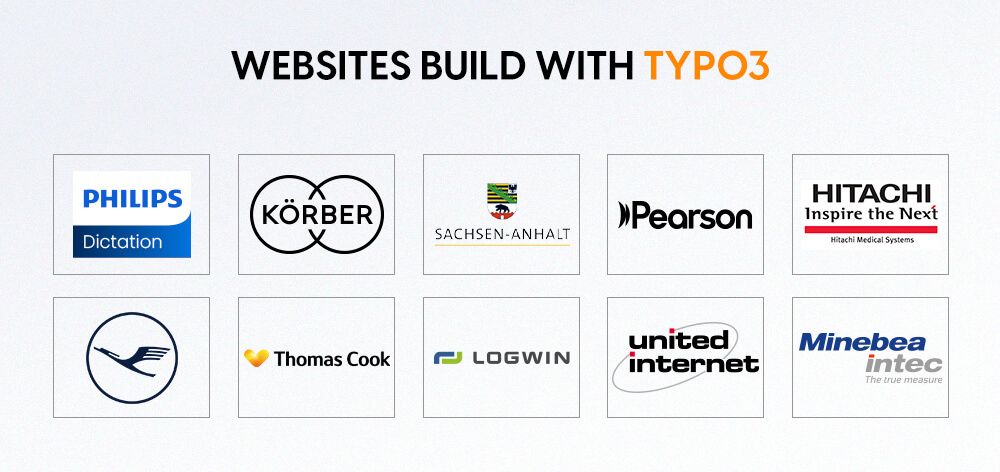
Here are ten real-world TYPO3 websites. They demonstrate how flexible, powerful, and reliable this content management system (CMS) is.
**1. Philips Dictation** - **Healthcare Technology**
**Website:**
**Analysis:** This website shows how TYPO3 handles complex product information without compromising user-friendliness. It is a good example of how well TYPO3 can work for global brands in the healthcare sector.
**2. Körber AG - Technology Group**
**Website:** [https://www.koerber.com/](https://www.koerber.com/en)
**Analysis:** Körber AG uses TYPO3 to organize its complex and diverse corporate content. The site delivers a clear brand message while seamlessly serving different business areas.
**3. Saxony-Anhalt - State portal**
**Website:** [https://www.sachsen-anhalt.de/](https://www.sachsen-anhalt.de/startseite)
**Analysis:** This government portal demonstrates how powerful TYPO3 is in managing large public websites. It offers a wealth of important content and makes information easy to find for all users.
**4 Pearson - Educational Publishing**
**Website:**
**Analysis:** Pearson's website is a good example. It shows how a large educational platform can have many users. It also constantly changes its content. Everything is clearly laid out and easy to navigate.
**5 Hitachi Medical Systems - Medical Equipment**
**Website:**
**Analysis:** Hitachi Medical Systems uses TYPO3 to manage technical content. This keeps the website user-friendly for medical professionals and buyers.
**6 Lufthansa Group - Aviation**
**Website:**
**Analysis:** The Lufthansa Group website shows that TYPO3 can manage large, international corporate websites well. It meets complex requirements and offers visitors a smooth experience.
**7 Thomas Cook Intranet - Travel Services**
**Website:**
**Analysis:** The Thomas Cook intranet shows how flexible TYPO3 is. It helps manage internal platforms. These platforms offer secure access and easy content management for employees.
**8 Logwin Logistics - Logistics and Supply Chain**
**Website:**
**Analysis:** Logwin Logistics uses TYPO3. This enables the company to manage rapidly changing content. It thus provides clear information to customers worldwide. A good example of the use of TYPO3 in the logistics industry.
**9th United Internet - Internet Services**
**Website:**
**Analysis:** The United Internet website shows how well TYPO3 supports complex service platforms. There are many moving parts, but the user experience remains smooth.
**10. Minebea Intec - Industrial Manufacturing**
**Website:**
**Analysis:** Minebea Intec's website shows how TYPO3 handles specialized technical content. Visitors don't have to search long to find what they're looking for.
These websites show us how flexible and powerful the system really is. For developers, TYPO3 offers a modular way to create content. This means that functions can be added or removed.
This keeps the entire website intact, making it easier to keep websites up to date and scalable. Many websites use extensions such as news modules,[**TYPO3 SEO**](https://nitsantech.de/en/blog/typo3-seo)-tools, and forms to improve functionality.
The platform integrates well with other tools and services, making it easy to integrate marketing automation, analytics, and e-commerce solutions.
Performance is an important focus. These websites show that TYPO3 is fast and responsive even with high visitor numbers and complex content. This is important for both user-friendliness and search engine ranking.
Finally, TYPO3 proves that it can grow with your requirements. It scales well from small to large websites. It supports complex, multilingual, and cross-location setups. This makes it a good choice for enterprise projects.
Here is a simple comparison between [**TYPO3 vs WordPress**](https://nitsantech.de/en/blog/typo3-vs-wordpress), and [**TYPO3 vs Drupal**](https://nitsantech.de/en/blog/typo3-vs-drupal). This will help you see where each CMS stands.
| **CMS Feature** | **TYPO3** | **WordPress** | **Drupal** |
|---|---|---|---|
| Best for | Large, complex, multilingual websites | Blogs, small to medium-sized corporate websites | Complex, customized applications |
| Scalability | Strongly geared towards the needs of companies | Moderate need for plugins for scaling | High scalability geared towards developers |
| Multisite support | Integrated and robust | Available with plugins | Strong, but more complex to set up |
| Multilingual | Native support, excellent for global use | Requires plugins, not always seamless | Good multilingual support |
| Editor experience | Structured and secure for teams | Very user-friendly for individuals | More technically demanding, steeper learning curve |
| Security | Strongly ideal for governments and businesses | Varies depending on plugins and themes | Strong, but depends on implementation |
| Custom features | Easily extendable with powerful modules | Heavy reliance on plugins, mixed quality | Strong developer tools |
| Performance | High performance with caching and tuning | Can slow down with too many plugins | Depends on hosting and setup |
| Learning curve | Steep at the beginning, but rewarding in the long term | Easy to learn and set up | Requires technical knowledge |
| Community & support | Strong European base, active contributors | Massive global community | Active developer community |
TYPO3 is still a good choice for organizations. It offers a secure, scalable, and flexible content management system. We are very adaptable. This is demonstrated by examples from government platforms, large companies, education, and healthcare.
Every website uses TYPO3 to manage complex content. It also helps with multilingual communication. In addition, it works reliably, even with high traffic.
When projects require more than a simple CMS, the structure provides stability. This allows you to grow with your requirements.
For teams that want to get the most out of TYPO3, it is important to work with a [**TYPO3 agency**](https://nitsantech.de/en/blog/typo3-agency-typo3-freelancer). A good agency knows its stuff. It can make setup and maintenance easier and more efficient. This is especially helpful for large or customer-specific projects.

Choosing the right CMS is a strategic decision
----------------------------------------------
A clear comparison that helps you decide based on complexity, security, scalability, and long-term requirements.
[ Download guide ](https://nitsantech.de/javascript:;)
#### Contact for Internet agency and TYPO3 projects
#### Sven Thelemann
Service Partner - Germany
[ st@nitsantech.de ](mailto:st@nitsantech.de) [ +49 351 48196661 ](tel:4935148196661)


### Sven Thelemann
Client Service Lead
- [](https://www.linkedin.com/in/sven-thelemann-0a30867b/ "linkedin")
Sven Thelemann serves as the Client Service Lead at NITSAN, focusing on delivering TYPO3 solutions that meet client goals. With a strong understanding of technology and client expectations, he ensures smooth communication and project execution. Outside of work, Sven enjoys cycling and experimenting with homemade recipes.
Comments and Responses
----------------------
Thank you for your comment. Your Comment Added Successfully.
Thank you for your comment. Your Comment Will Be Visible After Approval.
Oops! Something went wrong, please try again later.
##### **Be the First to Comment**
### Related Blogs
[ 
#### TYPO3 CMS for Public Sector Websites: Requirements and Best Practices
](https://nitsantech.de/en/typo3-public-sector-2026)
[ 
#### TYPO3 SEO: Improve Your TYPO3 Website Ranking
](https://nitsantech.de/en/blog/typo3-seo)