---
title: "TYPO3 Upgrade Guide 2026: Update or Relaunch to v13?"
url: "https://nitsantech.de/en/blog/typo3-update-upgrade"
description: "Learn when and how to upgrade your TYPO3 website to v13: roadmap, risks, upgrade vs relaunch, & step-by-step process for agencies & organisations"
image: "https://nitsantech.de/fileadmin/_processed_/5/2/csm_The_Ultimate_Guide_to_TYPO3_Update_Upgrade_521aab3761.jpg"
author: Sanjay Chauhan - TYPO3 Technopreneur
date: 2026-01-15
modified: 2026-01-15
lastUpdated: 2026-02-26
keywords:
- TYPO3 upgrade
- v13 upgrade
- typo3 update
- v13 update
- TYPO3 upgrade v13 LTS
- v13 LTS
- typo3 upgrade cost
- typo3 upgrade checklist
categories:
- Upgrade
---
# TYPO3 Upgrade Guide 2026: Update or Relaunch to v13?
TYPO3 Upgrade Guide 2026: Update or Relaunch to v13?
====================================================
25 Sep 2025
[](https://nitsantech.de/en/blog/author/mihaela-angelova)
[Mihaela Angelova](https://nitsantech.de/en/blog/author/mihaela-angelova)
[ Upgrade ](https://nitsantech.de/en/categories/upgrade)
Upgrading TYPO3 should be treated as a project that impacts Security, Performance, and the Editor's Workflow as well as Long Term Support of the website. TYPO3 upgrades will include a peace-of-mind option with regards to security and support.
Table of content
This guide provides agencies, corporations and government organizations with a clear, vendor-neutral framework to determine when to upgrade, when to redesign and how to plan for a safe upgrade to the most recent LTS (Long-Term Support) Versions of [**TYPO3**](https://nitsantech.de/en/blog/typo3).
The [**TYPO3 Upgrade**](https://nitsantech.de/en/services/typo3-upgrade-service) guide is aimed at organizations that already use the TYPO3 framework and need a systematic approach to planning their upcoming upgrades.
It highlights the teams that must simultaneously manage technical risks, compliance requirements, and budget constraints.
### **Main audiences**
- Agencies that manage many [**TYPO3 installations**](https://nitsantech.de/en/blog/installing-typo3) across different versions for their clients.
- Companies and firms that use TYPO3 for marketing, e-commerce, or intranet platforms.
- Authorities that need to consider WCAG/BITV, GDPR, and long-term support during upgrades.
### **What you will learn**
- The guide shows how to distinguish between minor updates, major upgrades, and a relaunch scenario.
- It also shows you how to review your current TYPO3 configuration and make a realistic effort estimation.
- You will learn how to create a step-by-step upgrade process plan that includes QA, go-live, and long-term maintenance.
The first step in budgeting and planning is to distinguish between maintenance updates, major LTS upgrades, and a complete relaunch. Each of these three options has different impacts, risks, and benefits for your TYPO3 project.
### **TYPO3 Update vs Upgrade vs Relaunch**
In general, a [**TYPO3 Update**](https://nitsantech.de/en/blog/typo3-update) refers to a minor or security update within the same LTS branch (13.1 to 13.2). A TYPO3 Upgrade not only moves your project to a new LTS version but also includes many changes in the code and extensions (10 LTS to 13 LTS).
A relaunch is a major update that replaces the old technology and introduces new UX, structure, and content.
### **Overview table**
| **Aspect** | **Minor Security Update** | **Major LTS Upgrade** | **Relaunch** |
|---|---|---|---|
| Typical Scope | Core patch, minor bug fixes | Core, extensions, templates, configuration | New design, structure, content, and technical base |
| Version Change | Within the same LTS (e.g., 13.1→13.2) | Between LTS (e.g., 10→13) | Often includes an upgrade plus new website setup |
| Main Goal | Close security gaps, fix bugs | Stay supported, gain new features | Modernize experience and technology together |
| Impact on Editors | Minimal | Noticeable UX changes, new features | Completely new workflows and layouts |
| Typical Risk Level | Low (with backup) | Medium, depending on custom code | High, complete project change |
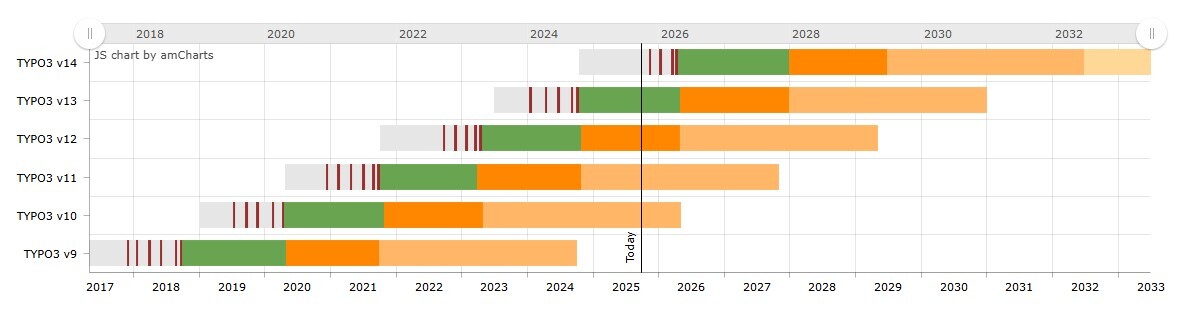
Begin the upgrade process by clearly identifying which LTS versions you are using and how long each of them is supported.
This allows you to make a decision about whether the upgrade is necessary, whether it can be delayed until the release of the new version, or whether it can be carried out with ELTS as a transitional solution.
### **Current LTS status**
- The [**TYPO3 Version**](https://nitsantech.de/en/blog/check-typo3-version) 13 LTS (13.4) is the current version with long-term support and should be chosen for new projects and recommended for upgrades from older LTS versions.
- Typically, **TYPO3 LTS** versions enjoy a three-year phase with regular maintenance and security support, followed by optional extended long-term support (ELTS) for a few more years.
### **What LTS means in practice**
- Regular release of bug fixes and security updates within the LTS branch.
- Publication of clear maintenance and security end dates in the official [**TYPO3 Roadmap**](https://nitsantech.de/en/blog/typo3-roadmap) and version support overview.
- Predictable upgrade paths from one LTS version to the next, allowing agencies and organizations to incorporate these into their multi-year planning.
### **Roadmap towards TYPO3 v14**
The next major step after v13 is [**TYPO3 v14**](https://nitsantech.de/en/blog/typo3-v14-roadmap), which follows a staged release model.
| **Version** | **Planned Date** | **Focus** |
|---|---|---|
| TYPO3 v14.0 | 25 November 2025 | Breaking changes and core updates |
| TYPO3 v14.1 | 20 January 2026 | Feature integration |
| TYPO3 v14.2 | 31 March 2026 | Feature freeze |
| TYPO3 v14.3 LTS | 21 April 2026 | Long-term support release |
### **Version detection**
Before making decisions regarding the upgrade, verify the exact version of TYPO3 and the patch level on your website. This helps you choose the right upgrade path and recognize the urgency of the change.
#### **How to check in the TYPO3 backend**
- Log in to the [**TYPO3 Backend**](https://nitsantech.de/en/blog/typo3-backend) with a user account that has at least editor rights.
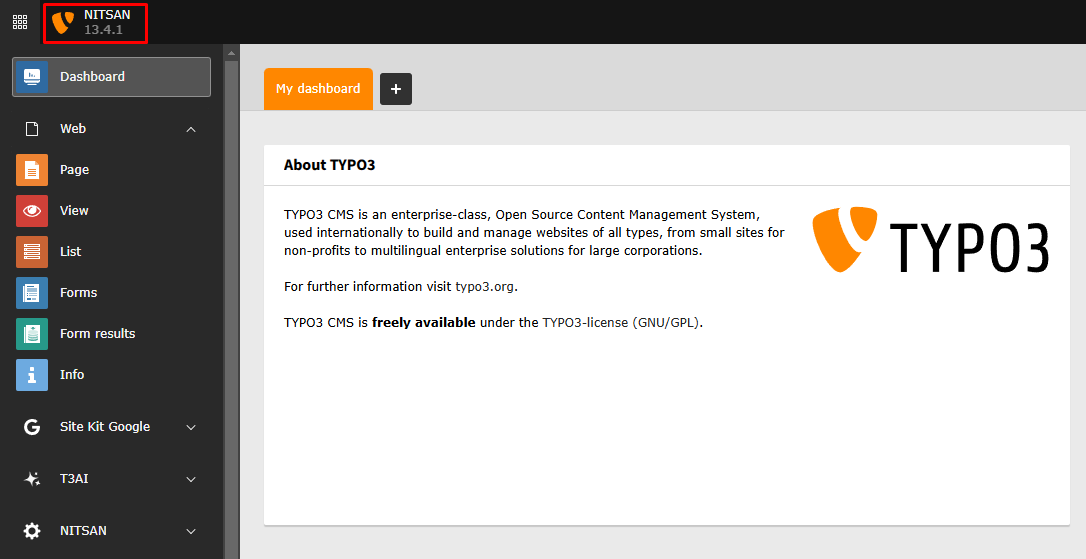
- In TYPO3 v13 and later versions, you can find the version either in the header or in the "System Information/Environment" section.
- Note the main version (e.g., 13.4) and the patch level, as these will determine the available update paths.
What is your TYPO3 Version?
Check it now and take action.
---------------------------------------------------------
Your TYPO3 Version:13.4
Congratulations, your TYPO3 system is up to date with version 13! We would be happy to take care of the maintenance and installation of regular system and security updates for you. [Contact us](https://nitsantech.de/en/inquire) now for a non-binding, customized quote!
Your TYPO3 Version:
With TYPO3 version 12, you still have some time before support expires at the end of April 2029. Nevertheless, we recommend upgrading to the latest version 13 to keep your system up to date. You will also benefit from the latest TYPO3 features. We would be happy to check your system for upgrade possibilities. [Contact us](https://nitsantech.de/en/inquire) now for a non-binding, customized quote!
You do not have a TYPO3 system, or we are unable to identify your version. Please contact us for an individual review of your system and a non-binding initial consultation regarding your TYPO3 upgrade. The upgrade is particularly critical for TYPO3 systems older than version 8, as the lack of further development and support can lead to acute security vulnerabilities. Let us plan your next [TYPO3 upgrade](https://nitsantech.de/en/services/typo3-upgrade-service) together!
Please enter a valid domain
#### **How to check on the server**
- For a Composer-based installation, open the composer.json file and look for the version constraint for typo3/cms-core.
- In the case of legacy installations without Composer, check the typo3\_src folder or symlink, which usually indicates the installed version of the core.
When using the TYPO3 version, it is important to decide between an upgrade and a relaunch. The decision mainly depends on technical debt, design goals, compliance requirements, and the available budget.
### **Typical upgrade scenarios**
In most cases, a structured upgrade path could be the fastest option for the projects.
#### **TYPO3 11 or 12 LTS with modern templates**
- Clear extension landscape, not very old custom code.
- **Goal:** Maintain the current UX, improve security and editorial tools by transitioning to v13 LTS.
#### **TYPO3 9 or 10 LTS with limited customisation**
- The website is stable, but the support windows are either ending soon or have already ended.
- **Goal:** Ensure secure operation and compatibility before introducing new features.
#### **Public or enterprise sites with strict change management**
- The new design is not yet part of the plan, but security and GDPR requirements are very strict.
- **Goal:** First control the technical upgrade, then UX changes later.
### **When a relaunch is the better choice**
There are certain circumstances where a complete relaunch cannot be avoided instead of doing several major upgrades in succession.
- Very old TYPO3 versions (e.g., 4.x–8.x) with outdated templates and many legacy extensions.
- Non-responsive website, outdated UX, and the old information architecture no longer reflects business or organizational needs.
- Performance, SEO, and accessibility issues require a deep redesign instead of a series of incremental fixes.
- The estimated effort for a multi-stage upgrade is about the same or even higher than a clean build on the current TYPO3 LTS.
In these situations, a relaunch offers teams the opportunity to clean up content, optimize navigation, and adopt current best practices in a single project instead of conducting multiple partial upgrades.
### **Role of ELTS and support windows**
- Extended Long-Term Support (ELTS) can provide time to plan the next major step very carefully.
- TYPO3 LTS versions undergo a defined period of regular maintenance and security updates; afterward, the ELTS can bridge the gap until the upgrade or relaunch.
- ELTS is useful when an important project cannot be postponed immediately, for example, due to budget cycles, external integrations, or approval in public institutions.
- ELTS should be considered a temporary risk mitigation measure and not an alternative to the supported LTS upgrade.
The first point is that an upgrade is not just a matter of "currency." The security, speed, and maintainability of your [**TYPO3 website**](https://nitsantech.de/en/blog/typo3-website) for the coming years are directly influenced by the upgrade.
With TYPO3 v13 as the current LTS version and v14 on the roadmap, 2026 marks a strategic time to reduce technical debt and prepare for future projects.
### **Security and support**
- Versions with LTS status receive continuous security updates; older versions, on the other hand, lose this protection and become more vulnerable to security vulnerabilities over time.
- [**TYPO3 v13 LTS**](https://nitsantech.de/en/blog/typo3-v13-lts) is the version that provides bug fixes until April 2026 and security updates until October 2027, thus providing the basis for medium-term planning.
### **Performance and stability**
- The latest version, TYPO3 v13, utilizes optimized database queries, improved caching, and better image processing, all of which help reduce load times and increase system stability.
- For this reason, fast-loading pages are widely perceived as more user-friendly, and SEO rankings could even slightly improve, especially for mobile users.
### **Features and editor experience**
- In the TYPO3 v13 version, the backend is modernized, the page and file tree unit is clearer, bulk editing is improved, and the Fluid templating engine is updated.
- The navigation for editors is simplified through more user-friendly navigation, better accessibility support, and time-saving features that facilitate daily content work.
### **SEO and GDPR-related aspects**
- Combined, the built-in SEO tools and technical improvements such as image processing and performance ensure that bounce rates remain low and stable ranking signals are supported.
- The latest TYPO3 versions offer more options that help create GDPR-compliant setups (such as regarding cookies, logging, and security headers), but do not replace legal advice or a formal compliance assessment.
A structured analysis of your current TYPO3 installation is the foundation for realistic effort estimates and a low-risk upgrade plan. The goal is to identify technical blockages early and decide which parts can be upgraded, replaced, or removed.
### **Technical audit checklist**
First, focus on the key technical components of your installation.
- #### **Core and extensions**
- Current TYPO3 version and patch level.
- List of all installed extensions, including custom extensions and their compatibility with target versions.
- #### **Infrastructure and PHP**
- Server operating system, PHP version, database, and web server configuration.
- Alignment of PHP and database versions with the requirements of TYPO3 v13 and future versions.
- #### **Templates and integrations**
- Templating stack (Fluid, legacy approaches, third-party template extensions).
- External integrations such as payment systems, CRM, search, or SSO that might be affected by an upgrade.
- #### **Performance and logging**
- Current performance metrics (page load times, cache hit rates, error log volume).
- Known bottlenecks or recurring errors that should be addressed during the upgrade project.
### **Using ns\_ext\_compatibility for extension checks**
The ns\_ext\_compatibility extension from NITSAN can significantly shorten the analysis phase.
- It creates a structured compatibility report for extensions across TYPO3 versions (4.x to 13.x) and highlights extensions that require attention for the planned target version.
- Additional features such as automatic email notifications, server compatibility overview, and export reports support transparent communication with clients and internal stakeholders.
This tool should be used alongside the manual review of critical business extensions to validate results and plan refactoring or replacements if needed.
### **Risk assessment and rollback planning**
Based on the audit, document the key technical risks and define clear fallback options.
#### **Risk assessment**
- Identify areas with heavily customized code, outdated APIs, or unsupported extensions.
- Assess their impact on core business processes (e.g., orders, forms, logins).
#### **Backup and rollback strategy**
- Define how and when full backups of the database and file system are created before each upgrade step.
- Plan a tested rollback path from the staging and live systems so you can quickly revert in case of critical issues.
A TYPO3 upgrade should be estimated based on the specific technical scope, not on a fixed number of hours per version step. A clear breakdown into work packages makes the timeframe and budget transparent for internal stakeholders and customers.
### **Effort categories at a glanc**
Most projects can be grouped into several main effort blocks.
| **Category** | **Typical Content** | **Main Drivers** |
|---|---|---|
| Core upgrade | Version steps, Install Tool, configuration changes | Current vs. target LTS, number of intermediate steps |
| Extensions and custom code | TER updates, custom extensions, deprecation fixes | Number, age, and complexity of extensions |
| Templates and frontend | Fluid migration, layout adjustments, JS/CSS compatibility | Templating method, design changes, integrations |
| QA and bug fixing | Function tests, regression fixes, performance tuning | Website size, languages, business-critical functions |
| Deployment and coordination | Staging setup, go-live, stakeholder communication | Environments, approvals, release processes |
### **From analysis to a concrete proposal**
- Use the technical audit and the ns\_ext\_compatibility report as a quantitative basis for each category, instead of relying on rough estimates.
- For complex, older installations (e.g., upgrades from 4.x–8.x), add a buffer for unknown issues, especially with custom extensions and outdated APIs.
- When creating a proposal, structure the estimate along the same categories (Core, Extensions, Templates, QA, Deployment) so that customers understand where the effort comes from and where uncertainties, such as incompatible extensions, might require additional effort.
Curious about the costs for your TYPO3 upgrade? We provide the answer!
----------------------------------------------------------------------
A structured process should be followed for a TYPO3 upgrade across different environments, which reduces risk and prevents disruptions in the live system.
The following steps can be adapted for agencies, companies, and public institutions of different sizes.
### **From live to local or staging**
#### **Step 1: Establish a local or staging environment**
- Make a full backup of the live system (database and files).
- The project should be restored on a local or dedicated staging environment with the same PHP and server stack, if possible.
- Ensure that the copy functions like the live website before starting the upgrade work.
### **Core, extensions, and template migration**
#### **Step 2: Upgrade the TYPO3 core**
- Update the TYPO3 core according to the recommended version steps (e.g., v10 → v11 → v12 → v13) using the Install Tools and the official upgrade wizards.
- Change configuration and system settings according to the requirements of the new version.
#### **Step 3: Extensions and templates are updated**
- Update TER extensions via Composer or the Extension Manager and replace unsupported extensions if necessary.
- Adapt custom extensions and templates to remove deprecated APIs and be compatible with the new TYPO3 version and PHP stack.
### **Handling incompatible extensions**
#### **Step 4: Analyse and resolve non-compatible extensions**
- Identify extensions that cannot be directly updated via tools like ns\_ext\_compatibility and a manual review.
- Each "unfeasible" extension should be documented, and alternatives should be suggested, such as replacement extensions, refactoring, or eliminating outdated functions.
- Stakeholders should be involved in these decisions as they may affect both functions and timelines.
### **QA, stakeholder testing, and launch**
#### **Step 5: QA and user testing on DEV**
- Reinstall the upgraded version of the system on a DEV or test server (e.g., dev.yourdomain.com) and conduct the entire QA checklist: main user paths, connections, logging, and performance.
- Get the cooperation of editorial staff and key users to review usual processes and ensure the proper functioning of key processes.
#### **Step 6: Go-live with rollback option**
- Plan the go-live, create a final backup of the existing live system, and deploy the updated version from staging to production.
- After the launch, careful monitoring of logs, performance, and error reports is required, and a tested rollback path should be kept ready in case unexpected critical issues arise.
Between major LTS upgrades, smaller and security updates ensure that your TYPO3 installation remains stable and protected. They require less effort than a full upgrade but still need a controlled process and proper backups.
### **Updating via TYPO3 backend**
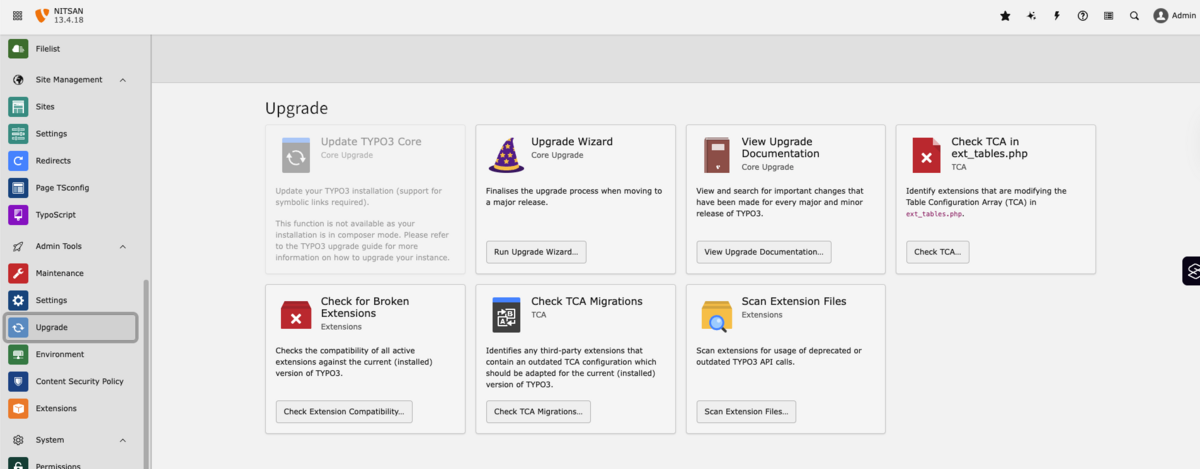
- In installations where it is supported, the Install Tool offers the possibility to update the TYPO3 Core within the same LTS branch (for example, from 13.1 to 13.2).
- This case is suitable if the hosting, file permissions, and server tools (such as the tar command) meet the TYPO3 requirements and you have a quick way to restore from the backup if needed.
### **The manual process for minor and security updates**
- On the other hand, you might consider downloading the new core package from the official TYPO3 download page, installing it on the server, and then either moving the typo3\_src symlink or changing the Composer constraint.
- This procedure allows for better control and is therefore the most common choice in areas with strict change management policies or limited backend update options.
### **When to decide which way**
- Perform backend updates for smaller projects with simple hosting where creating and testing backups is easy.
- Manual or Composer-based updates should be attempted for more complex installations, multi-server setups, or regulated environments, and each update step should be well documented to support future audits.
A TYPO3 upgrade is the ideal moment to modernize extensions and remove outdated code to ensure your project remains maintainable for future versions. The focus is on TER extensions, custom code, and API changes between older versions and the current LTS.
### **TER extensions: update via Extension Manager or manually**
- **Extension Manager / Composer**
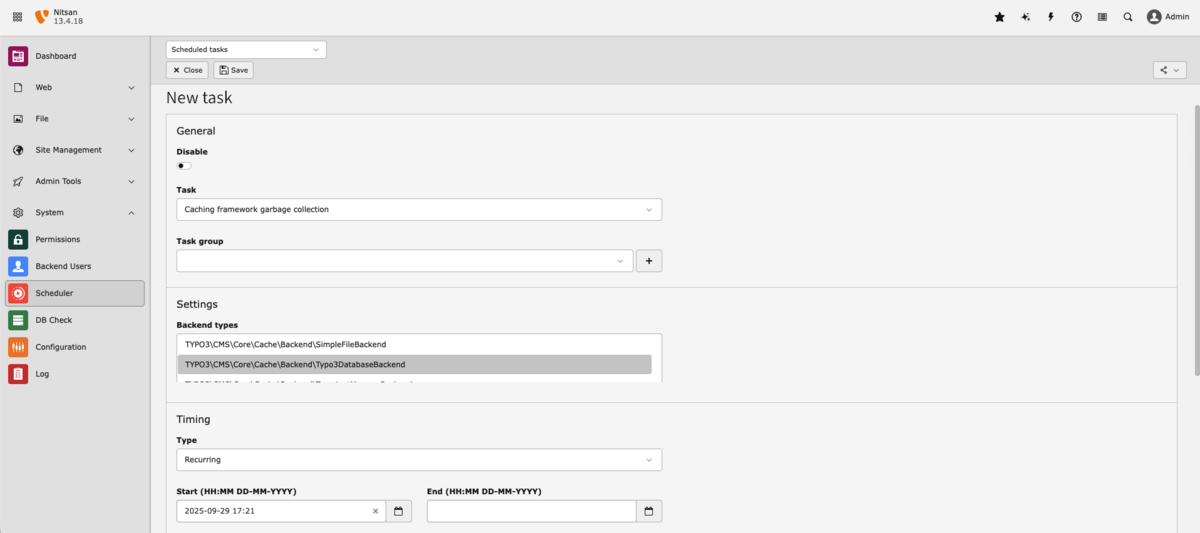
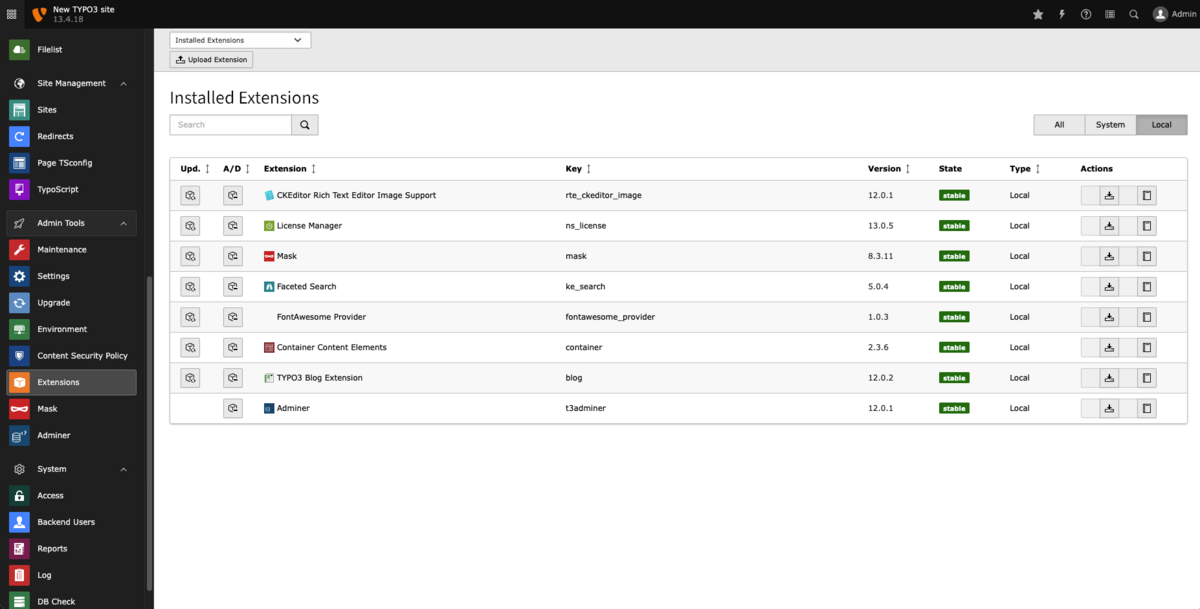
- For many TER extensions, you can update directly via the Extension Manager or Composer by selecting the compatible version for your target TYPO3 version. When you update the extension list, the scheduler "Update Extension List (Extension Manager)" compares the available versions and indicates which extensions can be updated in the "Manage Extensions" section.
- After clicking on the upgrade icon for a specific extension, TYPO3 displays a pop-up with the available versions, allowing you to select the version that matches your planned TYPO3 core version.
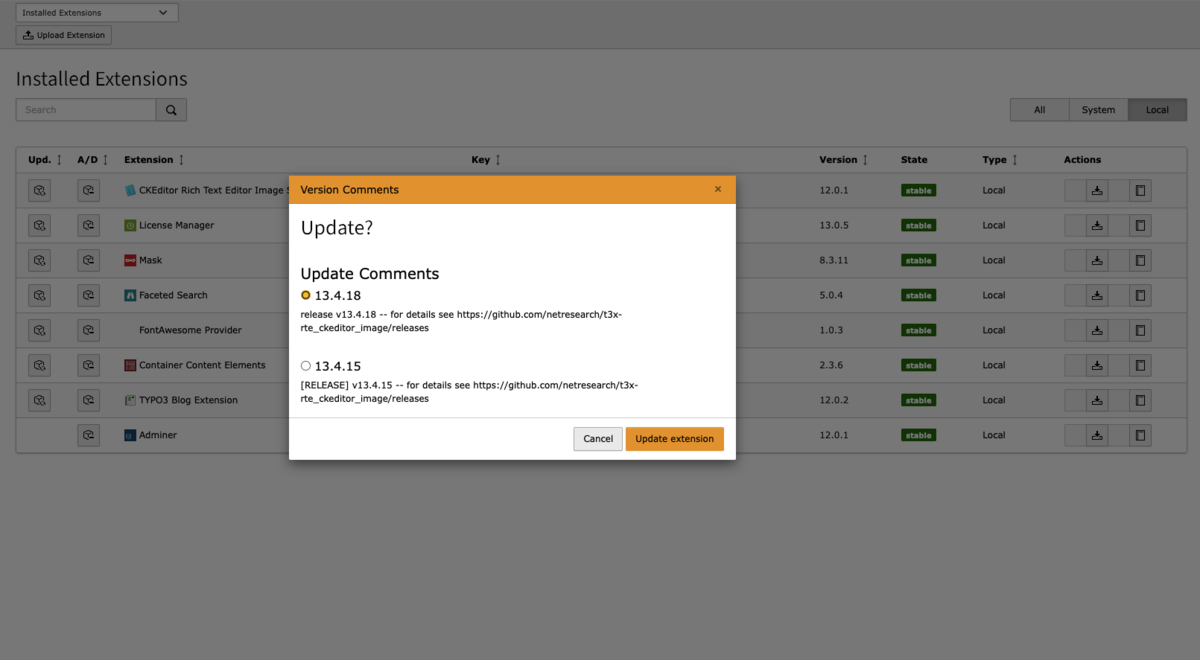
- This approach is efficient when extensions are actively maintained and their version constraints are clearly declared.
- **Manual updates**
- If no compatible version is offered, you may need to download newer versions from [extensions.typo3.org](http://extensions.typo3.org), check the dependencies, and test them carefully before deploying.
- In some cases, it is safer to replace an extension with a better-maintained alternative than to force compatibility.
### **Custom extensions and deprecated APIs**
- **Refactoring custom extensions**
- Older custom extensions often rely on outdated classes and functions such as piBase, t3lib\_div, t3lib\_extMgm, or legacy TCA definitions.
- During an upgrade, these should be mapped to the current APIs like Extbase, GeneralUtility, ExtensionManagementUtility, and modern TCA/TSConfig locations as recommended in the TYPO3 core changelogs.
- **Handling extensive code changes**
- Very long migration lists containing individual method replacements and SQL workarounds for FAL data should be better documented in an internal appendix or technical playbook rather than directly in the main article.
- Always verify each change with the current official TYPO3 documentation and upgrade guides, as precise code examples in the core versions may become outdated.
Direct developers to the TYPO3 Core API documentation and upgrade instructions as the primary reference and use project-specific notes only as a supplement, not a replacement.
- Whenever extensions are actively maintained, dependency management through version constraints becomes an effective method.
### **Updates are done manually**
- If no compatible versions are available, you must obtain the latest versions from extensions.typo3.org, check the dependencies, and thoroughly test before going live.
- In some cases, the best option might be to switch to a well-supported replacement extension instead of making compatibility changes.
### **Legacy extensions and discontinued APIs**
#### **Custom extensions refactoring**
- Legacy custom extensions sometimes rely on outdated classes and methods such as piBase, t3lib\_div, t3lib\_extMgm, or old TCA definitions.
- Whenever the system is updated, use Extbase, GeneralUtility, ExtensionManagementUtility, and modern TCA/TSConfig dimensions according to the TYPO3 core changelogs for your current core API mapping.
#### **Extensive code changes handling**
- Very long migration lists containing individual method changes and SQL workarounds for FAL data should be better documented in an internal appendix or technical playbook rather than in the main article.
- Always verify each change with the current official TYPO3 documentation and upgrade guides, as precise code examples during core releases may become outdated.
Inform developers about the TYPO3 Core API documentation and upgrade procedures as the main reference and use project-specific notes only as a supplement, not a replacement.
Thorough testing and a controlled go-live process reduce regressions and unplanned downtime after a TYPO3 upgrade. The table below summarizes the key checks.
| **Phase** | **Focus Area** | **Key Checks** |
|---|---|---|
| Functional & UX testing | Core scenarios | Navigation, page rendering, search, logins, and forms on key pages. |
| | | Backend editing workflows: creating, editing, and publishing content. |
| | UX & Accessibility | Layout and responsiveness on desktop, tablet, and mobile device. |
| | | Basic WCAG/BITV checks for public and major websites. |
| Performance, logs & monitoring | Performance | Measure load times (e.g., with PageSpeed) compared to the baseline before the upgrade. |
| | | Confirm that caching works and no unexpected slow queries occur. |
| | Logs and Errors | Check system reports, error, and deprecation logs. |
| | | Check the console in the browser on key pages for JavaScript issues. |
| Post-launch first week | After Deployment | Install tool shows no critical issues; scheduled tasks run as expected. |
| | | Monitor form submissions, transactions, and requests for anomalies. |
| | Stabilization | Keep the feedback channel open for editors and support teams. |
| | | Reserve time to fix urgent issues before switching to normal maintenance. |
For teams looking for a structured starting point, a dedicated TYPO3 Upgrade Kit can simplify planning and execution. It bundles reusable materials so you don't have to create every checklist and template from scratch.
### **What the TYPO3 Upgrade Kit includes**
- Checklists for technical audits, QA, and go-live.
- Template for estimating upgrade effort and customer offers.
- Sample communication plan for stakeholders and editors during the upgrade.
- Links to the current TYPO3 documentation, roadmap information, and NITSAN's detailed articles on TYPO3 v13 and future versions.
[**Free TYPO3 Update/Upgrade Kit**](https://nitsantech.de/en/typo3-upgrade/typo3-upgrade-kit)
Upgrading to TYPO3 v13 LTS ensures security, modern PHP performance, and superior editor experience. Follow a structured roadmap to minimize risks and deliver fast, secure, accessible websites. Start today with a [**TYPO3 Agency**](https://nitsantech.de/en/typo3-agency) to stay ahead.

Is Your TYPO3 Website Properly Secured?
---------------------------------------
Learn how to review system updates, user permissions, hosting security, and configuration settings.
[ Download guide ](https://nitsantech.de/javascript:;)
FAQs
----
What is a TYPO3 upgrade?
A TYPO3 upgrade moves your site from one LTS version to a newer one (for example v10 to v13), updating core, extensions and templates to current standards.
When should I upgrade my TYPO3 website?
Upgrade when security support is ending, required extensions need newer TYPO3 versions, or performance and editor UX are no longer sufficient.
What is the difference between an upgrade and a relaunch?
An upgrade keeps your structure and content but modernises the system. A relaunch combines a new technical base with new design, navigation and often content.
How much effort does a TYPO3 upgrade require?
Effort depends on version gap, number of extensions, custom code and integrations, and should be estimated after a structured technical audit.
What is TYPO3 ELTS and when does it make sense?
ELTS is paid extended support for older LTS versions and is useful when an immediate upgrade is not possible, but it remains a temporary solution.
How can I check my current TYPO3 version?
Check the version in the TYPO3 backend header or system information, or read the typo3/cms-core version from composer.json in Composer projects.
What should be tested after a TYPO3 upgrade?
Test key user journeys, forms, logins, search, integrations, editor workflows, performance and logs, and compare key pages before and after the upgrade.
When is a TYPO3 relaunch the better choice?
A relaunch is preferable for very old, non‑responsive or heavily customised sites where multiple upgrades would approach the cost of a fresh build.
Do I always need a TYPO3 agency for upgrades?
No. Smaller sites can be upgraded in-house, but complex, multi-language or public-sector projects often benefit from a specialised TYPO3 agency.

#### Contact for project management and team coordination
#### Mihaela Angelova
Project Manager - Germany
[ mihaela@nitsantech.de ](mailto:mihaela@nitsantech.de) [ +49 30 914 555 10 ](tel:493091455510)

### Mihaela Angelova
Project Manager
- [](https://www.linkedin.com/in/mihaela-n-angelova/ "linkedin")
Mihaela keeps technology projects on track and ensures to meet business goals. She specializes in coordinating teams, optimizing workflows, and delivering projects. At NITSAN, she works closely with clients to transform ideas into actionable solutions. Outside of work, she enjoys exploring new hiking trails.
Comments and Responses
----------------------
Thank you for your comment. Your Comment Added Successfully.
Thank you for your comment. Your Comment Will Be Visible After Approval.
Oops! Something went wrong, please try again later.
##### **Be the First to Comment**
### Related Blogs
[ 
#### TYPO3 v13 Upgrade Checklist: What to Prepare Before You Start
](https://nitsantech.de/en/blog/typo3-v13-upgrade-checklist)
[ 
#### TYPO3 Update 13: What Does This Mean for Agencies?
](https://nitsantech.de/en/blog/typo3-13-update-for-agencies)