---
title: TYPO3 Testing and Quality Assurance Handbook
url: "https://nitsantech.de/en/blog/typo3-testing"
description: "TYPO3 Quality Assurance and TYPO3 Testing: love it or hate it, you can’t live without it. From what we learned, behind every successful TYPO3 website there is a significant amount of testing in order to provide for its quality. And every testing process begins with a QA plan (or also known as a Test Plan)."
image: "https://nitsantech.de/fileadmin/_processed_/1/a/csm_TYPO3-Testing-QA-Blog-Share_bf41fce0eb.jpg"
date: 2022-03-20
modified: 2025-10-03
lastUpdated: 2026-02-25
keywords:
- TYPO3 ERROR
- TYPO3 TESTING
- TYPO3 QUALITY ASSURANCE
- TYPO3 ISSUES
- TYPO3 ERROR LOG
categories:
- Wartung / SLA
---
# TYPO3 Testing and Quality Assurance Handbook
TYPO3 Testing and Quality Assurance Documentation
=================================================
09 Jun 2021
[](https://nitsantech.de/en/blog/author/mihaela-angelova)
[Mihaela Angelova](https://nitsantech.de/en/blog/author/mihaela-angelova)
[ Support / SLA ](https://nitsantech.de/en/categories/support-sla)
TYPO3 Quality Assurance and TYPO3 Testing: love it or hate it, you can’t live without it. From what we learned, behind every successful TYPO3 website there is a significant amount of testing in order to provide for its quality. And every testing process begins with a QA plan (or also known as a Test Plan).

Table of content
In this detailed TYPO3 Testing and quality assurance guide we will explain what a QA plan is, who creates it, why it’s important to have one, and the steps that need to be followed in order to create it.
Let's start!
[via GIPHY](https://giphy.com/gifs/detectivepikachumovie-NS7gPxeumewkWDOIxi)
1. Preparing for TYPO3 Testing
------------------------------
Before you even test the TYPO3 website you need to know exactly what you intend to do before, functionalities to test, goals to achieve before you dig into the project.
This will include:
- A **set of goals** for the website and a rough plan and approach to meet requirements through design and development.
- A **checklist of every project-related task** and its associated deadline.
- A **QA step** built into every major milestone.
- Clearly **defined roles** for team members and the tasks they will be responsible for.
- Decide and **finalize the tools** you’ll be using to manage and test the TYPO3 project for quality assurance purposes.
Of course, this action plan needs to be fully documented.
2. Check for TYPO3 Server Compatibility
---------------------------------------
Imagine, you have three servers local, staging, and production server, there are chances where your production server might be not compatible with your TYPO3 version. Eg., PHP version.
It’s always a good practice to check out all **TYPO3 version compatibility** between your TYPO3 CMS and server. You can use one of our small PHP-script [ns\_typo3\_compatibility](https://github.com/nitsan-technologies/ns_typo3_compatibility) to easily check.
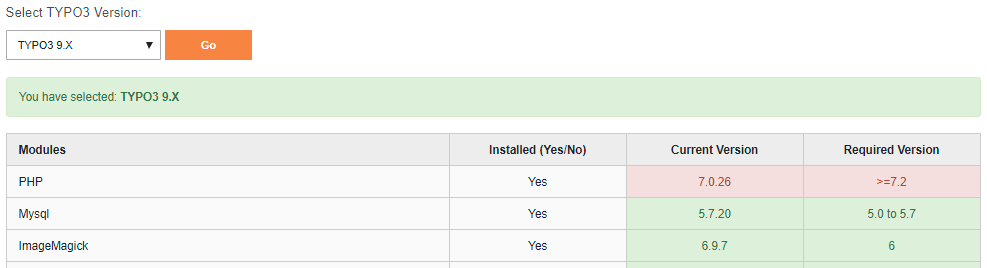 Check for TYPO3 Server Compatibility
 Check for TYPO3 Deployment System
To maintain your TYPO3 website for **hesitate-free and smooth deployment**, We suggest you set up an automatic deployment system.
It would be nice to have a [deployment system](https://nitsantech.de/en/blog/typo3-ci-cd) to deploy your changes from a testing server to a live server.
Based on your needs, You can define a number of stages for your deployment. We always set up the minimum following steps for the **TYPO3 website development.**
- **Local Server** Where Frontend & TYPO3 developers complete their code.
- **Staging System,** Where the QA testing team checkout the whole TYPO3 website, Also customers get a chance to have test-driven as well as approval to make any particular changes to live.
- **Production System,** It’s Go-live your website.
 Test for TYPO3 Security
Although, **TYPO3 is the most secure OpenSource CMS**, Let’s take care of security, Specially custom extensions.
Talk with your TYPO3 team to install and configure this strong TYPO3 security solution at [**How To Secure Your TYPO3 Sites From Hack Attempts?**](https://nitsantech.de/en/blog/how-to-secure-your-typo3-sites-from-hack-attempts)
One more thing, TYPO3 has a great dedicated security team, Whenever you found security issue into TYPO3 core then connect with them at
Here is the quick **checklist to secure your TYPO3** website.
- **Keep** your TYPO3 **up-to-date** with the latest major version
- Always consider immediately **update security TYPO3 updates**
- Use **secure passwords** and update frequently
- Invest in a **Malware detector**
- Be careful about your **permission** at the server
- **Setup TYPO3 SSL**
- Reduce **XSS** vulnerabilities
- Reduce **SQL injection** vulnerabilities
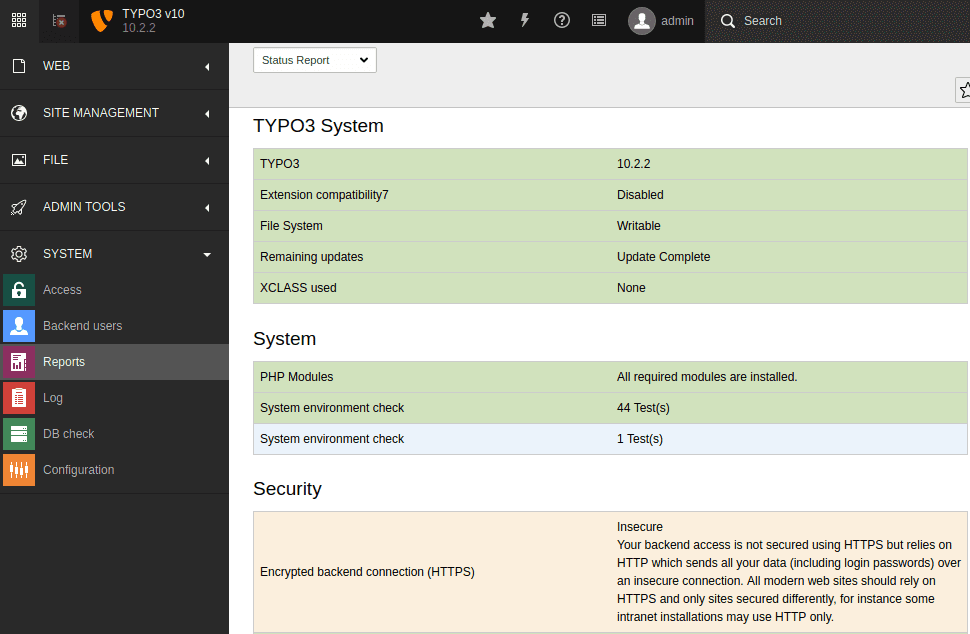
You must keep a check on TYPO3’s health as well without any errors and warnings, It will help TYPO3 to perform better.
**Step 1.** Go to System < Reports
**Step 2.** Choose Status Report to check out the whole **TYPO3 system report**
If you found any warning or errors, then contact your System Administrator or TYPO3 team to fix them.
The responsive TYPO3 site plays a major role in Google indexing, so this quality assurance test is not optional.
There are four tools and methods you will need to use to test your website’s cross-browser and device compatibility.
- The first is to **review each page of your site within the TYPO3 site**.
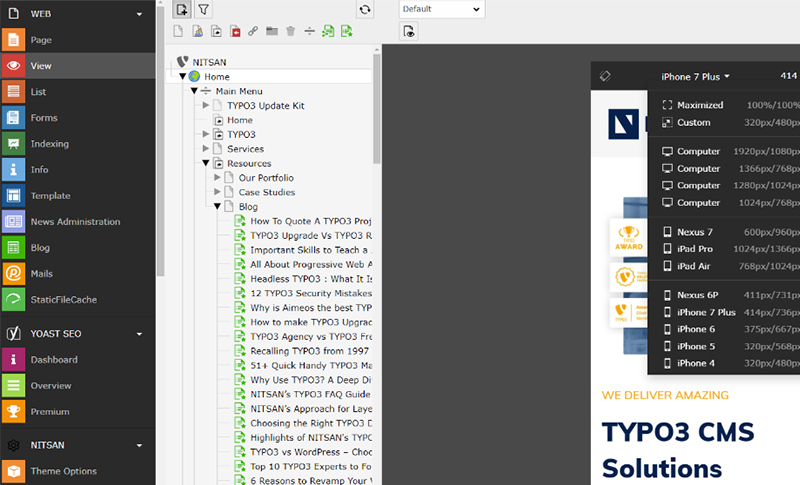
- If you’re using a TYPO3 template with a visual builder, you can review your on-page compatibility with tablets or mobile devices when developing in real-time, too.
- Next, you’ll need an app like [Browser Stack](https://www.browserstack.com/), [Experte](https://www.experte.com/mobile-friendly) to test your website on all major devices and browsers.
Next, test your site’s **cross-browser compatibility** manually. I know, I know… It sucks. But it’s the only way to know for sure that everything looks good *and* works as it’s supposed to on smaller screens.
And, finally, once your site is live, run it through [Google’s Mobile-Friendly Test](https://search.google.com/test/mobile-friendly).
Google will give you the all-clear and may also give you tips on how to fix rendering issues.
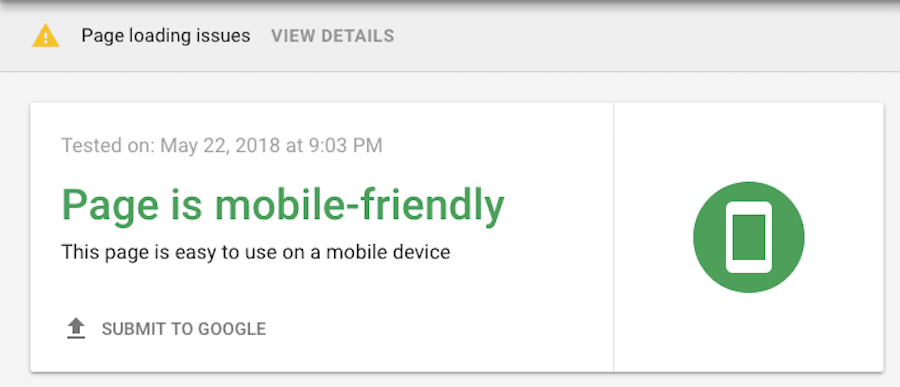 Cross browser Combability
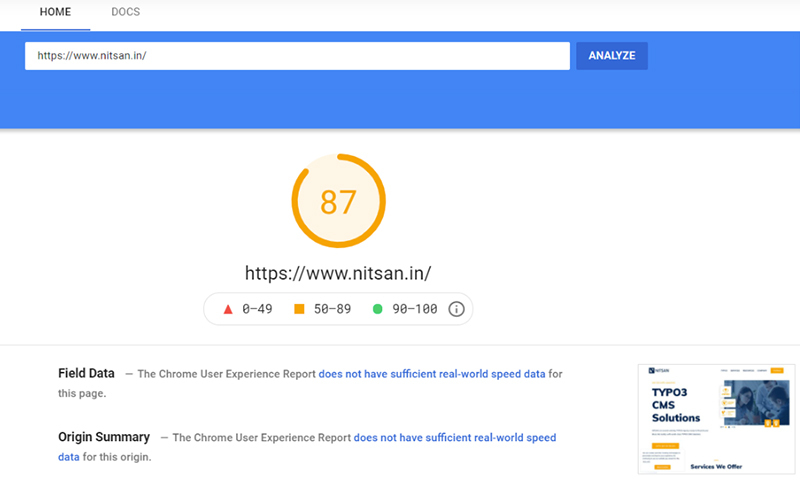
There are a number of free online speed testing tools you can use, but I prefer [Google’s PageSpeed Insights](https://developers.google.com/speed/pagespeed/insights/).
Its result is based on the [**latest Google Core Web Vitals**](https://t3planet.de/en/blog/typo3-google-core-web-vitals/) and not only provides a speed score for both the desktop and mobile experience, but it also provides me with tips on how to fix issues with coding or images that are impacting performance.
8. Check for GDPR Compliance on your TYPO3 Website
--------------------------------------------------
The TYPO3 community started to work on **TYPO3 GDPR compliance**. Make sure your TYPO3 website is well compatible with all standards of GDPR/DSGVO.
Check out our detailed TYPO3 blog on GDPR, and take action on your website from [**TYPO3 GDPR Essentials and Solutions**](https://t3planet.de/en/blog/add-openstreetmap-to-typo3/)

Who knows what will happen tomorrow? Maybe your server may crash, or maybe your server may get hacked, delete files as human errors, and so on. Make sure to have regular **TYPO3 backup and restore** the system.
You may consider having common following best-practice to have TYPO3 backup.
- Should have a daily backup of your **TYPO3 database**
- Should have a weekly or monthly backup of your **TYPO3 code**
- Should set up an **automatic TYPO3 backup system** instead of manual backup
- Should perform maintenance with **Git versioning**
- Should **secure** your backup server
- Should do **restore** testing with your backup files
- Should consider 3-2-1 backup policy
- Should also take a backup of **Email accounts**
[**Checkout best extensions for TYPO3 Backup**](https://t3planet.de/en/blog/typo3-backup/)
10. Checklist for UI/UX Design Testing
--------------------------------------
It’s very important that your end-result TYPO3 website should be 1:1 of your design which has been prepared by your **UI/UX graphics designer.**
Many of our customers are requesting to have the following special cares, we always happy to take care.
- Pixel perfect 1:1 design match
- Strictly following of style guide throughout the website
- Perfect matching of alignment and spacing
- etc.,
### **Design Testing Tools & Techniques**
| [Perfect Pixel](https://chrome.google.com/webstore/detail/perfectpixel-by-welldonec/dkaagdgjmgdmbnecmcefdhjekcoceebi) | Do you want pixel-perfect design testing? It’s an awesome tool. |
|---|---|
| [Ruler](https://addons.mozilla.org/en-US/firefox/addon/browser-ruler/) | A simple tool for measuring arbitrary parts of a page. |
| [Dimension Display](https://chrome.google.com/webstore/detail/width-and-height-display/hhcddohiohbojnfdmfpbbhiaompeiemo) | This extension displays the inner width and inner height of the screen |
| [CSS Viewer](https://chrome.google.com/webstore/detail/cssviewer/ggfgijbpiheegefliciemofobhmofgce) | A simple CSS property viewer. |
| [Magnifying Glass](https://mybrowseraddon.com/magnifying-glass.html) | Magnifying Glass lets you easily magnify a small portion of the page with a click of a button. |
| [Web Developer](https://chrispederick.com/work/web-developer/) | The Web Developer extension adds various web developer tools to a browser. |
| [ColorPick](https://chrome.google.com/webstore/detail/colorpick-eyedropper/ohcpnigalekghcmgcdcenkpelffpdolg/related?hl=en) | Color Pick is an Amazing Eye Dropper that allows a precise selection of color values through its one-of-a-kind zoomed preview! |
11. Review the Design with End Users
------------------------------------
For testing purposes, this is something your TYPO3 developer should do on their own, something you, as well as a number of people who’ve had no hand in the project up until this point.
Consider reaching out to clients, employees, or colleagues to test the site out.
At the staging site, you can create temporary login credentials for your users. Just ask them to step into the website and work their way around it.
Here is what you should be looking for:
- How does the search work? Are results relevant? Does it work fast enough?
- Is the page working on both Android and iPhone?
- Is the contact form on the page still working in Safari?
- Is the mobile menu opening on Android?
- Did the footer disappear?
- Are there any issues with the navigation? Was it easy to find? Easy to use? Do the labels clearly explain their intended destination?
- Were there any issues within the design itself that kept users from getting around the site? Colors? Typography? Images? Distractions?
- Did the natural path users take to drive them directly to conversion?
If you’re left with more questions and confusion after new users have taken it for a whirl, then you’ll need to take this back to the review points and discuss it with the client.
12. Check for TYPO3 Coding Compliance
-------------------------------------
Your technical TYPO3 team should prepare a good **TYPO3 code review** system. At least you should consider the following code review points.
- Check code standards lint with PHP PSR-2, TypoScript, YAML, XLIFF
- Check code standards with TYPO3 core
- Check code indentation
- Check code comments
- Check code name conventions
- Check code clean-up
- Check code redundant
- Check code localization
- And so on.
And even if you only have one TYPO3 developer building your site, or you’ve relied heavily on a [**TYPO3 template**](https://nitsantech.de/en/blog/typo3-templates) and extensions that you might not be aware of to build it, you should still check the quality of the coding for issues. You can do this with [W3’s Validator tool](https://validator.w3.org/).
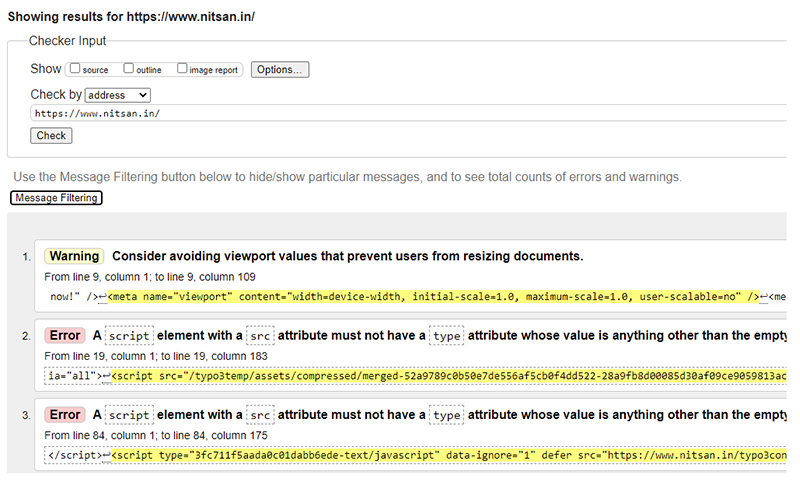
It will reveal any issues detected with your HTML and give you a chance to clean those up before you push your site live. In the end, that’ll help your site run more efficiently.
13. Checklist for TYPO3 Backend Usability
-----------------------------------------
In the Content Management System, Better backend usability is very important. You need to be sure, how can make **TYPO3 editor-friendly** so easily add/edit pages and content.
Because ultimately TYPO3 editors are the people who will interact with the TYPO3 backend in their day-to-day life. Here are a few **TYPO3 checklists,** you should consider for your TYPO3 editor.
- Should create special TYPO3 backend **editor usergroup and user**
- Should hide all unnecessary backend module
- Should easily create [**TYPO3 backend**](https://nitsantech.de/en/blog/typo3-backend) **layout** and frontend templates
- Should be hesitate-free **TYPO3 content elements**
- Should be able to configure **TYPO3 core elements**
- Should easily handle custom-developed TYPO3 extensions
- And so on.
Our all the **Free & Premium** [**TYPO3 templates**](https://t3planet.de/en/typo3-templates) are designed in a way where TYPO3 editor can easily manage their pages and content.
14. Test Contact Forms
----------------------
Every contact form on your website needs to be tested. It doesn’t matter if the form is identical from page to page. If there is a new instance of it, you need to verify that it works as promised.
Check your forms for the following:
- **Placement on the page.** Like the CTA, it should appear in a location where it’s expected.
- **Wording.** This pertains to any directions given above the form as well as labels placed inside and outside of the fields. Do they make sense?
- **Size of the fields.** This might not be a big deal for the average user, but for mobile as well as accessibility-impaired users it will.
- **Steps.** Some contact forms are more complex than others, so only include the number of fields and steps that are necessary.
- **Button.** The CTA of a contact form needs to be reviewed the same as all other buttons on the site.
- **Confirmation.** There are three kinds of confirmations to verify:
- Did the end-user receive a confirmation message on screen or be directed to a thank you page?
- Did the end-user receive a complementary confirmation email?,
- Did the admin of your site receive a confirmation email regarding the form submission? And did the messages make sense?
Be sure to do this for all contact forms.
15. Test Checkout and process
-----------------------------
If you have a TYPO3 Shop Website, the testing process for the contact form and confirmation will be the same as with a standard contact form. What will differ, however, is the following:
- Testing the login, if you allow users to sign in with a saved account, phone number, email, or social media.
- Testing the payment gateway to ensure that it captures the right details and completes the transaction.
- Confirming the purchase was registered on your end and that the delivery of the product, subscription, or service was initiated.
16. Test Third-Party Integrations
---------------------------------
With your live [TYPO3 website](https://nitsantech.de/en/blog/typo3-website), you’ll need to test your third-party external integrations the way you tested your on-site contact forms. So, if you’ve connected your TYPO3 website to any of the following third-party platforms, test out those processes to ensure they do their purpose.
- Email marketing
- CRM lead generation
- Landing page campaigns
- API Integration
17. Force Errors to Occur
-------------------------
Well to have a TYPO3 QA plan is to prevent errors from occurring. A link might break, a user may try to go to an old page that doesn’t exist anymore, or a contact form could be filled out improperly.
Take each of these potential scenarios into consideration and force them to happen during your QA phase.
With an incomplete or incorrectly filled out form, verify that the error message indeed shows up. Also, make sure that it’s clear why there was an error. Did someone miss a required field? Was the right kind of text inputted? Is there something else wrong with the form? You may want to give users testing the design a look at the error message.
As such RIGID Testing is a must!
18. Play Around with Interactive Elements
-----------------------------------------
Any interactive elements you’ve included on your site will need a thorough QA round, too. These could be things like:
- Pop-ups
- Calculators
- Image galleries
- Video or audio players
- Downloadable content
- Live chat
- Social media links or shares
Look at how they show up on the page, review the design, read the wording, and make sure they’re only triggered to show up or animate when and where they’re supposed to. And make sure to check them in a responsive view too.
19. Check the configuration of SEO basics
-----------------------------------------
SEO is very important for your TYPO3 website. You should consider preparing a detailed checklist for [**TYPO3 SEO**](https://nitsantech.de/en/blog/typo3-seo) **Testing** and make sure to implement it too.
Check out one of the most popular TYPO3 Blog [30 Ultimate TYPO3 SEO Tips & Techniques](https://t3planet.de/en/blog/typo3-seo/)
### **Website On-Page SEO Tools & Techniques**
| [Check SEO Site Checkup](https://seositecheckup.com/) | Search Engine Optimization Made Easy |
|---|---|
| [Check SEO Spider](https://www.screamingfrog.co.uk/seo-spider/) | Screaming Frog SEO Spider |
| [Check SEO Analyzer](https://neilpatel.com/seo-analyzer/) | SEO Analyzer If you’re struggling to get more visitors to your site, the answer might just lie in this FREE report! |
| [Check GA Checker](http://www.gachecker.com/) | Check your entire site for missing Google Analytics or Google AdWords code with one click |
| [Robots.txt](https://www.robots-viewer.com/) | robots.txt viewer, I like to look into the robots.txt file on websites. |
| [Sitemap.xml](https://www.xml-sitemaps.com/) | Just enter your website URL to create a sitemap |
| [W3C Validator](https://validator.w3.org/#validate_by_uri) | W3C Validation of HTML and CSS |
| [Broken Links Checker](https://headmasterseo.com/) | HEADMasterSEO is a small desktop program (PC or Mac) that can quickly check URLs in bulk for status code, redirect details, response time, response headers, and HTTP header fields |
| [AMP Validator](https://chrome.google.com/webstore/detail/amp-validator/nmoffdblmcmgeicmolmhobpoocbbmknc?hl=en) | Automatically checks each page for AMP validation. The AMP Validator will check the current page to see if it is an AMP page and then run it through the AMP validator and report if the page passes (green) or fails (red) via the extension icon |
| [Twitter Card Validator](https://cards-dev.twitter.com/validator) | Check social-media share preview for Twitter |
| [Facebook Sharing Debugger](https://developers.facebook.com/tools/debug/) | Check social-media share preview for Facebook |
| [LinkedIn Post Inspector](https://www.linkedin.com/post-inspector/) | Check social-media share preview for LinkedIn |
| Verify 404 Error page | Check if the 404 error page is configured on your website |
20. Test Every Link
-------------------
Broken links can be very annoying and can give a negative impression on your brand and TYPO3 site. One must check and correct all broken links.
Next, [set up a system of 301 redirects](https://t3planet.de/en/blog/typo3-redirects/) to handle any future broken links. This will help keep users on your site and away from the dreaded 404 error page.
21. Look Over Your Images
-------------------------
What you need to do now is verify that:
- Images are compressed and used
- Images appear when they’re supposed to.
- The placement on the page makes sense.
- Alt tags are used for users with accessibility issues.
- Images are consistently sized around the website when they appear in the same location or for the same function.
- Every image appears crystal-clear.
- Any text displayed on top of the image can be easily read, even if scrolling over a parallax image.
22. Check for Accessibility Issues
----------------------------------
Then comes the accessibility issues, stating the developed TYPO3 site is developed and is accessing properly as per standards.
Compare and analyze working, functioning, and behavior upon all accessible cases.
23. Verify if Your Site Is Being Indexed
----------------------------------------
Once your site has been live for about a week. In the meantime, you can use [Google’s Search Console](https://www.google.com/webmasters/tools/) to verify that your entire website has been indexed.
If you discover any issues, check these two files from your website:
1. **robots.txt –** which will tell search engines whether or not to index your site or certain pages within it
2. **sitemap\_index.xml –** which will provide search engines with all the indexable pages on your site
If either of these is missing or contains erroneous information, fix them and resubmit your site to Google. You can just do it through the Google Search Console.
24. Follow Your Quality Assurance Plan on an Ongoing Basis
----------------------------------------------------------
What is given you here is a list of basic TYPO3 quality assurance plans.
If you are an individual or develop websites for a particular industry there are other elements that need testing upon the website's purpose.
Testing is a never-ending process, keep doing it upon priority by deciding tasks to check on a weekly, monthly, and quarterly basis.
Wrapping Things Up
------------------
As it can be seen, the test plan covers important processes and contains a lot of essential information needed for testing a TYPO3 website. Having everything documented would make it easier to manage and follow the workflow and create best practices with the support of a professional [**TYPO3 Agency**](https://nitsantech.de/en/typo3-agency).
Happy TYPO3 Testing!

#### Contact for project management and team coordination
#### Mihaela Angelova
Project Manager - Germany
[ mihaela@nitsantech.de ](mailto:mihaela@nitsantech.de) [ +49 30 914 555 10 ](tel:493091455510)

### Mihaela Angelova
Project Manager
- [](https://www.linkedin.com/in/mihaela-n-angelova/ "linkedin")
Mihaela keeps technology projects on track and ensures to meet business goals. She specializes in coordinating teams, optimizing workflows, and delivering projects. At NITSAN, she works closely with clients to transform ideas into actionable solutions. Outside of work, she enjoys exploring new hiking trails.
Comments and Responses
----------------------
Thank you for your comment. Your Comment Added Successfully.
Thank you for your comment. Your Comment Will Be Visible After Approval.
Oops! Something went wrong, please try again later.
##### **Be the First to Comment**
### Related Blogs
[ 
#### TYPO3 v10 End Of Free Support Announcement
](https://nitsantech.de/en/blog/typo3-v10-end-of-free-support-announcement)
[ 
#### What is GDPR? Prepare yourself for GDPR Compliance
](https://nitsantech.de/en/blog/what-is-gdpr-prepare-yourself-for-gdpr-compliance)