---
title: "Apache Solr for TYPO3 | The Search for Your Website"
url: "https://nitsantech.de/en/blog/typo3-solr"
description: Make search smarter with Apache Solr for TYPO3. Delivers fast search with autocomplete, synonyms, and faceted results for a better user experience.
image: "https://nitsantech.de/fileadmin/_processed_/6/7/csm_Apache-TYPO3-solr_4650f0fa94.jpg"
date: 2025-04-11
modified: 2026-01-29
lastUpdated: 2026-02-26
keywords:
- TYPO3 Solr
- Solr for typo3
categories:
- TYPO3 CMS
---
# Apache Solr for TYPO3 | The Search for Your Website
Apache Solr for TYPO3 - The Search for Your Website
===================================================
11 Apr 2025
[](https://nitsantech.de/en/blog/author/sven-thelemann)
[Sven Thelemann](https://nitsantech.de/en/blog/author/sven-thelemann)
[ TYPO3 CMS ](https://nitsantech.de/en/categories/typo3-cms)
Have you ever used a search bar on a website and... found nothing useful? It's annoying, isn't it? Users expect immediate answers. If the search on your TYPO3 website is slow, clunky, or missing important features, they will bounce. With Apache Solr, you can deliver fast, accurate, and helpful search results that keep visitors coming back.
Table of content
Your website is full of great content. But what good is it if visitors can't find it? What's missing? **Search** - but not just any search. You need a tool, like a hosted solr server, that is smart, fast and flexible. Yes! You are right. I'm talking about **Apache Solr** here. If you add Solr to your [**TYPO3**](https://nitsantech.de/en/blog/typo3) website, you get a powerful, smart and super-fast search. It displays filters and suggestions and can even look inside documents.
*Many* [***TYPO3 Agency***](https://nitsantech.de/en/typo3-agency) *implement Solr to boost search performance. Read on to see how easy it is to add TYPO3 Solr and improve your search!*

[**Apache Solr**](https://solr.apache.org/) **(S**earching **O**n **L**ucene) is a free and open search engine platform. It is based on **Apache Lucene**. Solr can process large amounts of content without slowing down.
Solr was developed to provide fast and powerful search functions for many applications. These include websites and enterprise systems. Solr works in the background. It helps users quickly find what they are looking for on large sites.
##### **Key features of Apache Solr:**
- **High-speed search**: Solr can search large amounts of data quickly, providing users with fast and relevant results.
- **Advanced search features**: Solr offers features such as faceted search, which allows users to filter results by category. There is also autocomplete and spell check, which improve search results.
- **Comprehensive document processing**: Solr can index and search many document formats. These include PDFs, Word documents, and Excel files. This makes various types of content searchable.
- **Scalability and fault tolerance**: Solr was developed to handle growing amounts of data and user queries. Apache Solr for TYPO3 supports distributed indexing and replication, ensuring reliability and scalability for large applications.
In short, Solr search gives your [**TYPO3 website**](https://nitsantech.de/en/blog/typo3-website) the search power it needs. This keeps visitors happy and helps them find exactly what they are looking for.
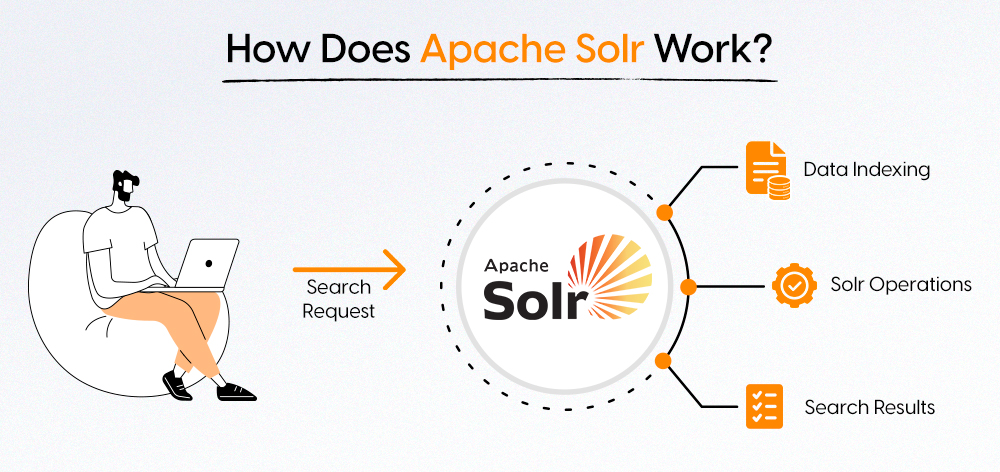
Solr processes data in several central steps: **Indexing**, **Query Ranking**.
### 1. Indexing data
Indexing means preparing data so that it can be searched quickly. Solr can process data in many formats, such as JSON, XML, CSV or even PDFs and Microsoft Office documents. It uses tools such as Apache Tika to extract text and metadata from these documents.
Solr then creates an **inverted index** that assigns terms (words or phrases) to the documents in which they occur. This structure helps to return results very quickly.
### 2. Queries
When a user searches, TYPO3 Solr uses a query handler to process the query. It finds matching documents using the inverted index. Solr supports various search types, including a powerful search engine :
- Keywords
- filters
- Range queries (e.g. date ranges)
- Location-based searches
### 3. Ranking and return of results
Solr assigns **a relevance score to** each document based on how well it matches the search query. It then sorts the results so that the most relevant are displayed first.
Solr returns results in formats such as JSON or XML. This makes it easier to use in web applications, dashboards, or APIs.
If your website has a lot of content, you need a Solr server. This includes Apache TYPO3 Solr. Such content can be pages, news, documents, or products. It makes searching on your website faster, smarter, and improves the user experience.
Here's why Apache Solr is so important for TYPO3:
#### 1. Faster search for large websites
TYPO3 websites can become very extensive over time. Solr is designed to process large amounts of content, which is particularly important for businesses. It can search through thousands of entries in a matter of seconds.
#### 2. Smarter results
Solr understands what people are searching for and offers autosuggest while typing to improve user-friendliness. It displays suggestions while typing, corrects minor spelling mistakes, and even recognizes different terms with similar meanings. For example, if someone types in “photo” but your page uses “image,” TYPO3 Solr will still find the right result.
#### 3. Easier for visitors
Solr allows visitors to filter search results by date, category, or keywords. This helps them find what they are looking for more quickly. These advantages improve the overall user experience.
#### 4. Customizable to your needs
Every website is different. TYPO3 Solr can be set up to display results exactly the way you want them. You can specify what to search, what to ignore, and how the results are displayed.
#### 5. Better than the standard search
TYPO3 comes with a simple standard search function, but it is limited. TYPO3 Solr is faster, more flexible, and offers significantly more features. It can be perfectly integrated into TYPO3 via a TYPO3 extension called EXT:solr.
Apache Solr for TYPO3 works well with TYPO3. This is thanks to a TYPO3 Solr extension and many useful tools. These make setup, content indexing, and customization easier for both developers and editors.
#### 1 [EXT:solr](https://github.com/TYPO3-Solr/ext-solr)
This is the main Solr extension that connects Apache Solr to TYPO3. It offers features like:
- Faceted search (filtering by category, keyword, date, etc.)
- Support for synonyms
- Spell check, suggestions and other advanced search functions
This Solr extension is open source and widely used in the TYPO3 community. It supports multi-site and multilingual search and integrates well with TYPO3 content types.
#### 2. [solr file\_indexer](https://github.com/hmmh/typo3-solr-file-indexer)
This add-on allows you to index not only file names or titles, but also the actual content of files. With the help of Apache Tika, it can read text from over 1,200 file formats. These include PDFs, Word documents, and Excel files. This allows users to search directly within the document content, which promotes participation in search optimization.
#### 3 [DDEV Apache Solr for TYPO3](https://github.com/ddev/ddev-typo3-solr)
This tool is intended for development environments. It helps developers quickly set up a Solr+TYPO3 environment locally with DDEV. DDEV is a popular container-based development tool. Ideal for testing, developing, and speeding up project setup.
Apache TYPO3 Solr makes searching on your TYPO3 website better and faster. Here's how to set it up and use it:
#### 1. Installation and setup of TYPO3 Solr
**Step 1: Add Solr extension**
- You need to install the **EXT:solr** extension in TYPO3.
- With the TYPO3 Extension Manager (in the [**TYPO3 backend**](https://nitsantech.de/en/blog/typo3-backend)):
- Go to TYPO3 Extension Manager.
- Click on "Get Extensions".
- Search for solr.
- Click on Install.
- With Composer (if you use [**TYPO3 Composer**](https://nitsantech.de/en/blog/typo3-composer)):
- Execute this command in the project directory:
composer require apache-solr-for-typo3/solr
- Then go to [**TYPO3 Extension**](https://nitsantech.de/en/blog/how-to-install-and-uninstall-typo3-extensions) Manager and activate the extension.
**Step 2: Set up the TYPO3 Solr extension**
- Go to your root page in the page tree and add the static [**TypoScript**](https://nitsantech.de/en/typoscript-conditions-with-symfony-expression-language) of TYPO3 Solr in the [**TYPO3 template**](https://nitsantech.de/en/blog/typo3-templates) settings.
- Add these two markers in the website template around your main content:
Your main content here
- Activate indexing via the following TypoScript:
config { index\_enable = 1 }
- If you are using [**TYPO3 version**](https://nitsantech.de/en/blog/typo3-roadmap) 9.5 or higher:
- Go to the **Sites** module.
- Set the base URL of your website (e.g. https:// example. com/).
- Enter the Solr core name in the configuration of the respective language.
#### 2. Index the content of the website
- As soon as Solr is installed and set up:
- Go to the **Empty caches** menu in the TYPO3 backend.
- Click on **Initialize Solr connections**.
- To check if everything is working:
- Open the **Reports** module
- Go to **Status report** to see if TYPO3 Solr is connected.
- To keep content up to date:
- Use the **Scheduler** module
- Create a job that indexes content regularly (e.g. every hour).
#### 3. Customize the search in TYPO3 Solr
You can customize the appearance and behavior of the search:
- Customize the **search templates** to match the design of your website.
- Use **TypoScript** to, for example:
- Display filters
- Sort results
- Add further options such as categories
Implementing Apache TYPO3 Solr brings real added value to your website. It improves search speed and makes it easier for users to find content. It can process large amounts of data without slowing down.
With its flexibility and strong integration with TYPO3, Solr is a good choice. It offers better performance, better [**TYPO3 SEO**](https://nitsantech.de/en/blog/typo3-seo) and a better user experience. If you want to improve search on your website, now is the time. Start with TYPO3 Solr.
*Get started with TYPO3 Solr today - and experience the difference!*

A Structured Start for TYPO3 Projects
-------------------------------------
Use this guide to avoid common mistakes and lay a solid foundation for your TYPO3 project from the beginning.
[ Download guide ](https://nitsantech.de/javascript:;)
#### Contact for Internet agency and TYPO3 projects
#### Sven Thelemann
Service Partner - Germany
[ st@nitsantech.de ](mailto:st@nitsantech.de) [ +49 351 48196661 ](tel:4935148196661)


### Sven Thelemann
Client Service Lead
- [](https://www.linkedin.com/in/sven-thelemann-0a30867b/ "linkedin")
Sven Thelemann serves as the Client Service Lead at NITSAN, focusing on delivering TYPO3 solutions that meet client goals. With a strong understanding of technology and client expectations, he ensures smooth communication and project execution. Outside of work, Sven enjoys cycling and experimenting with homemade recipes.
Comments and Responses
----------------------
Thank you for your comment. Your Comment Added Successfully.
Thank you for your comment. Your Comment Will Be Visible After Approval.
Oops! Something went wrong, please try again later.
##### **Be the First to Comment**
### Related Blogs
[ 
#### TYPO3 CMS for Public Sector Websites: Requirements and Best Practices
](https://nitsantech.de/en/typo3-public-sector-2026)
[ 
#### TYPO3 SEO: Improve Your TYPO3 Website Ranking
](https://nitsantech.de/en/blog/typo3-seo)