---
title: "Install TYPO3 with Docker – Fast & Reliable"
url: "https://nitsantech.de/en/blog/typo3-docker"
description: "TYPO3 Docker Step-by-Step: From DDEV Basics to WebDevOps Pro, Docker Images, Best Practices, and Dockerizing Existing Projects."
image: "https://nitsantech.de/fileadmin/_processed_/6/d/csm_TYPO3_Docker_a5dbd44064.jpg"
date: 2025-04-16
modified: 2026-01-29
lastUpdated: 2026-02-26
keywords:
- TYPO3 docker
- docker for TYPO3
- typo3 in docker
categories:
- TYPO3 CMS
---
# Install TYPO3 with Docker – Fast & Reliable
TYPO3 Docker: Install and Configure TYPO3 with Docker
=====================================================
16 Apr 2025
[](https://nitsantech.de/en/blog/author/sven-thelemann)
[Sven Thelemann](https://nitsantech.de/en/blog/author/sven-thelemann)
[ TYPO3 CMS ](https://nitsantech.de/en/categories/typo3-cms)
So, you’ve decided to dive into TYPO3. hmm… great choice! TYPO3 is a powerhouse when it comes to flexibility and scalability. But to be real, setting up and running TYPO3 can feel a bit... old-school. No worries, let me introduce you to Docker to save your day.
Table of content
With **Docker**, you can skip the hours of manual setup, avoid the*"it works on my machine*" problems, and launch TYPO3 in minutes. Sounds good? It gets better. There are now two helpful ways to do it: one is lightning-fast and beginner-friendly **(DDEV**), and the other gives you full control under the hood **(WebDevOps Docker setup**).
*Let's Dockerize TYPO3 the easy (and smart) way!*
**TYPO3** is a powerful and robust content management system (CMS) built for professional and enterprise-level websites. It's widely recognized for its flexibility, scalability, and strong multilingual capabilities, making it a preferred choice for organizations such as universities, governments, and [**TYPO3 Agency**](https://nitsantech.de/en/typo3-agency), especially across Europe.
TYPO3 is open-source, runs on PHP, and has been around for over 20 years. It allows developers to customize almost every part of the system. It's known for being:
- Super flexible (you can build just about anything with it)
- Great for big, multi-language websites
- Supported by a strong community and regular long-term support (LTS) versions
In short, TYPO3 is a great choice when you need a CMS that can handle more than just a simple blog.
Curious? Check it out at our full [**TYPO3**](https://nitsantech.de/en/blog/typo3) blog!
Not sure of your TYPO3 version?
Check it now and take action.
-------------------------------------------------------------
Your TYPO3 Version:13.4
Congratulations, your TYPO3 system is up to date with version 13! We would be happy to take care of the maintenance and installation of regular system and security updates for you. [Contact us](https://nitsantech.de/en/inquire) now for a non-binding, customized quote!
Your TYPO3 Version:
With TYPO3 version 12, you still have some time before support expires at the end of April 2029. Nevertheless, we recommend upgrading to the latest version 13 to keep your system up to date. You will also benefit from the latest TYPO3 features. We would be happy to check your system for upgrade possibilities. [Contact us](https://nitsantech.de/en/inquire) now for a non-binding, customized quote!
You do not have a TYPO3 system, or we are unable to identify your version. Please contact us for an individual review of your system and a non-binding initial consultation regarding your TYPO3 upgrade. The upgrade is particularly critical for TYPO3 systems older than version 8, as the lack of further development and support can lead to acute security vulnerabilities. Let us plan your next [TYPO3 upgrade](https://nitsantech.de/en/services/typo3-upgrade-service) together!
Please enter a valid domain
Setting up TYPO3 can be time-consuming, especially when handling multiple tools, dependencies, and configurations. [**Docker**](https://www.docker.com/) ease this process by packaging everything TYPO3 needs, like the PHP environment, web server, and database, into portable containers that run consistently across machines.
#### **Benefits of using TYPO3 in Docker:**
- **Consistent Environments**: TYPO3 Docker ensures your setup runs the same on every machine, eliminating problems.
- **Quick Setup**: Launch a fully functional TYPO3 environment in minutes without manual configuration.
- **Easy Collaboration**: Share your Docker setup with team members, making onboarding and collaboration seamless.
- **Simplified Deployment**: Deploy your TYPO3 site to different environments (development, staging, production) with minimal effort.
- **Integration with CI/CD**: Incorporate Docker into your continuous integration and deployment pipelines for automated testing and deployment.
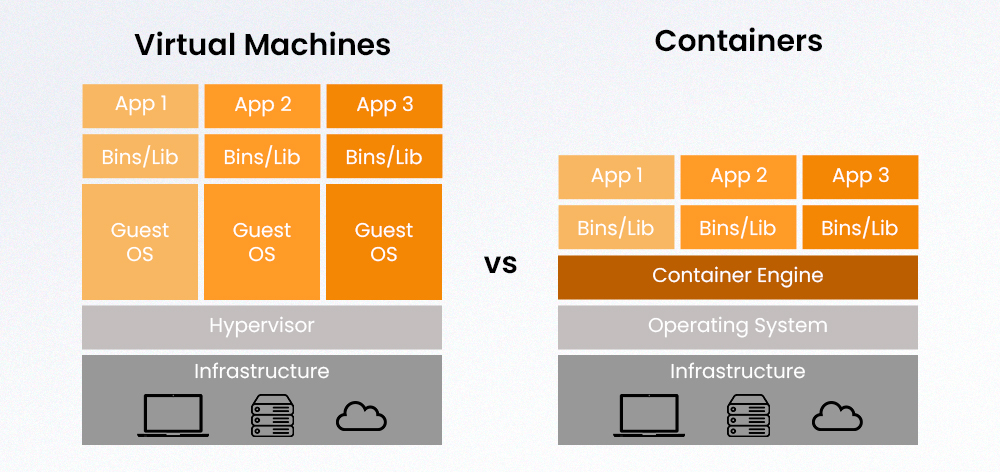
| ###### **Feature** | ###### **Virtual Machines (VMs)** | ###### **Containers** |
|---|---|---|
| **Architecture** | Includes the full OS, hypervisor, and app | Shares the host OS kernel, isolated at the process level |
| **Boot Time** | Minutes (slower, due to full OS boot) | Seconds (lightweight and fast startup) |
| **Resource Usage** | Heavy (each VM includes full OS) | Lightweight (shares OS kernel, less overhead) |
| **Isolation** | Strong (hardware-level isolation via hypervisor) | Strong (process-level, but shares kernel) |
| **Portability** | Moderate (depends on hypervisor compatibility) | High (can run anywhere Docker is supported) |
| **Use Case** | Multiple OS on the same hardware, legacy apps | Microservices, CI/CD pipelines, scalable app deployment |
To run TYPO3 Docker, you mainly need the following components:
#### **1. Docker & Docker Compose**
- **Docker**: Install Docker to run containers.
- **Docker Compose**: Install Docker Compose to manage multi-container setups (like a web server and database).
#### **2. DDEV (For Local Development)**
DDEV is an open-source tool that simplifies the process of setting up local development environments using Docker. It supports TYPO3 and other CMS platforms, providing a streamlined workflow for developers.
- **Installation Guide**: [**DDEV Installation**](https://nitsantech.de/blog/installing-typo3-with-ddev)
#### **3. PHP Version**
- **PHP**: TYPO3 requires PHP 7.4 or above. Ensure your TYPO3 Docker image includes the correct PHP version (commonly PHP 7.4 or 8.x).
#### **4. Web server (Apache or Nginx)**
- **Apache** or **Nginx**: A web server to serve the TYPO3 application. You can use a pre-configured TYPO3 Docker image with Apache and PHP or configure Nginx with PHP-FPM.
#### **5. Database (MariaDB or MySQL)**
- **MariaDB** or **MySQL**: TYPO3 typically uses MariaDB or MySQL for the database. You can use TYPO3's official Docker image for MariaDB or MySQL.
#### **6. Docker Compose File**
- Define your services (web server, database) in a docker-compose.yml file.
Here's a simplified example:
```none
version: '3.7'
services:
web:
image: php:7.4-apache
ports:
- "80:80"
volumes:
- ./html:/var/www/html
depends_on:
- db
db:
image: mariadb:10.4
environment:
- MYSQL_ROOT_PASSWORD=typo3password
volumes:
- db_data:/var/lib/mysql
volumes:
db_data:
```
Here are two proven ways to run TYPO3 using Docker. Whether you're just getting started or need a more advanced, flexible setup.
### **1 Method: TYPO3 Local Development with DDEV (Recommended)**
**Step-by-Step:**
**1. Create a new TYPO3 project folder**
mkdir my-typo3-site && cd my-typo3-site
**2. Initialize DDEV**
ddev config --project-type=typo3 --docroot=public --create-docroot
**3. Start the containers**
ddev start
**4. Install TYPO3 via Composer**
ddev composer create "typo3/cms-base-distribution:^13"
**5. Run the setup wizard**
- CLI method:
ddev typo3cms install:setup
- OR: Web method
ddev exec touch public/FIRST\_INSTALL
ddev launch
**6. Access** [**TYPO3 backend**](https://nitsantech.de/en/blog/typo3-backend)
ddev launch typo3
**Pros:**
- Super easy
- Great for beginners
- Officially recommended by TYPO3
- Automatically handles PHP, MySQL, Apache, Mailhog
### **2 Method: Advanced Setup Using WebDevOps TYPO3 Docker Images**
**Step-by-Step:**
**1. Clone the boilerplate repo**
git clone
https:// github .com/ webdevops/ TYPO3-docker-boilerplate. git my-typo3-project
cd my-typo3-project
**2. Choose and copy the dev environment file**
cp docker-compose.development.yml docker-compose.yml
**3. Start the stack**
docker-compose up -d
**4.** [**Install TYPO3**](https://nitsantech.de/en/blog/installing-typo3) **manually inside a container or use the web installer**
- Point browser to localhost or whatever port/domain you set
- Complete the installation steps
- Set up database (can use adminer.php or phpMyAdmin container)
- https:// your-url. ddev .site: 8037 (For phpMyAdmin Database)
**Pros:**
- Great for production or team setups
- Fully customizable Dockerfiles
- Based on standard webdevops/php-apache-dev images
#### **1. Martin Helmich's TYPO3 Docker Image**
- **Repository:** martinhelmich/typo3
- **GitHub:** [martin-helmich/docker-typo3](https://github.com/martin-helmich/docker-typo3)
- **Available Tags:** Supports TYPO3 versions 6.2 through 12.4, including LTS releases like 9.5, 10.4, 11.5, and 12.4.
- **Base Image:** Built on php:7.4-apache with necessary PHP extensions.
- **Use Case:** Ideal for quick local development setups.
- **Note:** Not recommended for production environments.
#### **2. Crinis TYPO3 Docker Images**
- **Repository:** [crinis/typo3-docker](https://github.com/crinis/typo3-docker)
- **Available Tags:** Supports recent TYPO3 LTS versions.
- **Project Structure:** Assumes a Composer-based project structure, typically created using [TYPO3 composer](https://nitsantech.de/en/blog/typo3-composer) create-project typo3/cms-base-distribution.
- **Use Case:** Suitable for both development and production environments with customizable configurations.
#### **3. WebDevOps TYPO3 Docker Boilerplate**
- **Repository:** [webdevops/TYPO3-docker-boilerplate](https://github.com/webdevops/TYPO3-docker-boilerplate)
- **Features:** Provides a comprehensive Docker setup including services like Apache, PHP-FPM, MySQL, Solr, Elasticsearch, Redis, and more.
- **Use Case:** Great for complex development environments and scalable production deployments.
#### **4. fnagel/docker-typo3**
- **Repository:** [fnagel/docker-typo3](https://github.com/fnagel/docker-typo3)
- **Features:** A simple and minimal TYPO3 Docker setup based on PHP and Apache.
- **Use Case:** Ideal for developers seeking a straightforward and clean Docker environment for TYPO3.
#### **5. Raimund Rittnauer's TYPO3 Docker Setup**
- **Repository:** [raaaimund/typo3-docker](https://raaaimund.github.io/tech/2019/08/07/run-typo3-with-docker/)
- **Features:** Provides a Docker setup to run TYPO3 with NGINX, PHP-FPM, and MySQL, including optional SQL dump import.
- **Use Case:** Suitable for developers looking for a customized Docker environment for TYPO3.
#### **6. Kronova TYPO3 Docker**
- **Repository:** [kronova/typo3-docker](https://hub.docker.com/layers/kronova/typo3-apache/latest/images/sha256-8e1bcd6d3649ec97be2437d132d7f8d910f7807652912caeedfda4782d15f540?context%3Dexplore)
- **Features:** It offers a scalable Docker setup for TYPO3, supporting multiple LTS versions.
- **Use Case:** Designed for both development and production environments, with scalability in mind.
When running TYPO3 Docker, it's crucial to persist certain directories to retain your site's content, configurations, and user uploads across container restarts or rebuilds.
##### **Key Directories to Persist**
Ensure the following TYPO3 directories are mapped to persistent storage:
- **fileadmin/**: User-uploaded files and media
- **typo3conf/**: Configuration files and extensions
- **typo3temp/**: Temporary files and caches
- **uploads/**: Files uploaded through TYPO3's backend
Persisting these directories ensures that your site's content and configurations remain intact.
##### **Docker Compose Volume Configuration**
In your docker-compose.yml file, define volumes to map these directories to your host machine:
services:
web:
image: your-typo3-image
volumes:
\- ./data/fileadmin:/var/www/html/public/fileadmin
\- ./data/typo3conf:/var/www/html/public/typo3conf
\- ./data/typo3temp:/var/www/html/public/typo3temp
\- ./data/uploads:/var/www/html/public/uploads
This setup ensures that changes made within the container are reflected on your host machine and vice versa.
- **Use .env files** for sensitive data and reuse across projects.
- Set TYPO3\_CONTEXT to differentiate dev/staging/prod:
environment:
\- TYPO3\_CONTEXT=Development
- Enable **Xdebug** with DDEV for debugging:
ddev xdebug on
- TYPO3 uses OPcache heavily, ensure it's tuned in php.ini.
- Always version-lock Composer installs (^13.1, not dev-master).
| ###### **Issue** | ###### **Solution** |
|---|---|
| White screen after install | Check file/folder permissions (use ddev ssh to inspect) |
| "No database connection" | Make sure your DB container is running and credentials match |
| TYPO3 not accessible via URL | Check docker-compose.yml port mappings or DDEV router |
| TYPO3 complains about image processing | Ensure gd or imagick PHP extensions are enabled |
For users who already have a TYPO3 project running locally or on a server
- Add a composer.json if missing (composer init)
- Copy public/ structure if using legacy TYPO3 setup
- Use DDEV's import-db and import-files:
```
ddev import-db --src=backupup.sql.gz
ddev import-files --src=uploads/
```
The TYPO3 Docker journey doesn't have to be daunting. With the simple steps outlined above, you're already on the path to creating a more easy and efficient development environment.
Remember, whether you're just getting started or trying to optimize your setup, there's always room for improvement. TYPO3 Docker gives you the flexibility to scale and adapt your project as your need grows right from the [TYPO3 login](https://nitsantech.de/en/blog/typo3-login) to deployment.
*If you have any questions or need help, feel free to comment below - we'd love to assist you!*

Improve the Page Speed of Your TYPO3 Website
--------------------------------------------
Overview of key performance issues affecting TYPO3 loading times, and how to optimize for faster, more stable performance.
[ Download guide ](https://nitsantech.de/javascript:;)
FAQs
----
Can I use Docker for the production of TYPO3 sites?
Yes, but it's recommended only if you're experienced with Docker. For production, ensure you're using optimized images, secure configurations, and proper volume/data handling. Tools like Kubernetes or Docker Swarm are often used for scalable deployments.
Is DDEV the only way to run TYPO3 in Docker?
No. While DDEV is the easiest and most beginner-friendly method, you can also use custom Docker Compose setups or WebDevOps TYPO3 images for more control and flexibility.
Do I need to know Docker commands to use TYPO3 in Docker?
Basic Docker and Docker Compose knowledge is helpful, but tools like DDEV abstract most commands, making it easy even for those new to containers.
Can I migrate an existing TYPO3 project into Docker?
Yes! You just need to set up a Docker environment (like DDEV), import your database and files, and ensure your project structure is compatible (e.g., public/ folder, composer.json).
Will my extensions work in Docker?
Almost always, yes. TYPO3 extensions work the same way in Docker as in a local/server environment, as long as PHP and system dependencies are properly set.
How do I update TYPO3 in a Docker setup?
Use Composer to update your TYPO3 version (composer update) and clear caches. With DDEV, updates can be tested safely in isolated environments before being pushed live.
#### Contact for Internet agency and TYPO3 projects
#### Sven Thelemann
Service Partner - Germany
[ st@nitsantech.de ](mailto:st@nitsantech.de) [ +49 351 48196661 ](tel:4935148196661)


### Sven Thelemann
Client Service Lead
- [](https://www.linkedin.com/in/sven-thelemann-0a30867b/ "linkedin")
Sven Thelemann serves as the Client Service Lead at NITSAN, focusing on delivering TYPO3 solutions that meet client goals. With a strong understanding of technology and client expectations, he ensures smooth communication and project execution. Outside of work, Sven enjoys cycling and experimenting with homemade recipes.
Comments and Responses
----------------------
Thank you for your comment. Your Comment Added Successfully.
Thank you for your comment. Your Comment Will Be Visible After Approval.
Oops! Something went wrong, please try again later.
##### **Be the First to Comment**
### Related Blogs
[ 
#### TYPO3 CMS for Public Sector Websites: Requirements and Best Practices
](https://nitsantech.de/en/typo3-public-sector-2026)
[ 
#### TYPO3 SEO: Improve Your TYPO3 Website Ranking
](https://nitsantech.de/en/blog/typo3-seo)