---
title: "TYPO3 Admin Panel Guide: Login, Admin URL, and Key Features"
url: "https://nitsantech.de/en/blog/typo3-admin-panel"
description: The TYPO3 admin panel is where every update begins. It is a secure workspace for controlling pages, users, extensions, and the full website structure.
image: "https://nitsantech.de/fileadmin/_processed_/0/0/csm_TYPO3-Admin_-Panel-Guide_e6704ba375.jpg"
date: 2025-10-07
modified: 2026-04-13
lastUpdated: 2026-04-27
keywords:
- typo3 admin panel
- typo3 admin
- typo3 admin url
- typo3 admin page
- typo3 backend
categories:
- TYPO3 CMS
---
# TYPO3 Admin Panel Guide: Login, Admin URL, and Key Features
TYPO3 Admin Panel Guide: Login, Admin URL, and Key Features
===========================================================
08 Oct 2025
[](https://nitsantech.de/en/blog/author/stefan-reinhardt)
[Stefan Reinhardt](https://nitsantech.de/en/blog/author/stefan-reinhardt)
[ TYPO3 CMS ](https://nitsantech.de/en/categories/typo3-cms)
You’ve just been given access to a TYPO3 website, and now you’re staring at the backend, wondering where to start.
Table of content
The TYPO3 admin panel is where everything happens: content updates, user management, extensions, and system configuration. But without a clear understanding, it can feel overwhelming at first.
This guide breaks down exactly how the TYPO3 admin panel works, from login to advanced features, so you can use it with confidence.
### **This guide is for:**
- TYPO3 editors and content managers working in the backend
- Administrators managing users, permissions, and workflows
- Beginners who are new to [**TYPO3**](https://nitsantech.de/en/blog/typo3) and want a clear starting point
- Teams handling multi-site or multilingual TYPO3 setups
### **This guide is not for:**
- Advanced [**TYPO3 developers**](https://nitsantech.de/en/typo3-certified-developer-tccd-preparation-experience-and-review) looking for deep TypoScript or extension development
- Users expecting a no-code website builder experience like WordPress
- One-page website owners with minimal backend requirements
### **Default URL:**
https:// yourdomain.com/typo3
This is the standard [**TYPO3 backend**](https://nitsantech.de/en/blog/typo3-backend) login URL used by administrators and editors.
### **Alternative URL (If Changed):**
- [**TYPO3 installations**](https://nitsantech.de/en/blog/installing-typo3) may use a **custom backend path** for security
- Common alternatives: **/admin**, **/backen**d, or a custom route
- If **/typo3** doesn’t work, the login URL has likely been modified
- Contact your **developer or system administrator** to get the correct URL
### **If the Login Page Doesn’t Load:**
- Verify the correct backend URL (**/typo3** or custom path)
- Check if the website/server is online
- Review firewall, VPN, or **.htaccess** restrictions
- Clear browser cache or use incognito mode
- Ensure your IP is not restricted (common in secure environments)
### **Quick Security Notes:**
- Always access the backend via **HTTPS**
- Avoid logging in from **public or unsecured networks**
- Backend access is restricted to **authorized users only**
- Login credentials are created and managed by an administrator
**Note:** In [**TYPO3 v11**](https://nitsantech.de/en/top-11-features-of-typo3-v11-we-love-1) and above, the backend entry point can be customized via system configuration (**BE.entryPoint**), so the login path may differ.
The TYPO3 Admin Panel, commonly called the backend, is the central interface where users manage content, users, and system settings. It acts as the control center for everything that happens behind the website.
In the TYPO3 ecosystem, the backend enables structured content management, user access control, and full customization of website functionality, making it essential for both editors and developers.
### **TYPO3 Admin Panel vs Backend vs Admin User**
| **Term** | **Meaning** | **Key Role** |
|---|---|---|
| **Admin Panel** | The interface (UI) used to manage TYPO3 | Where users interact with the system |
| **Backend** | The entire system behind the frontend | Handles content, logic, and configurations |
| **Admin User** | A user role with full permissions | Manages settings, users, and system access |
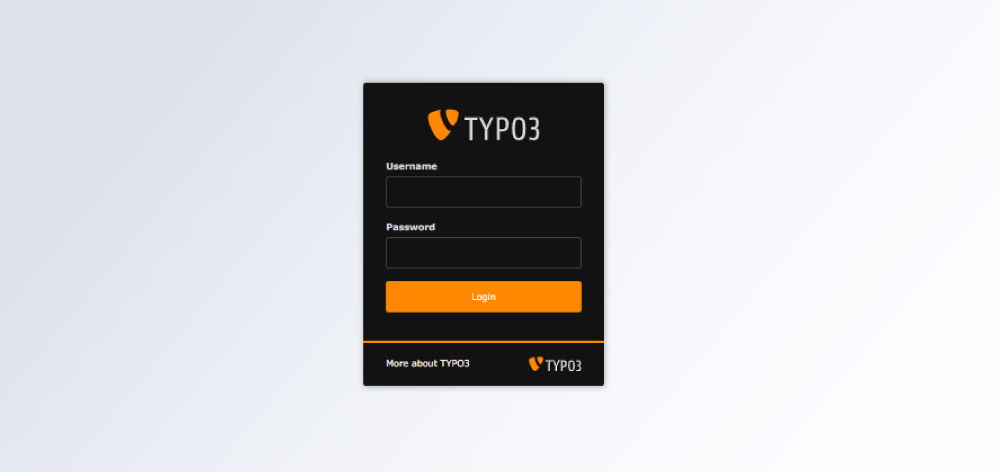
Accessing the TYPO3 Admin Panel (backend) is straightforward once you have the correct URL and login credentials.
### **Step 1: Open the Admin URL**
Go to your TYPO3 backend login page, typically:
**https:// yourdomain.com/typo3**
**Note:** Some TYPO3 installations use a **custom backend URL** for security. If **/typo3** doesn’t work, check with your administrator or developer.
### **Step 2: Enter Your Login Credentials**
- Enter your **username and password**
- Credentials are created and managed by an administrator
- Ensure your account has the required backend access permissions
### **Step 3: Access the Dashboard**
After a successful login, you’ll be redirected to the TYPO3 backend dashboard, where you can:
- Manage pages and content
- Access modules and extensions
- Configure users, templates, and settings
### **TYPO3 Login Best Practices**
- **Always use HTTPS** to ensure a secure connection
- **Avoid public or unsecured networks** when accessing the backend
- **Enable two-factor authentication (2FA)** for added security
- Log out after use, especially on shared devices
This process ensures secure and reliable access to the TYPO3 Admin Panel while maintaining full control over your website’s content and configuration.
The TYPO3 backend is designed as a structured workspace that helps users manage content, pages, and system settings efficiently. Its interface is divided into key areas that make navigation and content management intuitive, even for complex websites.
### **Dashboard Overview**
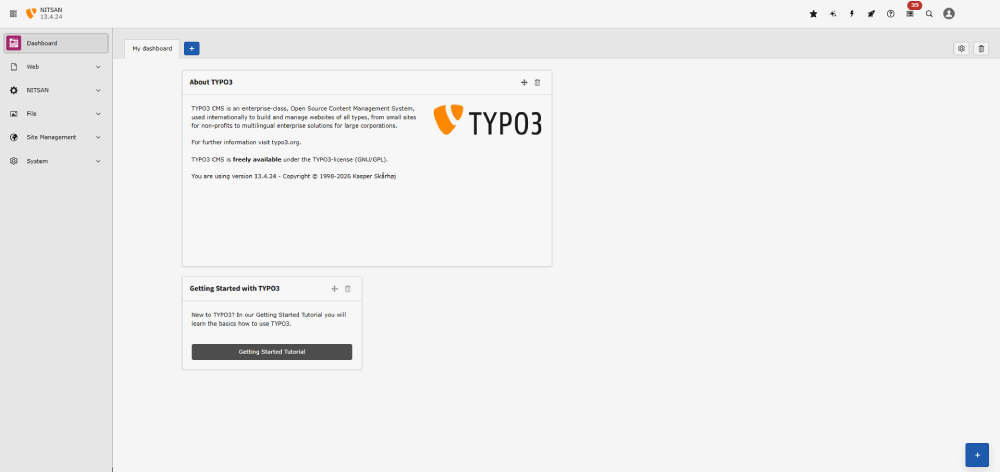
The dashboard provides a quick summary of your website’s activity and system status.
You can view recent changes, pending tasks, system notifications, and customize widgets based on your role or workflow.
### **Page Tree Navigation**
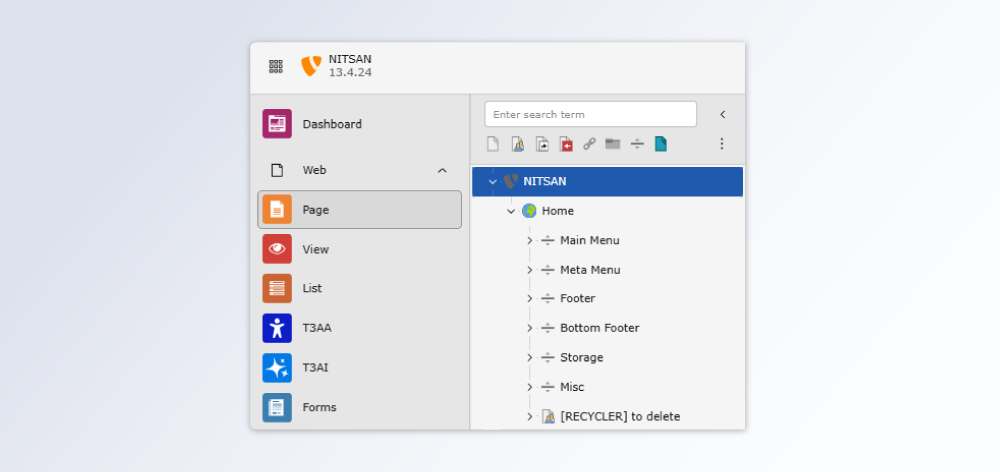
The page tree displays the full structure of your website in a hierarchical format.
- Create, edit, move, or delete pages
- Organize content into parent and subpages
- Quickly navigate large or multi-site setups
### **Module Menu**
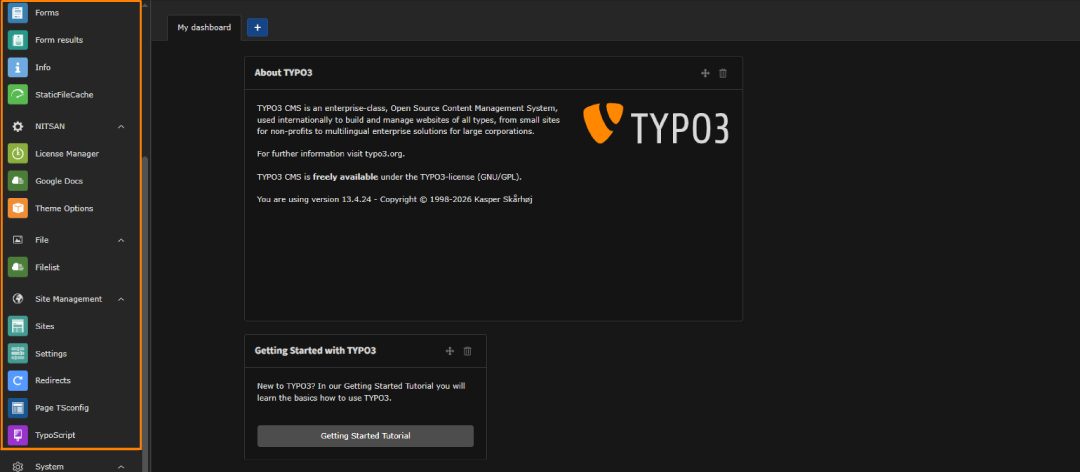
The module menu gives access to all core TYPO3 functionalities, such as:
- **Web** (Page, List, View)
- **File** (media management)
- **User tools**
- **Admin tools**
- **Extensions**
Access to modules depends on user roles and permissions.
### **Content Editing Area**
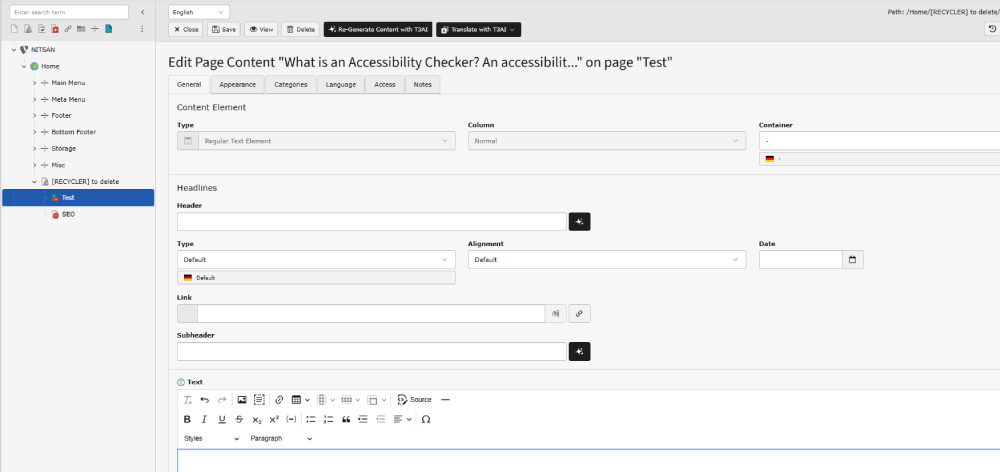
This is the main workspace where content is created and updated.
- Add text, images, videos, and plugins
- Use the rich text editor for formatting
- Preview changes before publishing
- Manage content elements within each page
The TYPO3 backend layout is built for scalability, allowing teams to manage everything from simple websites to complex, multi-language enterprise platforms within a single interface.
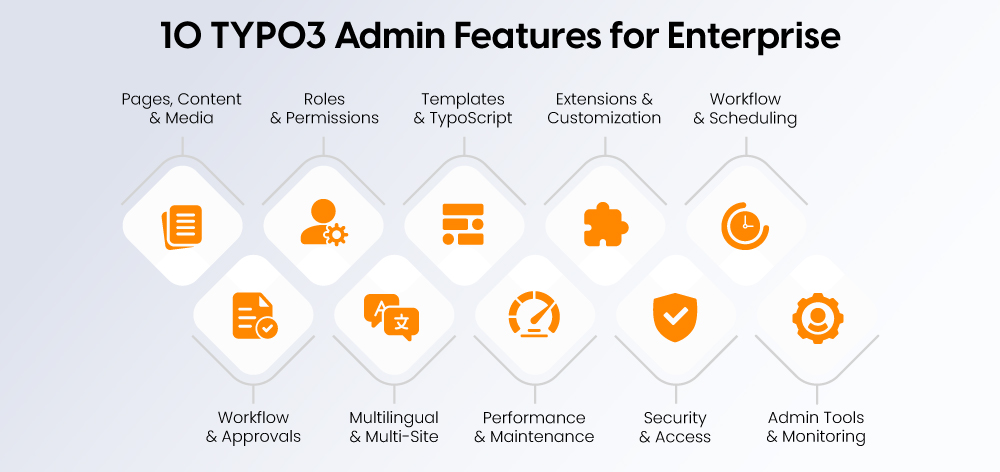
The TYPO3 Admin Panel is more than just a content editor; it provides a structured environment for managing complex websites, teams, and workflows efficiently. Below are its key features with real-world applications:
### **Managing Pages, Content, and Media**
- Organize website structure using the page tree
- Create, edit, and rearrange content (text, images, videos, links)
- Manage and reuse media via the File Abstraction Layer (FAL)
**Use case:**
Manage large websites with hundreds of pages while keeping content and media structured and reusable.
### **User Roles and Permissions**
- Create backend users and assign them to groups
- Define role-based access to pages, modules, and features
- Restrict sensitive actions based on responsibilities
**Use case:**
Editors handle content updates while admins control system settings, reducing risk and maintaining control.
### **Templates and TypoScript Control**
- Customize design and layout using templates
- Control site-wide behavior with TypoScript
- Maintain consistent structure across all pages
**Use case:**
Update branding or layout across the entire website without editing individual pages.
### **Extensions and Custom Functionality**
- Install extensions from the [**TYPO3 repository**](https://nitsantech.de/en/typo3-glossary/typo3-repository)
- Add features like SEO tools, forms, analytics, or e-commerce
- Extend functionality with custom-built solutions
**Use case:**
Add marketing tools or advanced features without rebuilding the website.
### **Workflow and Content Scheduling**
- Schedule content with start and end visibility dates
- Use versioning and workspaces for content staging
- Enable structured publishing workflows
**Use case:**
Plan campaigns in advance and publish approved content automatically.
### **Workflow and Approval System**
- Set up multi-level content approval processes
- Assign roles for reviewing and publishing content
- Ensure only approved changes go live
**Use case:**
Large teams can maintain quality control with editor → reviewer → publisher workflows.
### **Multilingual and Multi-Site Management**
- Manage multiple languages within a single backend
- Handle multiple websites with shared resources
- Maintain consistency across regions and domains
**Use case:**
Global businesses can manage country-specific websites and languages from one centralized system.
### **Backend Performance and Maintenance Tools**
- Clear and manage system and page caches
- Monitor backend performance and system status
- Use debugging tools for troubleshooting
**Use case:**
Improve backend speed and quickly resolve performance issues without developer dependency.
### **Security and Access Control**
- Enforce strong passwords and access policies
- Enable two-factor authentication (2FA)
- Restrict access by roles, modules, or IP ranges
**Use case:**
Protect sensitive data and prevent unauthorized access in enterprise environments.
### **Admin Tools and System Monitoring**
- Access system logs and activity reports
- Monitor errors and backend operations
- Use admin panel tools for debugging and analysis
- Simulate user roles or preview different access levels
**Use case:**
Administrators can track changes, diagnose issues, and ensure system stability efficiently.
These features make the TYPO3 Admin Panel a powerful solution for organizations that require scalability, structured workflows, strong security, and full control over their digital platforms.
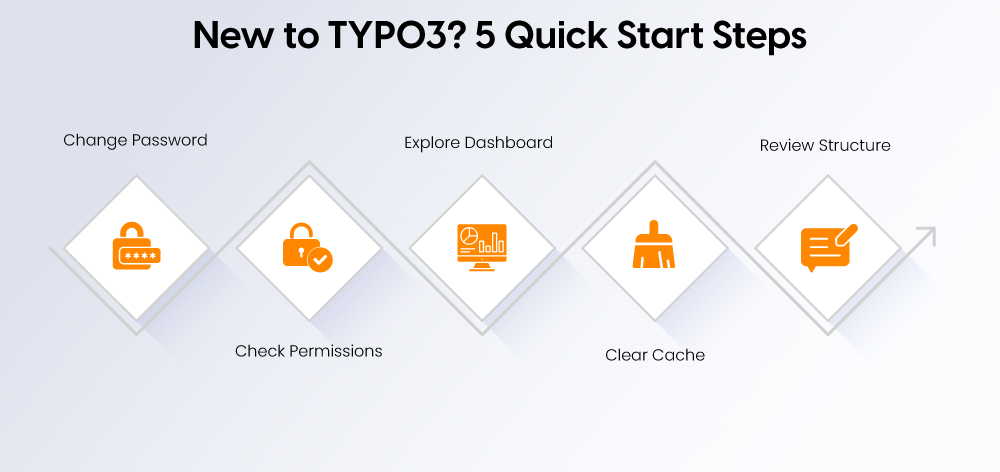
Once you log into the TYPO3 Admin Panel, it’s important to set up your workspace and understand the basics before making changes. These first steps help you work efficiently and avoid common mistakes.
### **Change Your Password**
- Update your default or temporary password immediately
- Use a strong, unique password for better security
- Enable two-factor authentication (2FA) if available
### **Check User Permissions**
- Confirm what pages and modules you have access to
- Identify any restrictions based on your user role
- Contact an admin if required access is missing
### **Explore the Dashboard**
- Review widgets for recent activity and system updates
- Check notifications, pending tasks, or workflow items
- Customize the dashboard for your daily workflow
### **Clear Cache (Basic Awareness)**
- Understand when to clear cache after making changes
- Use the top toolbar option to refresh frontend updates
- Avoid unnecessary cache clearing unless required
### **Review Site Structure**
- Navigate the page tree to understand website hierarchy
- Identify where your assigned pages or content sections are
- Get familiar with parent and subpage relationships
These initial steps help new users quickly adapt to the TYPO3 backend, reduce errors, and build confidence while working within a structured and permission-based environment.
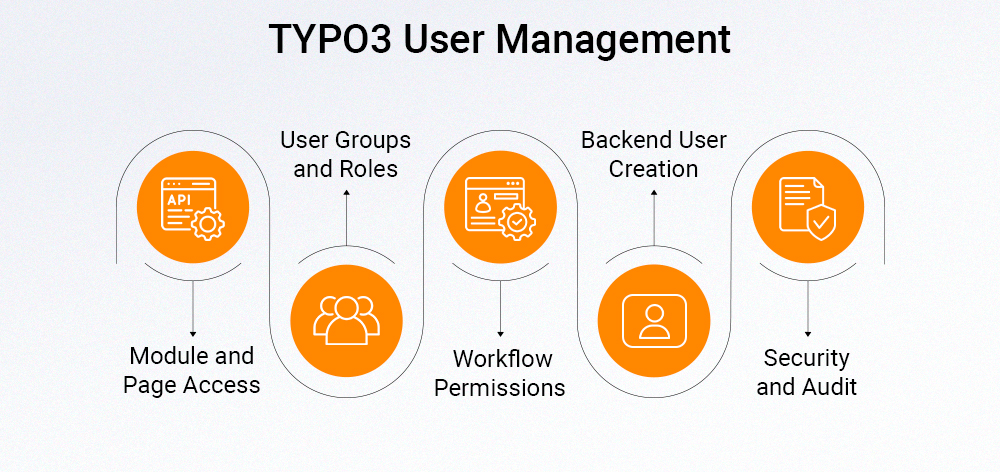
Managing users and permissions in TYPO3 ensures that the right people have the right level of access, reducing errors and improving security.
### **Creating Users**
- Go to the **Backend Users** module
- Add a new user with username, email, and password
- Assign the user to a relevant group (e.g., editor, admin)
### **User Groups**
- Create groups to manage permissions collectively
- Assign roles based on responsibilities (editor, author, admin)
- Reuse groups to maintain consistency across teams
### **Module and Page Access**
- Restrict access to specific modules (e.g., Templates, Admin Tools)
- Limit page tree access so users only edit assigned sections
- Control who can view, edit, delete, or create content
### **Workflow Permissions**
- Assign rights for content approval and publishing
- Use workspaces for draft, review, and live stages
- Ensure only authorized users can publish changes
### **Security and Audit Controls**
- Enable **two-factor authentication (2FA)** for sensitive roles
- Monitor backend activity using logs
- Regularly review user access and permissions
A well-structured permission setup keeps your TYPO3 backend secure, organized, and efficient, especially when multiple editors and administrators are involved.
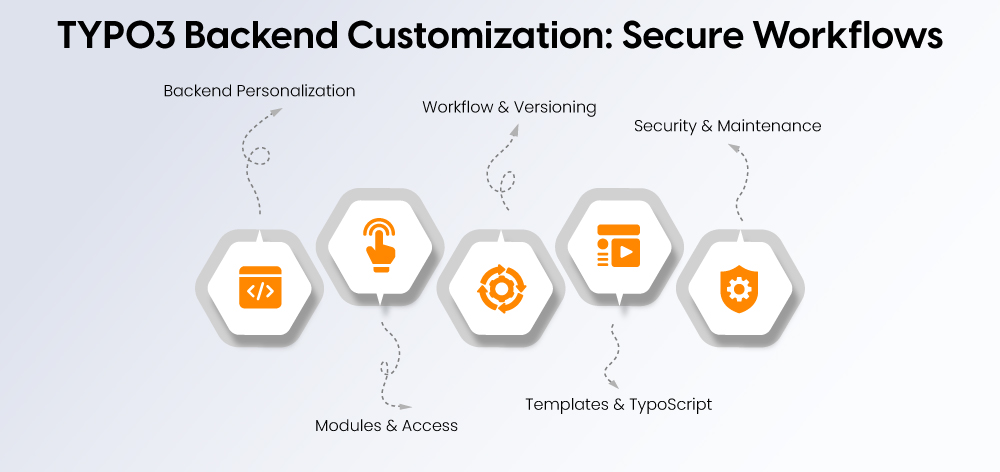
The TYPO3 Admin Panel offers flexible settings that allow you to tailor the backend to your workflow, improve usability, and maintain strong security controls.
### **Personalizing the Backend Interface**
- Set preferred **language, date, and time format**
- Add **shortcuts and favorites** for frequently used modules or pages
- Customize the **dashboard** with widgets based on your role
- Adjust interface layout for a cleaner, more efficient workspace
### **Module and Access Customization**
- Show or hide modules based on user needs
- Reorder modules to match your workflow
- Assign **role-based access** to control who sees what
- Restrict sensitive modules (e.g., Admin Tools, Templates)
### **Workflow and Versioning Setup**
- Create structured workflows: **Draft → Review → Publish**
- Enable **workspaces** for staging content changes
- Set up approval processes for controlled publishing
- Use notifications to track content status
### **Template and TypoScript Configuration**
- Manage **site templates** for layout and design consistency
- Configure **TypoScript** for site-wide behavior and logic
- Customize functionality for extensions and integrations
- Maintain centralized control over frontend output
### **Security and Maintenance Settings**
- Enable **two-factor authentication (2FA)**
- Apply **IP restrictions** for backend access
- Enforce strong password policies and login limits
- Manage cache for performance optimization
- Monitor system health via reports and logs
These settings allow TYPO3 administrators to create a backend environment that is efficient, secure, and tailored to both technical teams and content editors.
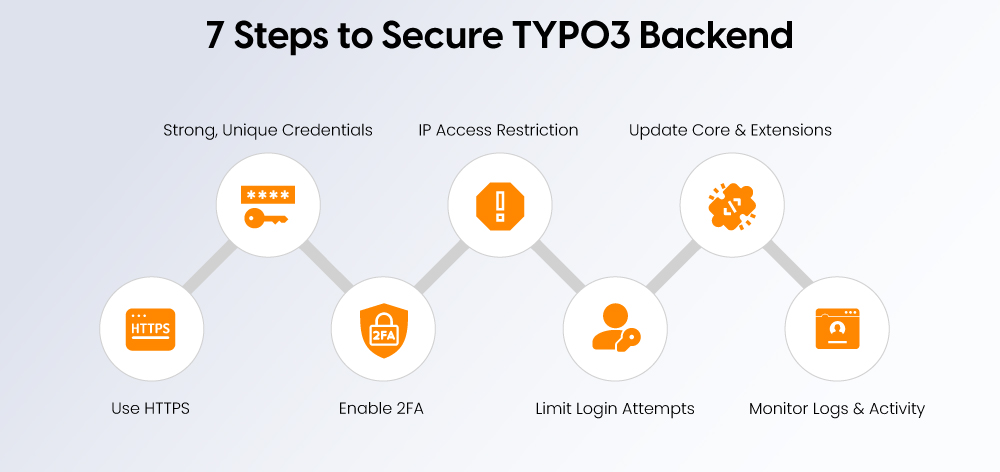
Securing your TYPO3 Admin Panel is essential to protect your website from unauthorized access and potential threats. Use this checklist to ensure your backend is properly secured:
- **Use HTTPS for all backend access**
Ensure your admin URL always runs over HTTPS to encrypt login data and user sessions
- **Use strong, unique credentials**
Avoid generic usernames like “admin” and enforce strong password policies
- **Enable two-factor authentication (2FA)**
Add an extra layer of security for all users, especially administrators
- **Restrict backend access by IP**
Allow access only from trusted IP addresses or networks where possible
- **Limit login attempts**
Configure lockouts or delays after multiple failed login attempts to prevent brute-force attacks
- **Keep TYPO3 core and extensions updated**
Regular updates ensure security patches are applied and vulnerabilities are fixed
- **Monitor logs and user activity**
Regularly review backend logs to track login attempts, changes, and suspicious behavior
Following this checklist helps ensure that only authorized users can access your TYPO3 Admin Panel while maintaining a secure and stable website environment.
If you’re facing issues with the TYPO3 backend, most problems are related to access, permissions, or configuration. Use the table below to quickly identify and fix common issues:
| **Issue** | **Possible Cause** | **Solution** |
|---|---|---|
| **Can't access login page** | Incorrect URL, server down, or DNS issue | Check **/typo3** or custom URL, verify server status and DNS settings |
| **Login fails** | Wrong credentials or inactive user account | Re-enter details, reset password, or check user activation |
| **Missing modules or features** | Insufficient permissions | Review user roles and enable required modules |
| **Slow backend performance** | Cache overload or server limitations | Clear cache, disable unused extensions, optimize server/PHP settings |
| **Admin tools not visible** | User lacks admin/system maintenance rights | Update user permissions or assign admin role |
| **Content or page errors** | TypoScript issues or system errors | Check backend logs and review TypoScript configuration |
By identifying the root cause quickly, you can resolve most TYPO3 admin issues without major disruptions and keep your backend running smoothly.
The TYPO3 Admin Panel brings together everything needed to manage a website with precision, from content and media to workflows, permissions, and extensions. Its structured backend gives teams full control while maintaining consistency and efficiency across even complex setups.
With strong customization options, built-in security features, and scalable architecture, TYPO3 stands out as a reliable solution for organizations that require flexibility without compromising control.
For businesses operating at scale, TYPO3 is not just a CMS, it’s an enterprise-ready platform designed to support structured workflows, multilingual environments, and long-term growth. Partnering with an experienced [**TYPO3 agency**](https://nitsantech.de/en/typo3-agency) can further streamline backend operations, strengthen security, and help you get the most out of your implementation.

Is Your TYPO3 Website Properly Secured?
---------------------------------------
Learn how to review system updates, user permissions, hosting security, and configuration settings.
[ Download guide ](https://nitsantech.de/javascript:;)
FAQs
----
What is the TYPO3 admin login URL?
The default TYPO3 admin login URL is **/typo3**, which opens the backend login page. However, many TYPO3 installations use a custom backend path for security reasons, so if the default URL doesn’t work, you’ll need to check with your administrator or developer.
How do I access TYPO3 backend?
Open the admin URL (usually **/typo3**), enter your username and password, and you’ll be redirected to the backend dashboard.
How can I secure my TYPO3 admin panel?
Use HTTPS, enable two-factor authentication (2FA), set strong passwords, restrict IP access, and keep TYPO3 and extensions updated.
Why can’t I log into TYPO3 admin?
Common reasons include incorrect credentials, wrong admin URL, inactive user account, or restricted access due to security settings.
How do I customize TYPO3 backend?
You can customize it by adjusting user roles, showing/hiding modules, configuring dashboard widgets, and modifying templates or TypoScript.
#### Contact for Internet agency and TYPO3 projects
#### Sven Thelemann
Service Partner - Germany
[ st@nitsantech.de ](mailto:st@nitsantech.de) [ +49 351 48196661 ](tel:4935148196661)


### Stefan Reinhardt
Service Partner
- [](https://www.linkedin.com/in/markt-machen-system/ "linkedin")
Stefan solves tech problems for businesses. He focuses on upgrading outdated systems and moving companies to the cloud. At NITSAN, he collaborates with clients to create solutions that save both time and money. Outside of work, he enjoys brewing coffee and hiking with his dog.
Comments and Responses
----------------------
Thank you for your comment. Your Comment Added Successfully.
Thank you for your comment. Your Comment Will Be Visible After Approval.
Oops! Something went wrong, please try again later.
##### **Be the First to Comment**
### Related Blogs
[ 
#### TYPO3 CMS for Public Sector Websites: Requirements and Best Practices
](https://nitsantech.de/en/typo3-public-sector-2026)
[ 
#### TYPO3 SEO: Improve Your TYPO3 Website Ranking
](https://nitsantech.de/en/blog/typo3-seo)