---
title: "Top Tips & Tricks for Optimum TYPO3 Website Speed and Performance"
url: "https://nitsantech.de/en/blog/tips-typo3-website-speed-and-performance"
description: "Know Top 30 tips & tricks to optimize your TYPO3 website in terms of speed, performance, reliability, and accessibility."
image: "https://nitsantech.de/fileadmin/_processed_/6/7/csm_30-Tipps-f%C3%BCr-optimale-TYPO3-Website-Geschwindigkeit-und-Performance_970ecc7af3.jpg"
author: Sanjay Chauhan - TYPO3 Technopreneur
date: 2019-10-04
modified: 2025-11-07
lastUpdated: 2026-02-26
categories:
- Pagespeed
---
# Top Tips & Tricks for Optimum TYPO3 Website Speed and Performance
Tips & Tricks for TYPO3 Website Speed Performance
=====================================================
08 Aug 2019
[](https://nitsantech.de/en/blog/author/mihaela-angelova)
[Mihaela Angelova](https://nitsantech.de/en/blog/author/mihaela-angelova)
[ Pagespeed ](https://nitsantech.de/en/categories/pagespeed)
Table of content
Your website is your domain and keeping it functioning as well as it can be of the essence. Having a well-managed Enterprise Content Management System that provides the basis for websites, intranets, and mobile applications can work wonders for your business and its offerings!
[**Keeping your TYPO3 Website well-maintained**](https://nitsantech.de/en/blog/typo3-website-maintenance) provides the basis for Scalable Web Application Framework along with a user-friendly interactions with a large, active global community and unlimited extendability!
Having a strategy alone can only do so much for your business website and hence here are some tips and tricks that will optimize and [**develop your TYPO3 website**](https://nitsantech.de/en/services/typo3-development) in terms of speed, performance, reliability, and accessibility.
Tip #1: Selecting Web Hosting Services
--------------------------------------
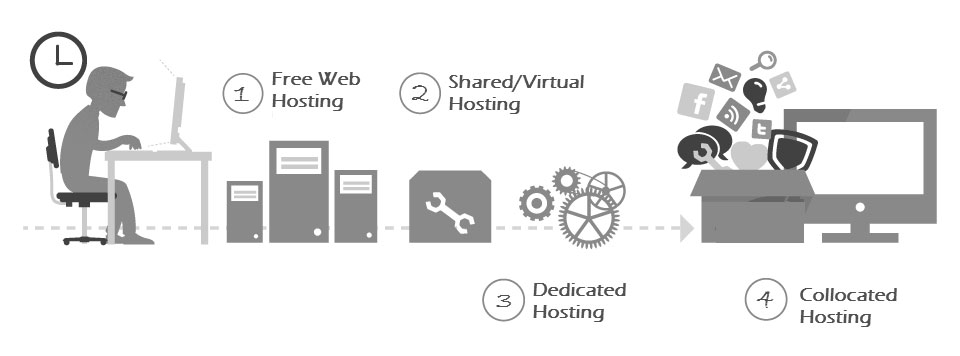
If anything had the audacity to make or break your website, this is it. Selecting a web hosting service provider that is fast and reliable and does not compromise on its effectiveness, is of top priority.
Following are few of the options you can consider:
- [https://aws.amazon.com/](https://aws.amazon.com/marketplace/seller-profile?id=3c5e5f3c-d60e-4405-a9ca-aae8abfa3e2b)
-
- [http://mittwald.de](https://www.mittwald.de/)
- [https://www.ipax.at](https://www.ipax.at/)
---
Tip #2: Keep TYPO3 Updated
--------------------------

Updates are created to add more credibility and key features to the service provider and hence keeping your system updated will provide you with a wider range of control over your website. Upgrade your site to latest TYPO3 LTS version, if you haven’t already and take advantage of the new setup by following our [**ultimate guide on TYPO3 update/upgrade**](https://nitsantech.de/en/blog/typo3-update-upgrade) with planning template and TYPO3 before and after update checklist.
Tip #3: Enable TYPO3 Cache
--------------------------
The easiest and most effective way to make your site function at its optimum speed is by caching it. Activate the internal TYPO3, caching system by using the following settings in TypoScript.
\#Setup
config.no\_cache = 0
---
Tip #4: Static File Caching
---------------------------

Slow response time? No problem! Each request for a TYPO3 page involves several SQL queries and heavy PHP logic. Having a site that has many static pages, might not work in your favor unless you manage it correctly. TYPO3's cache won't compare in performance to static HTML files, hence using the static file cache extension **nc\_staticfilecache** is highly recommended.
Your ticket to a faster response time:
**TER:** [**https://extensions.typo3.org/extension/nc\_staticfilecache**](https://extensions.typo3.org/extension/nc_staticfilecache)
**Exension Manual:** [**https://docs.typo3.org/typo3cms/extensions/nc\_staticfilecache/stable/**](https://extensions.typo3.org/extension/nc_staticfilecache)
Tip #5: Image Optimization
--------------------------
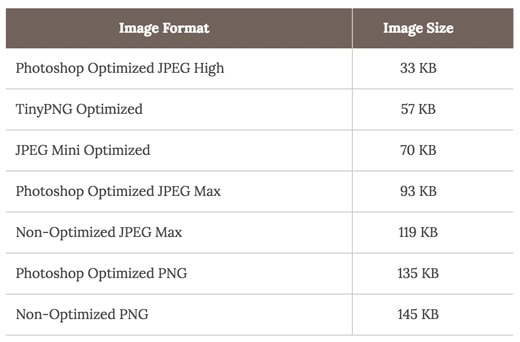
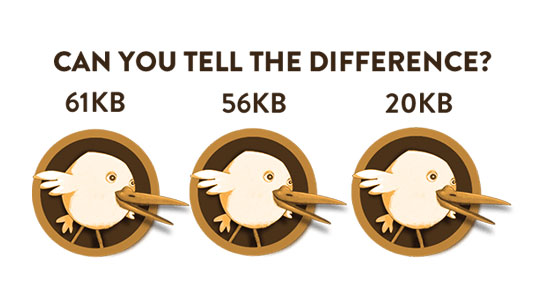
The size of the images you have placed on your website is a huge factor in determining how fast your site will load. However, switching to alternatives that lower the image quality is not recommended.
Here’s how you can better optimize your images:
**1. Manually decrease size of images** (using online tools or photoshop)
-
-
-
**2. Crop/Resize images** by using Fluid Templating
**3. Configure the image quality**
\#typo3conf/LocalConfiguration.php
$TYPO3\_CONF\_VARS\['GFX'\]\['jpg\_quality'\] = '65';
A side by side Comparison of Image Sizes
Tip #6: Compress CSS & JS
-----------------------------
A benefit of minifying your HTML is that it eliminates extra spaces. Give it a try!
\#Setup
config.compressCss = 1
config.compressJs =1
---
Tip #7: Concatenate CSS & JS
--------------------------------
Get a step closer to better performance Bundle JS and CSS files at frontend!
\#Setup for TYPO3 <= 6.x
config.concatenateJsAndCss = 1
\#Setup for TYPO3 >= 7
config.concatenateCss = 1
config.concatenateJs = 1
---
Tip #8: Compress TYPO3 Backend & Frontend
---------------------------------------------
Compression doesn’t sacrifice on the quality. Give it a try!
\#typo3conf/LocalConfiguration.php
$GLOBALS\['TYPO3\_CONF\_VARS'\]\['BE'\]\['compressionLevel'\] = 9;
$GLOBALS\['TYPO3\_CONF\_VARS'\]\['FE'\]\['compressionLevel'\] = 9;
Tip #9: CSS to the Top & JS to the Bottom
---------------------------------------------
Preordained setup makes JavaScript move to the bottom of the HTML document. Placing it after the content and before the closing body tag, here’s how:
\#Setup: Moves all JavaScripts into the footer
config.moveJsFromHeaderToFooter = 1
\#Setup: Move individual JavaScripts to the footer
page.includeJSFooter {
Jquery = jquery.min.js
Bootstrap = bootstrap.min.js
}
Tip #10: Disable TYPO3 Logs
---------------------------
Keeping logs and maintain logs can be a conundrum, here’s how you can disable them:
\#typo3conf/LocalConfiguration.php;
$TYPO3\_CONF\_VARS\['SYS'\]\['enableDeprecationLog'\] = '0';
$TYPO3\_CONF\_VARS\['SYS'\]\['syslogErrorReporting'\] = '0';
$TYPO3\_CONF\_VARS\['SYS'\]\['belogErrorReporting'\] = '0';
$TYPO3\_CONF\_VARS\['SYS'\]\['systemLogLevel'\] = '4';
$TYPO3\_CONF\_VARS\['SYS'\]\['sqlDebug'\] = false;
$TYPO3\_CONF\_VARS\['SYS'\]\['no\_pconnect'\] = '1';
$TYPO3\_CONF\_VARS\['BE'\]\['versionNumberInFilename'\] = '1';
Tip #11: TypoScript Code Optimization
-------------------------------------
Optimizing your codes is always a bright idea, but many website owners fail to realize it.
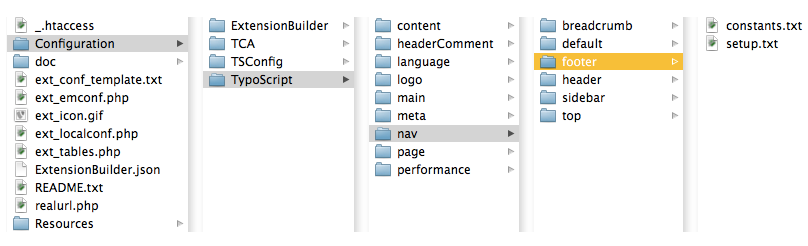
Optimize TypoScript code from your Templating code by :
- Remove unnecessary TypoScript code,
- Adding only required template extension,
- Getting rid of extra spaces
- Avoid TYPO3 backend template for TypoScript & Setup file based TypoScript
- Modular TSConfig & TypoScript
- Be more efficient! Create custom TYPO3 Extension for Templating with writing structure TypoScript for Packageable, Auto-loading abilities, Re-usability of code etc.,
- Include TSConfig & TypoScript via INCLUDE\_TYPOSCRIPT
```
```
---
Tip #12: Reduce HTTP Requests
-----------------------------
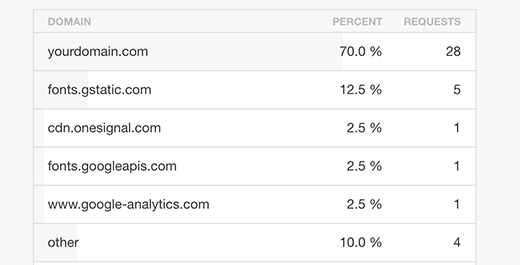
This part is simple mathematics, the fewer the request the faster will the website load.
---
Tip #13: Use a Content Delivery Network (CDN)
---------------------------------------------

Using a Content Delivery Network provides you with the luxury of hosting your website on multiple servers all while distributing the files and loading them across multiple systems. Give it a try!
Exampl,
\#or
**Factors That Work in Your Favor:**
- Availability Different domains
- Files may be pre-cached
- High-capacity infrastructures
- Distributed data centers
- Built-in version control
- Usage analytics
- Boosts performance and saves money
Tip #14: Reduce Number of TYPO3 Extensions
------------------------------------------
While trying to achieve a faster functioning website it is better to disable all the TYPO3 extensions that are unnecessary.
Tip #15: Gzip Compression (.htaccess)
-------------------------------------
Loading speed and bandwidth go hand in hand and via the use of GZIP compression, save 50-80% bandwidth. Here’s how:
\#.Htaccess
AddType "text/javascript" .gzip
AddType "text/css" .gzip
AddEncoding gzip .gzip
Tip #16: Leverage browser caching (.htaccess)
---------------------------------------------
Give it a try!
\#.Htaccess
ExpiresActive On
ExpiresByType text / css "access plus 7 days"
ExpiresByType image / gif "access plus 6 months"
ExpiresByType image / jpeg "access plus 6 months"
ExpiresByType image / png "access plus 6 months"
ExpiresByType image / jpg "access plus 6 months"
ExpiresByType image / x-icon "access plus 6 months"
ExpiresByType application / font-woff "access plus 6 months"
ExpiresByType application / x-font-ttf "access plus 6 months"
ExpiresByType application / svg + xml "access plus 6 months"
ExpiresByType application / vnd.ms-fontobject "access plus 6 months"
ExpiresByType application / x-shockwave-flash "access plus 6 months"
ExpiresByType application / javascript "access plus 7 days"
ExpiresByType application / x-javascript “access plus 7 days”
**FYI:** From onwards TYPO3 7 already have this code at .htaccess file.
Tip #17: Content Management - Disable Hotlinking and Leaching
-------------------------------------------------------------

Get the most out of your website by disabling these two features.
\#.Htaccess
\#Let's disable hotlinking for images with either forbidden or providing custom image option
RewriteEngine on
RewriteCond %{HTTP\_REFERER} !^$ RewriteCond %{HTTP\_REFERER} !^http(s)?://(www\\.)?yoursite.com \[NC\] RewriteCond %{HTTP\_REFERER} !^http(s)?://(www\\.)?google.com \[NC\] RewriteRule \\.(jpg|jpeg|png|gif)$ – \[NC,F,L\]
Tip #18: Enable Keep Live
-------------------------
\#.Htaccess
Header set Connection keep-alive
Tip #19: Avoid 301 Redirections
-------------------------------
If there ever was a red zone, this would be it. Hence it is recommended to avoid 301 redirections.
Tip #20: Fix 404 Errors
-----------------------

“404” are an absolute nuisance to the viewer, a minor inconvenience to the website owner and the visitor. Setup the below code at Install tool, to better cope with the situation.
\#typo3conf/LocalConfiguration.php;
$GLOBALS\['TYPO3\_CONF\_VARS'\]\['FE'\]\['pageNotFound\_handling'\] = '/404/';
---
Tip #21: TTFB
-------------
**Source:**
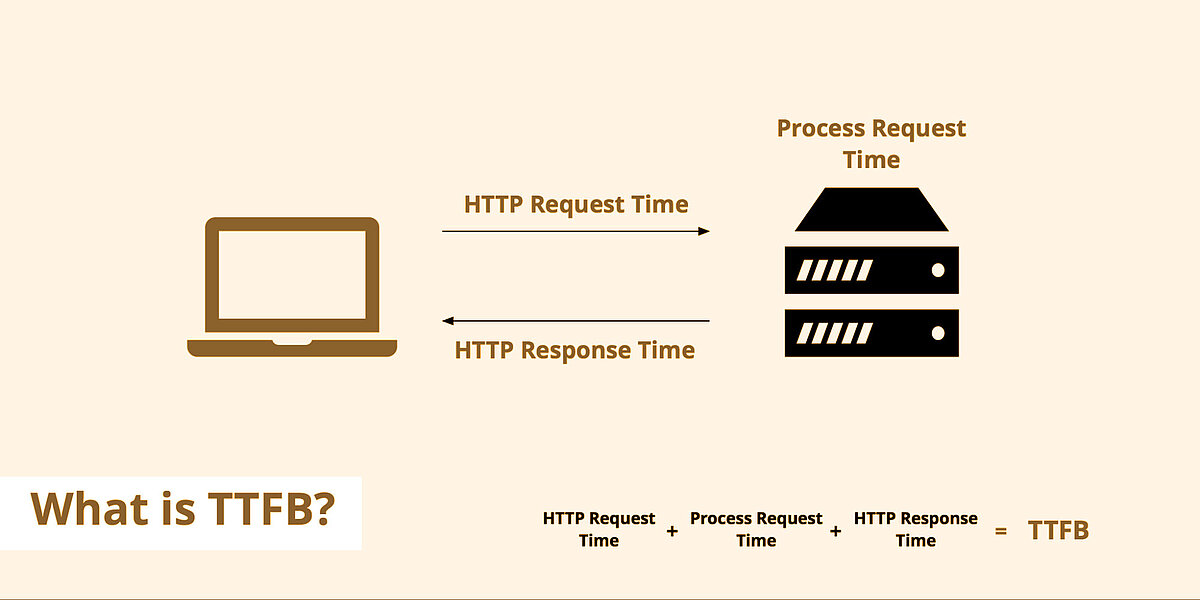
Measuring the responsiveness of a web server is essential to benchmark its performance. Time to the first byte (TTFB lets you do just that. Initially, it tracks the time your browser takes before it starts receiving information based on a requested from the server.
HTTP request time + Process request time + HTTP response time
Tip #22: Combine Your Images Into One – CSS Sprites
---------------------------------------------------

Tip #23: Async Javascript
-------------------------
Async is a handy tool which allows the script to be downloaded in the background without it being blocked.
Tip #24: Use Lazy Load For Videos & Images
----------------------------------------------
When it comes to getting the job done at the fastest pace possible, lazy images and lazy videos are a great option. Embedding YouTube and Vimeo videos on our website let visitors easily direct themselves to their subject of interest. Along with lazy images that have lower load time and take lower bandwidth.
---
Tip #25: Prefetch and Preconnect
--------------------------------
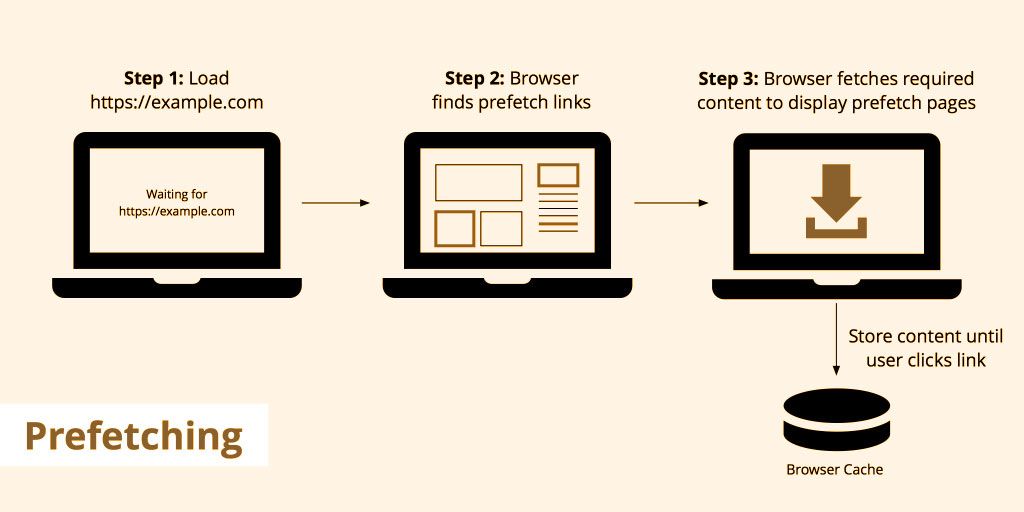
A duo that will surely improve your website and help in optimizing it.
**Source:**
##### **Prefetch**
Prefetch Google Fonts:
Prefetch Google Code (jQuery)
Prefetch Google Analytics
##### **Preconnect connect in advance!**
---
Tip #26: Avoid to use TYPO3 EXT:indexed\_search
-----------------------------------------------
If you have a website with over hundred pages do not use indexed\_search, as it will overload the database. Remove it and notice the difference!
Tip #27: Regularly Clean-up MySQL Database Caches & Temporary Files
-----------------------------------------------------------------------
### 1. Clear Cache Files
##### **clear-caches.sh**
\#!/bin/sh
\#clear all TYPO3 caches
\#requires TYPO3 extension coreapi
set -e
rm -rf /var/www/site/htdocs/typo3temp/\*
su -c "cd /var/www/site/htdocs && ./typo3/cli\_dispatch.phpsh extbase cacheapi:clearsystemcache"\\
-s /bin/sh\\
www-data
su -c "cd /var/www/site/htdocs && ./typo3/cli\_dispatch.phpsh extbase cacheapi:clearallcaches"\\
-s /bin/sh\\
www-data
### 2. Clear MySQL Cache Tables
##### **clear\_typo3\_cache.sql**
SET foreign\_key\_checks = 0;
TRUNCATE TABLE `cache\_md5params`;
TRUNCATE TABLE `cache\_treelist`;
TRUNCATE TABLE `cf\_cache\_hash`;
TRUNCATE TABLE `cf\_cache\_hash\_tags`;
TRUNCATE TABLE `cf\_cache\_imagesizes`;
TRUNCATE TABLE `cf\_cache\_imagesizes\_tags`;
TRUNCATE TABLE `cf\_cache\_pages`;
TRUNCATE TABLE `cf\_cache\_pagesection`;
TRUNCATE TABLE `cf\_cache\_pagesection\_tags`;
TRUNCATE TABLE `cf\_cache\_pages\_tags`;
TRUNCATE TABLE `cf\_cache\_rootline`;
TRUNCATE TABLE `cf\_cache\_rootline\_tags`;
TRUNCATE TABLE `cf\_extbase\_datamapfactory\_datamap`;
TRUNCATE TABLE `cf\_extbase\_datamapfactory\_datamap\_tags`;
TRUNCATE TABLE `cf\_extbase\_object`;
TRUNCATE TABLE `cf\_extbase\_object\_tags`;
TRUNCATE TABLE `cf\_extbase\_reflection`;
TRUNCATE TABLE `cf\_extbase\_reflection\_tags`;
TRUNCATE TABLE `cf\_extbase\_typo3dbbackend\_queries`;
TRUNCATE TABLE `cf\_extbase\_typo3dbbackend\_queries\_tags`;
TRUNCATE TABLE `cf\_extbase\_typo3dbbackend\_tablecolumns`;
TRUNCATE TABLE `cf\_extbase\_typo3dbbackend\_tablecolumns\_tags`;
TRUNCATE TABLE `cf\_fluidcontent`;
TRUNCATE TABLE `cf\_fluidcontent\_tags`;
TRUNCATE TABLE `cf\_flux`;
TRUNCATE TABLE `cf\_flux\_tags`;
TRUNCATE TABLE `cf\_schemaker`;
TRUNCATE TABLE `cf\_schemaker\_tags`;
TRUNCATE TABLE `cf\_vhs\_main`;
TRUNCATE TABLE `cf\_vhs\_main\_tags`;
TRUNCATE TABLE `cf\_vhs\_markdown`;
TRUNCATE TABLE `cf\_vhs\_markdown\_tags`;
### 3. Clear Log History
##### **clear\_typo3\_log\_history.sql**
SET foreign\_key\_checks = 0;
TRUNCATE TABLE `sys\_history`;
TRUNCATE TABLE `sys\_log`;
### 4. Clear RealURL Cache
##### **clear\_realurl\_cache.sql**
SET foreign\_key\_checks = 0;
TRUNCATE TABLE `tx\_realurl\_chashcache`;
TRUNCATE TABLE `tx\_realurl\_pathcache`;
TRUNCATE TABLE `tx\_realurl\_urldecodecache`;
TRUNCATE TABLE `tx\_realurl\_urlencodecache`;
---
Tip #28: Server Optimization
----------------------------

### 1. PHP Configuration
memory\_limit = 64M
upload\_max\_filesize = 100M
post\_max\_size = 100M
### 2. MySQL Configuration
\#Disable bin log
log-bin
\#Switch on and increase query\_cache
query\_cache\_limit = 2M #default was 1M
query\_cache\_size = 64M #default was 0
query\_cache\_type = 1
\#Increase table\_cache
table\_cache = 256 #default was 64
\#Increase key\_buffer
key\_buffer\_size = 64M #default was 8M
### 3. Apache Settings
\#Disable excessive logging
LogLevel warn
\#Disable DNS lookups, your log file analyser can do this afterwards
HostNameLookups off
Tip #29: TYPO3 Source & General
-----------------------------------
- Using the **same source directory** for more than a single site.
- Make **pages cacheable**.
- Take consideration of **performance killer extensions**.
- Standard **TYPO3 Extbase/Fluid** should be used.
---
Tip #30: Find What Works for You
--------------------------------
Invest your time and energy to a website hosting server for a better, well-managed website. Explore your options and take advantage of some of the best choices the internet has to offer!
Summary
-------
Last but certainly not the least; remember to keep a close watch on your portal’s TYPO3 performance as **“Optimization should not stop”**. From choosing a good host and server to [**TYPO3**](https://nitsantech.de/en/blog/typo3) Configuration, front-end techniques, ways of implementing a CDN, database cleanups, server optimization, and more, there’s a lot that can be done to extract the best speed and performance from [**TYPO3 websites**](https://nitsantech.de/en/blog/typo3-website). Through this helpful post, we have strived to lay down the **best ways to speed up TYPO3** and the many options it entails.
As your [**TYPO3 Agency**](https://nitsantech.de/en/typo3-agency), we would love to hear from you. Do share some other [**TYPO3 website development**](https://nitsantech.de/en/services/typo3-development) **speed enhancement strategies** that we might have not mentioned here.

Improve the Page Speed of Your TYPO3 Website
--------------------------------------------
Overview of key performance issues affecting TYPO3 loading times, and how to optimize for faster, more stable performance.
[ Download guide ](https://nitsantech.de/javascript:;)

### Mihaela Angelova
Project Manager
- [](https://www.linkedin.com/in/mihaela-n-angelova/ "linkedin")
Mihaela keeps technology projects on track and ensures to meet business goals. She specializes in coordinating teams, optimizing workflows, and delivering projects. At NITSAN, she works closely with clients to transform ideas into actionable solutions. Outside of work, she enjoys exploring new hiking trails.
Comments and Responses
----------------------
Thank you for your comment. Your Comment Added Successfully.
Thank you for your comment. Your Comment Will Be Visible After Approval.
Oops! Something went wrong, please try again later.
##### **Be the First to Comment**
### Related Blogs
[ 
#### TYPO3 Performance Optimization for Faster TYPO3 Website
](https://nitsantech.de/en/blog/typo3-performance-optimization)
[ 
#### Top Tips for Optimize TYPO3 Core Web Vitals (Ultimate Guide)
](https://nitsantech.de/en/blog/typo3-core-web-vitals)