---
title: "Install/Uninstall TYPO3 Extensions: Backend & Composer"
url: "https://nitsantech.de/en/blog/how-to-install-and-uninstall-typo3-extensions"
description: "Guide to installing or uninstalling TYPO3 extensions: Use Extension Manager, utilize Composer, check dependencies, and stay secure."
image: "https://nitsantech.de/fileadmin/_processed_/a/4/csm_How-to-Install-and-Uninstall-TYPO3-Extensions_136a7b2280.jpg"
date: 2023-03-21
modified: 2025-11-07
lastUpdated: 2026-02-25
keywords:
- Typo3 Install
- TYPO3 Uninstall
- TYPO3 Template
- TYPO3 blogs
categories:
- Extensions
---
# Install/Uninstall TYPO3 Extensions: Backend & Composer
How to Install and Uninstall TYPO3 Extensions?
==============================================
19 Sep 2024
[](https://nitsantech.de/en/blog/author/mihaela-angelova)
[Mihaela Angelova](https://nitsantech.de/en/blog/author/mihaela-angelova)
[ Extensions ](https://nitsantech.de/en/categories/extensions)
TYPO3 is a powerful content management system (CMS). It enables website operators and developers to easily create and manage complex websites.

Table of content
One of the great advantages of TYPO3 is its large ecosystem of extensions. These add new features to the platform. However, installing and uninstalling these extensions can sometimes be a difficult task, especially for beginners.
In this blog post, we will guide you step by step through the installation and uninstallation of TYPO3 extensions.
Whether you are an experienced TYPO3 developer or new to it, this guide will help you. It gives you everything you need to know to manage your TYPO3 extensions well.
You can find TYPO3 extensions in three different ways:
1. **TYPO3 Repository** - All TYPO3 plugins are available in [TER](https://extensions.typo3.org/). You can search for names, keywords, or categories free of charge using the search bar. This allows you to find extensions and install them easily.
2. **TYPO3 Repository for Premium TYPO3 Templates & Extensions** - Almost all free [**TYPO3 Extensions**](https://nitsantech.de/en/blog/typo3-extensions) or their premium versions can be found in the [**TYPO3 repository**](https://nitsantech.de/en/blog/typo3-templates). Choosing the right extensions improves the functionality and performance of your website.
Not sure of your TYPO3 version?
Check it now and take action.
-------------------------------------------------------------
Your TYPO3 Version:13.4
Congratulations, your TYPO3 system is now up to date with version 13! We would be happy to take care of maintenance and installation of regular system and security updates for you. [Contact Us](https://nitsantech.de/en/inquire) now for a non-binding, customized quote!
Your TYPO3 Version:
With TYPO3 version 12, you still have some time before support expires at the end of April 2029. Nevertheless, we recommend upgrading to the latest version 13 to keep your system up to date. You will also benefit from the latest TYPO3 features. We would be happy to check your system for upgrade options. [Contact Us](https://nitsantech.de/en/inquire) now for a non-binding, customized quote!
You do not have a TYPO3 system, or we are unable to identify your version. Contact us for an individual review of your system and a non-binding initial consultation regarding your TYPO3 upgrade. The upgrade is particularly critical for TYPO3 systems older than version 8, as the lack of further development and support can lead to acute security vulnerabilities. Let's plan your next [Upgrade](https://nitsantech.de/en/services/typo3-upgrade-service) together!
Please enter a valid domain
There are three different ways to install TYPO3 extensions.
1. Install the TYPO3 extensions from the TYPO3 backend.
2. Download TYPO3 extensions from the TYPO3 extension repository or TER).
3. Find a third-party developer and Install the TYPO3 extension through composer.
All three options mentioned are good for installing TYPO3 extensions. Let's go through the instructions step by step.
### **Install the TYPO3 Extensions from the TYPO3 Backends:**
Follow the below step to install TYPO3 extensions:
- Login to your [**TYPO3 Backends**](https://nitsantech.de/en/blog/typo3-backend).
- Go to “ADMIN TOOLS” > “Extensions”.
- Select “Get Extensions” in the header.
- Click on “Update Now” (the button is located at the top right).
- Enter the name, keyword, or category of the extension in the search field.
- Click on “Go.”
- On the left side, you will see the action icon for the extension, so click on “Import and install.”
Please note that the process described above is for installing the extension. These extensions are not yet activated. You have merely added them to your backend. To activate your selected extensions, you will need the following:
- Select “Installed Extensions” in the Docheader.
- Click on the “+” sign for your extension in the “A/D” column.
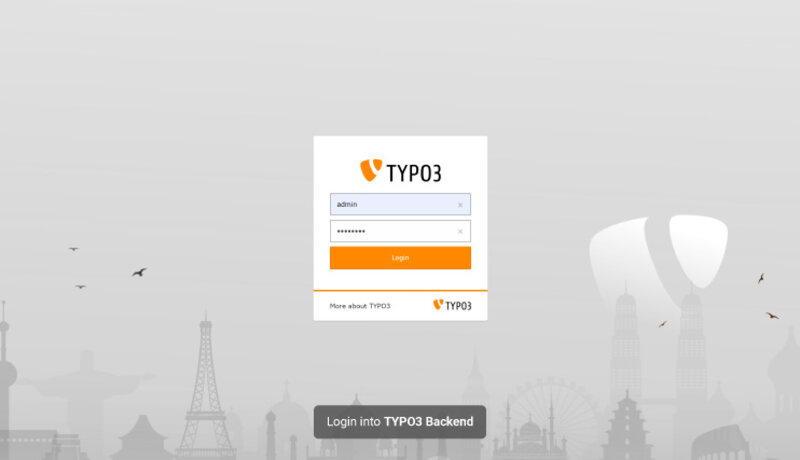
- Go to "ADMIN TOOLS" > “Extensions.”

- Select "Get Extensions" in the Docheader

- Click "Update now" (You’ll find the button is on the top right.)
- Enter the name, keyword or category of the extension in the search field.
- Click on "Go".
- You’ll see the action icon on the left for the extension so click on "Import and Install."

Remember, the above process is to install the extension. These extensions are not activated yet. You have just added them to your backend. To activate your selected extensions, you need the following:
- Select "Installed Extensions" in the Docheader.
- Click on the "+" sign icon for your extension in the "A/D" column.

### **Download TYPO3 Extensions from the TYPO3 Extension Repository or TER):**
Follow the below step to install TYPO3 extensions:
- Open [TER library](https://extensions.typo3.org/).
- Browse or search extensions by name.
- You’ll see the download option highlighted with orange color.
- Click on “Download”.
### **Find a Third-Party Developer and Install the TYPO3 Extension Through Composer:**
Follow the below step to install [**TYPO3 Extensions**](https://t3planet.de/en/typo3-extensions):
- Search for the best third-party developer composer to install their TYPO3 extensions.
- Click on the extension landing page. For example, ns\_news\_comments at [https://extensions.typo3.org/extension/ns\_news\_comments](https://extensions.typo3.org/extension/ns_news_comments)
- Find the composer command from the composer support section.
- Finally, Install that extension via the composer command.
You can uninstall TYPO3 extensions in two different ways:
1. Uninstall or deactivate TYPO3 extensions from the backend.
2. Uninstall TYPO3 extensions manually.
Here is the step-by-step installation guide for TYPO3 extensions:
### **Uninstall or Deactivate TYPO3 Extensions from the Backend:**
Follow the below step to uninstall TYPO3 extensions:
- Login to the TYPO3 backend.
- Open extension manager or ‘Ext Manager.’
- Choose ‘Install extensions’ from the menu.
After the previous step, you will see a list of all extensions that you have installed in TYPO3. You can also see the icon on the left side and the status of all extensions.
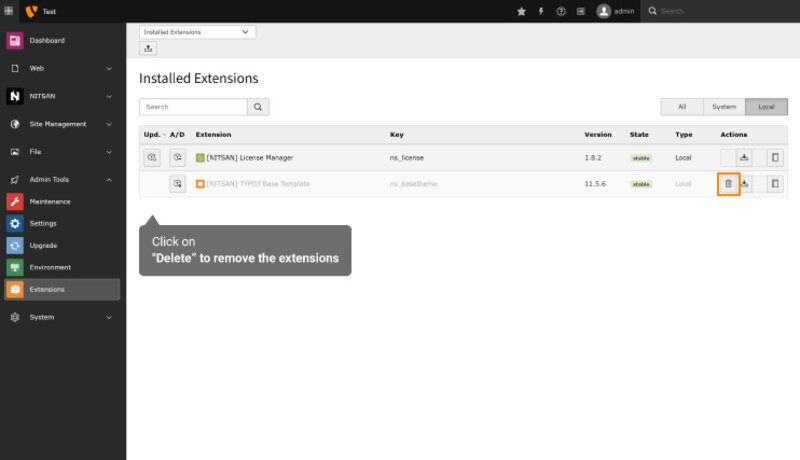
- Select the ‘Uninstall’ icon with a minus sign.

It can uninstall unwanted extensions from the TYPO3 system with just one click. After this process, you will need to wait a few seconds to verify the process.
Once your icon changes to the gray extension icon, you have successfully completed the uninstallation process.
To remove an extension, click on the trash can icon “Remove” next to the extension in the Extension Manager.
### **Uninstall TYPO3 Extensions Manually:**
Follow the below step to uninstall TYPO3 extensions:
- Open the file typo3conf/PackageStates.php
- Search for your ext\_key in the array:
For example, typo3conf/PackageStates.php
```php
ext_key' => [
'packagePath' => 'typo3conf/ext/ext_key/',
],
...
```
- Remove the entry
Please note that manually removing extensions is not common practice. This manual process is only performed as a last resort.
Before uninstalling an extension, you should first create a backup copy manually. You can then remove it by deleting the extension folder under typo3conf/ext/\[extension name\].
You can also remove the database tables via **Install Tool -> Important Actions -> Database Analyzer -> Compare** with Specification.
Finally, I hope that the above instructions for installing and uninstalling TYPO3 extensions are helpful. Remember that the right extensions can improve the performance, engagement, and security of your [**TYPO3 websites**](https://nitsantech.de/en/blog/typo3-website).
If you would like more guides on TYPO3 extensions, stay in touch with us. Sign up for our TYPO3 newsletter.
Let us know about your personal experience working with the [**TYPO3 Agency**](https://nitsantech.de/en/typo3-agency) in the comment section below. We’re glad to hear from you.

### Mihaela Angelova
Project Manager
- [](https://www.linkedin.com/in/mihaela-n-angelova/ "linkedin")
Mihaela keeps technology projects on track and ensures to meet business goals. She specializes in coordinating teams, optimizing workflows, and delivering projects. At NITSAN, she works closely with clients to transform ideas into actionable solutions. Outside of work, she enjoys exploring new hiking trails.
Comments and Responses
----------------------
Thank you for your comment. Your Comment Added Successfully.
Thank you for your comment. Your Comment Will Be Visible After Approval.
Oops! Something went wrong, please try again later.
##### **Be the First to Comment**
### Related Blogs
[ 
#### TYPO3 Extensions Developed & Managed by NITSAN
](https://nitsantech.de/en/blog/typo3-extensions)
[ 
#### Why TYPO3 Helpdesk Extension is Must?
](https://nitsantech.de/en/blog/why-typo3-helpdesk-extension-is-must)